Test Plans
Test Plans are the master orchestrator in Mockarty. A plan bundles an ordered list of items pointing to existing resources (functional collections, fuzz configs, chaos experiments, load configs, contracts) and runs them together as a single, coordinated execution with a unified Allure-compatible report.
About URLs in examples: all examples use
localhost:5770as the default Mockarty address. If your instance runs on a remote server, replacelocalhost:5770with its actual address (e.g.https://mockarty.company.com). See Tips & Useful Features for details.
Related pages: Test Plans in CI/CD · Test Plans API Cookbook · Performance Testing · Chaos Engineering · API Fuzzing · Contract Testing · Webhooks & Callbacks
Why Test Plans
Without a plan, each test type runs in its own silo: you trigger a fuzz run, then a functional collection, then a chaos experiment, then paste three separate reports into a CI comment.
With a plan you configure the bundle once and:
- run everything as a single CI step with one exit code;
- collect a single merged report — Allure JSON/ZIP, JUnit XML, Markdown, standalone HTML, or native Mockarty JSON — with steps, attachments and metrics from every item;
- schedule the whole bundle (nightly regression, hourly smoke) without juggling separate crons;
- fan out
run_started/run_finished/run_failed/item_failedevents to one webhook endpoint.
Core concepts
- Plan — top-level definition:
name,description,namespace, list ofitems[], optional executionscheduleand related schedules/webhooks. Every plan gets a UUID and a short numeric ID (e.g.#42) you can use interchangeably. - Item — one step in the plan:
typeselects what to run,ordersets its position, anddependsOnoptionally connects it to other steps. Most types also needrefId(the UUID of an existing resource);sleepusesparameters.durationMsinstead. - Run — concrete execution of the plan. A plan can be run many times; each run gets its own UUID and carries per-item state.
- Report — artefact generated for every run. Available in six formats: Allure JSON (summary), Allure ZIP (
result-*.json+ attachments), JUnit XML, Markdown summary, standalone HTML (print-friendly, save-as-PDF), and native Mockarty unified JSON. - Schedule — firing rule attached to a plan: cron, once, or interval. Plans may own any number of schedules.
- Webhook — HTTPS endpoint to notify when a plan run changes state.
- Ad-hoc run — one-shot, ephemeral plan dispatched in a single API call, useful for CI pipelines that assemble items dynamically.
Item types
| Type | What it runs | Source resource |
|---|---|---|
functional |
API Tester collection | functional collection UUID |
load |
Performance (k6-style) script | perf config UUID |
fuzz |
API fuzzer campaign | fuzz config UUID |
chaos |
Chaos experiment | chaos experiment UUID |
contract |
Contract validation / provider verification | contract config UUID |
test_plan |
Another Test Plan | plan UUID |
test_case |
TCM test case | case UUID |
sleep |
Wait between steps | no source resource; set parameters.durationMs |
ui_test |
Recorded UI test | UI test UUID |
temporal_probe |
Wait for an expected asynchronous effect | Temporal Probe UUID |
bot_scenario |
Bot conversation scenario | bot scenario UUID |
Saved Test Plans accept all 11 types. The one-shot ad-hoc endpoint accepts the five engine types above plus test_case, ui_test, temporal_probe, and bot_scenario; it does not accept test_plan or sleep. It also accepts the aliases collection, perf_config, fuzz_config, chaos_experiment, and contract_config for the engine types. Available pickers and convenience methods vary by client; use the API when a client does not expose a type directly.
Numeric IDs
Every plan gets a monotonic short ID in addition to its UUID. The UI surfaces it as a chip (#42). REST endpoints that accept the idOrNumericID path parameter transparently resolve either form:
GET /api/v1/namespaces/default/test-plans/42/runs/<runId>/report
GET /api/v1/namespaces/default/test-plans/5c0f13e4-.../runs/<runId>/report
The CLI strips a leading # for you: mockarty-cli testplan get '#42'.
The catalogue
/ui/test-plans lists every plan in the namespace as a card:
- Name, description and step badges — one badge per step type with a count, so you see a plan’s composition (functional, load, fuzz, chaos, …) without opening it.
- Trend — the last runs as coloured segments (oldest → newest). Click a segment to jump straight into that run. The total run count sits below the strip.
- Last run — status pill with relative start time and duration. A running plan shows a live “Running” badge that links to the active run; the list refreshes automatically while anything is in flight.
- Schedule — when the next enabled schedule fires.
- Actions — open, run now, delete.
Search matches the plan name, description, or the numeric ID — the filter runs server-side, so it covers every page, not just the visible one. The same data is available from the API: GET /api/v1/test-plans returns each plan with lastRun, recentRuns, runCount and nextSchedule, and accepts the same search parameter.
Creating a plan
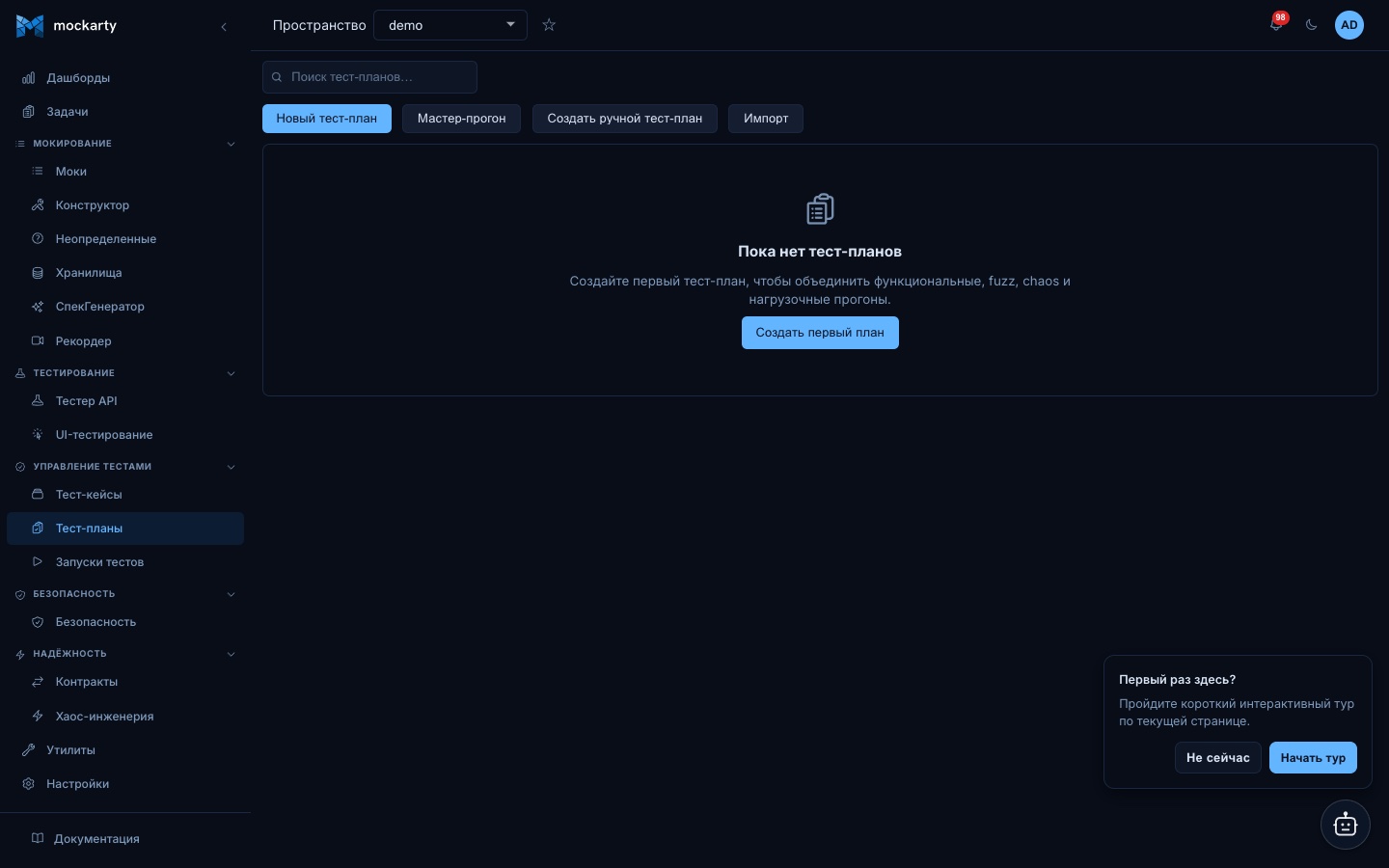
Web UI
- Open
/ui/test-plans(Test Plans in the sidebar). - Click + New Test Plan.
- Fill
Name, optionalDescription. - Click Add items to open the picker. It has a tab per source — test cases,
API collections, UI tests, load, fuzz, chaos, contract experiments and nested
plans. Search within a tab, tick everything you need (your selection is kept
as you move between tabs), then click Add to drop them all into the plan
at once. Each item keeps its real name, so the plan reads like a checklist. - Drag items to reorder. Set per-item
delayAfterMsif you need a cooldown. - Click Save — the plan is created in the currently-selected namespace.
- Detail page opens at
/ui/test-plans/<id>.
An unnamed entity or mock folder in the resource picker shows a readable
placeholder. Its internal ID remains available to the plan for execution,
without appearing as a hover label.
The picker initially shows up to 200 resources. Use Load more to browse
additional pages, or search by name to find a resource beyond the first page.
If a later page fails, the picker keeps the rows already loaded and offers
Retry.
If you close the plan editor with unsaved changes, Mockarty asks before discarding them. A missing plan link shows a dedicated message and a way back to the list; temporary load errors offer Retry.
CLI
# plan.yaml
name: Nightly regression
description: Functional + fuzz + chaos against staging
items:
  - order: 1
    type: functional
    resourceId: 11111111-1111-1111-1111-111111111111
  - order: 2
    type: fuzz
    resourceId: 22222222-2222-2222-2222-222222222222
  - order: 3
    type: chaos
    resourceId: 33333333-3333-3333-3333-333333333333
mockarty-cli testplan create -f plan.yaml
# → Created plan <uuid> (#42)
API
cURL
curl -X POST http://localhost:5770/api/v1/test-plans \
  -H "X-API-Key: $MOCKARTY_API_TOKEN" \
  -H "Content-Type: application/json" \
  -d '{
    "namespace": "default",
    "name": "Nightly regression",
    "description": "Functional + fuzz + chaos against staging",
    "items": [
      {"order": 1, "type": "functional", "refId": "11111111-1111-1111-1111-111111111111"},
      {"order": 2, "type": "fuzz",       "refId": "22222222-2222-2222-2222-222222222222"},
      {"order": 3, "type": "chaos",      "refId": "33333333-3333-3333-3333-333333333333"}
    ]
  }'
Go
plan, err := client.TestPlans().Create(ctx, mockarty.TestPlan{
    Namespace:   "default",
    Name:        "Nightly regression",
    Description: "Functional + fuzz + chaos against staging",
    Items: []mockarty.TestPlanItem{
        {Order: 1, Type: mockarty.PlanItemTypeFunctional, ResourceID: "11111111-..."},
        {Order: 2, Type: mockarty.PlanItemTypeFuzz,       ResourceID: "22222222-..."},
        {Order: 3, Type: mockarty.PlanItemTypeChaos,      ResourceID: "33333333-..."},
    },
})
Python
plan = client.test_plans.create(TestPlan(
    namespace="default",
    name="Nightly regression",
    description="Functional + fuzz + chaos against staging",
    items=[
        TestPlanItem(order=1, type="functional", ref_id="11111111-..."),
        TestPlanItem(order=2, type="fuzz",       ref_id="22222222-..."),
        TestPlanItem(order=3, type="chaos",      ref_id="33333333-..."),
    ],
))
Java
TestPlan created = client.testPlans().create(new TestPlan()
    .setNamespace("default")
    .setName("Nightly regression")
    .setItems(List.of(
        new TestPlanItem().setOrder(1).setType("functional").setResourceId("11111111-..."),
        new TestPlanItem().setOrder(2).setType("fuzz").setResourceId("22222222-..."),
        new TestPlanItem().setOrder(3).setType("chaos").setResourceId("33333333-...")
    )));
Plan fields reference
| Field | Type | Required | Notes |
|---|---|---|---|
namespace |
string | yes | Falls back to the caller’s namespace if omitted. |
name |
string | yes | 1..200 characters. |
description |
string | no | Free text. |
executionMode |
enum | no | Plan-level execution mode (preferred): fifo, parallel, or dag. Empty defers to auto-detection (Gates → DAG, otherwise FIFO). |
schedule |
string | no | Legacy combined field — accepts the same parallel / dag sentinels OR a 5-/6-field cron expression. Kept for backward compatibility; prefer executionMode for the typed mode and per-plan schedules (below) for cron firings. |
items[] |
array | yes | At least one item. Each order must be unique within the plan. |
items[].type |
enum | yes | One of the 11 types in Item types. |
items[].refId |
UUID | except sleep |
Source resource UUID; omit for sleep. |
items[].order |
int | yes | >= 0, unique per plan. |
items[].dependsOn |
array of UUIDs | no | Only honoured in DAG mode. An item cannot depend on itself. |
items[].delayAfterMs |
int64 | no | Cooldown after the item completes. |
Execution modes
Set executionMode to one of:
fifo— items run one after another inorderascending. The default when no Gates are present.parallel— all items are dispatched concurrently.dag— respectsdependsOnand per-item Gates; items with failed prerequisites are skipped withskipReason: dependency_failed. Auto-selected when Gates are present andexecutionModeis empty.
The legacy schedule field still accepts the parallel / dag sentinels and 5-/6-field cron expressions for backward compatibility. New integrations should use executionMode for the typed mode and the per-plan Schedules API (below) for cron firings.
CLI examples:
# Set the typed mode
mockarty-cli testplan patch plan-abc --execution-mode parallel
mockarty-cli testplan patch '#42' --execution-mode dag

# Legacy single-cron schedule (kept for backward compat)
mockarty-cli testplan patch plan-abc --schedule-cron '0 2 * * *'
Importing a plan (migration)
Migrating from Allure TestOps or Test IT? You can turn an existing test plan
into a Mockarty plan instead of rebuilding it by hand.
- Open Test Plans, click Import in the toolbar.
- Pick the source format:
- Allure TestOps (testplan.json) — upload the
testplan.jsonyour Allure
setup produces (Mockarty exports the same shape, so a plan you exported
re-imports cleanly). - Test IT export — upload your Test IT export; Mockarty imports the test
cases first and then builds a plan that runs them.
- Allure TestOps (testplan.json) — upload the
- Optionally name the plan, then Import.
Each entry in the file is matched to a Mockarty test case by name (or by
Mockarty id). The result tells you how many cases were matched and lists any
selectors that didn’t resolve — import those cases first (Test Cases →
Import), then re-run the plan import. A plan is only created when at least
one case resolves, so you never end up with an empty plan.
Tip for automation: the same import is available over the API —
POST /api/v1/test-plans/import/allurewith thetestplan.jsonbody, or the
Test IT case import with?createPlan=true.
Running a plan
Triggers
- Manual from the UI — Run button on the detail page.
- CLI —
mockarty-cli testplan run <plan-id|#numeric>. - API —
POST /api/v1/test-plans/:id/run. - Schedule — any enabled cron/once/interval schedule attached to the plan.
- Ad-hoc — single-shot plan that never appears in the catalogue (see below).
Run trigger body (optional)
{
  "items": [1, 3],
  "mode": "parallel"
}
items— subset of item orders to run. Omit to run everything.mode— override the plan-level mode for this run (sequential,parallel,dag,timed).
Waiting for completion
POST /run responds with 202 Accepted and a {runId, planId, status} envelope; the orchestrator runs the plan asynchronously on the server. Cancelling the client does not abort the run — use POST /runs/:runId/cancel. A cancel also stops the work the run started elsewhere: a distributed load campaign and a UI test replaying in a browser-extension runner stop too.
There are three ways to block until the run finishes:
- CLI
--wait:mockarty-cli testplan run <plan> --wait --timeout 5m. Exit codes:0completed,1failed,2cancelled,3timed out. - SDK
WaitForRun(Go / Python sync / Java): polls/runs/:runIdon a configurable interval. - SSE stream:
GET /api/v1/namespaces/:ns/test-plans/:planRef/runs/:runID/streamemitsrun.started,item.started,item.finished,run.completed, and periodicheartbeatevents. The CLI wraps it asmockarty-cli testplan stream <runID> --plan <plan>.
What completed means
A run reports completed only if every item finished and at least one of them actually checked the thing it names. A run whose items were all skipped because the entities they reference do not exist is failed, not completed — a release gate must not read “nothing was verified” as green. The reason is visible in the counters: failedItems stays 0 (nothing failed) and notVerifiedItems names how many items were skipped for a missing entity, while each item keeps its own skipped status with skipReason: entity_not_found.
Other skip reasons (a row deleted while the run was in flight, a missing coordinator, a cascading failure, a timeout, a plan deleted under the run) still leave the run completed — they mean “not verified” too, but existing CI pipelines depend on today’s verdict for them.
Pausing and resuming a run
Open the run and press Pause run next to Cancel run. A paused run starts no further item; items that are already running finish normally, and the run shows a Paused status. Press Resume run to continue — the next item starts within a couple of seconds. You can still cancel a paused run.
From a script or pipeline:
curl -X POST http://localhost:5770/api/v1/test-plans/runs/<runId>/pause  -H "Authorization: Bearer $MOCKARTY_TOKEN"
curl -X POST http://localhost:5770/api/v1/test-plans/runs/<runId>/resume -H "Authorization: Bearer $MOCKARTY_TOKEN"
Both answer with the run; while it is paused the run carries pausedAt. Pausing a paused run or resuming a running one changes nothing; a finished run answers 409. AI agents use the pause_test_plan_run and resume_test_plan_run tools.
Requirements a run verified
When your test cases are linked to wiki requirements (a requirement page’s Traceability panel, or the case’s Documentation links), the run’s Overview shows a Requirements row: how many requirements this run verified, how many are failing and how many it did not run. Open it to see each requirement with its verdict and a link to the page:
- Failing — at least one linked case failed in this run;
- Verified — at least one linked case passed and none failed;
- Not run — the linked cases were skipped or never started.
The same answer for scripts and release gates: GET /api/v1/test-plans/runs/<runId>/requirements returns requirements (each with verification and its cases), casesWithoutRequirement and a summary. AI agents use get_test_plan_run_requirements. Requirement pages you cannot view are left out.
Ad-hoc master runs
Use POST /api/v1/namespaces/:namespace/test-runs/ad-hoc when you want a run without first curating a plan (typical for dynamic CI pipelines). The server creates a hidden plan row, dispatches its items and responds with {run_id, plan_id, status, _links}:
Add optional "tags": ["release-42", "smoke"] to label the run at creation. Tags are trimmed, lowercased and deduplicated; each tag can contain letters, digits, ., _ or - (up to 64 bytes, 32 tags per run). Invalid tags reject the request before a plan is created. The response includes tags when supplied, and GET /api/v1/test-plans/runs/<runId> returns the stored tags.
To add tags to an existing run without replacing its other tags, send POST /api/v1/namespaces/<namespace>/test-plan-runs/<runId>/tags/merge with {"tags":["release-42"]}. The response includes the complete tag list and changed (false on a repeated request). The release tag is left alone. The request needs at least one tag; unknown fields and a combined list over 32 tags return 400. A concurrent merge may return 409; retry the same request. The existing /tags endpoint still replaces the full tag list.
curl -X POST http://localhost:5770/api/v1/namespaces/default/test-runs/ad-hoc \
  -H "X-API-Key: $MOCKARTY_API_TOKEN" \
  -H "Content-Type: application/json" \
  -d '{
    "name": "pr-1234 smoke",
    "items": [
      {"order": 1, "type": "functional", "ref_id": "11111111-..."},
      {"order": 2, "type": "contract",   "ref_id": "44444444-..."}
    ]
  }'
Follow-up URLs are provided in the response _links block. Ad-hoc plans are hidden from GET /test-plans but their runs and reports work exactly like regular plan runs.
An external adapter can create an empty run with a registered source such as allurectl or testit-cli and "items":[]. It remains pending while the adapter uploads case results; call POST /api/v1/test-plans/runs/<runId>/finish after upload. Finishing without a result fails the launch. Runs with executable items require the orchestrator; if it is unavailable, creation returns 503.
For CI retries, include a stable "idempotency_key":"job-4211" in the ad-hoc request. The key is scoped to the namespace and source. Repeating the same request returns the original run_id and plan_id with "replayed":true, even after a lost response or server restart; changing the request while reusing the key returns 409. A new job needs a new key. The key is accepted at 1–256 bytes and only its digest is stored.
Schedules
Each plan can own any number of schedules of mixed kinds. They are separate from the plan-level schedule field (which is the execution mode, not a firing rule).
Endpoints:
GET    /api/v1/test-plans/:id/schedules
POST   /api/v1/test-plans/:id/schedules
PATCH  /api/v1/test-plans/:id/schedules/:scheduleId
DELETE /api/v1/test-plans/:id/schedules/:scheduleId
Schedule kinds and payloads
| Kind | Payload | Notes |
|---|---|---|
cron |
{"expr": "0 2 * * *"} |
5- or 6-field cron. The 6-field form adds seconds. |
once |
{"fire_at": "2026-05-01T00:00:00Z"} |
RFC 3339 timestamp. Fires once, then auto-disables. |
interval |
{"every_seconds": 900} |
Fires every N seconds. Minimum 10 seconds. |
Every schedule also carries:
name— required, up to 200 chars;timezone— IANA zone name (e.g.Europe/Moscow), defaultUTC;enabled— toggle without deleting the schedule.
CLI
# cron — nightly at 02:00 in Europe/Moscow
mockarty-cli testplan schedule create plan-abc \
    --name nightly --kind cron \
    --payload '0 2 * * *' --timezone Europe/Moscow

# once — fire on a wall-clock timestamp
mockarty-cli testplan schedule create plan-abc \
    --name launch --kind once \
    --payload 2026-05-01T00:00:00Z

# interval — every 15 minutes
mockarty-cli testplan schedule create plan-abc \
    --name smoke --kind interval --payload 15m

mockarty-cli testplan schedule list plan-abc
mockarty-cli testplan schedule update plan-abc <scheduleId> --enabled=false
mockarty-cli testplan schedule delete plan-abc <scheduleId>
The CLI translates the --payload shortcut to the JSON shape the server expects.
Create a schedule via API
curl -X POST http://localhost:5770/api/v1/test-plans/<plan>/schedules \
  -H "X-API-Key: $MOCKARTY_API_TOKEN" \
  -H "Content-Type: application/json" \
  -d '{
    "name": "nightly",
    "kind": "cron",
    "timezone": "Europe/Moscow",
    "payload": {"expr": "0 2 * * *"}
  }'
Webhooks
A plan can notify an external endpoint whenever a run crosses a lifecycle boundary.
Supported events
| Event | Fires when |
|---|---|
run_started |
Orchestrator starts dispatching items. |
run_finished |
Every item reached a terminal state (passed / failed / skipped / cancelled). |
run_failed |
Run finished with at least one failed item. |
item_failed |
An individual item transitions to failed. |
Select any subset when creating a webhook. The CLI currently accepts run_started, run_finished, item_failed via --event; the full four-event vocabulary is always available through the API and SDKs.
Signing
Every delivery is signed:
X-Mockarty-Signature: sha256=<hex>— HMAC-SHA256 over the raw request body using the webhook’ssecretfield. This authenticates the body; verify it against the raw bytes you received.X-Mockarty-Timestamp: <RFC3339Nano>— the send time, for logging and a coarse freshness check. It is not part of the signature, so on its own it does not stop replay (an attacker resending the body could present a fresh timestamp). For replay protection, treat deliveries idempotently — dedup on the event identity rather than trusting the timestamp alone.
Mockarty accepts both the bare-digest and the sha256= prefix forms for interoperability with GitHub / GitLab receivers. The secret is write-only: the server returns an empty string on read, so rotate through PATCH { "secret": "<new>" }.
SSRF protection
Outbound URLs are validated at create/update time AND at dial time. Mockarty rejects:
- plaintext
http://(HTTPS required); - URLs with embedded credentials (
https://user:pass@host); - loopback, RFC 1918 private, link-local and multicast IP literals;
- hostnames matching
localhost,*.internal,*.cluster.local.
If the DNS name resolves at dial time to a blocked address, the delivery fails — this defeats DNS-rebinding attacks.
Retries
Every webhook carries retryCount (default 3, max 10) and backoffSeconds (default 5, max 3600). The dispatcher retries on 5xx and transport errors using exponential-ish spacing.
Payload
{
  "timestamp": "2026-04-19T10:15:00Z",
  "started_at": "2026-04-19T10:10:00Z",
  "finished_at": "2026-04-19T10:14:58Z",
  "event_type": "run_finished",
  "test_plan_id": "5c0f13e4-...",
  "numeric_id": 42,
  "test_plan_name": "Nightly regression",
  "run_id": "8a1f62d0-...",
  "status": "failed",
  "duration_ms": 298000,
  "item_summary": {"total": 3, "passed": 2, "failed": 1, "skipped": 0},
  "failed_items": [
    {"order": 3, "type": "chaos", "status": "failed", "error": "timeout", "run_id": "..."}
  ]
}
Create a webhook
cURL
curl -X POST http://localhost:5770/api/v1/test-plans/<plan>/webhooks \
  -H "X-API-Key: $MOCKARTY_API_TOKEN" \
  -H "Content-Type: application/json" \
  -d '{
    "name": "ci-slack",
    "url": "https://hooks.example.com/mockarty",
    "secret": "keep-me-safe",
    "events": ["run_finished", "item_failed"],
    "retryCount": 3,
    "backoffSeconds": 5
  }'
CLI
mockarty-cli testplan webhook create plan-abc \
    --name ci-slack \
    --url https://hooks.example.com/mockarty \
    --secret keep-me-safe \
    --event run_finished,item_failed
Go
hook, err := client.TestPlans().AddWebhook(ctx, planID, mockarty.Webhook{
    URL:     "https://hooks.example.com/mockarty",
    Secret:  "keep-me-safe",
    Events:  []string{"run_finished", "item_failed"},
    Enabled: true,
})
Probing a webhook
POST /api/v1/test-plans/:id/webhooks/:webhookId/test (CLI: testplan webhook test) enqueues a synthetic run_started payload so receivers can verify their integration end-to-end.
Reports
Every run produces a set of reports merged from all items. Six formats are available side-by-side so you can pick the one your tooling consumes without server-side conversion.
GET /api/v1/namespaces/:namespace/test-plans/:idOrNumericID/runs/:runID/report
GET /api/v1/namespaces/:namespace/test-plans/:idOrNumericID/runs/:runID/report.zip
GET /api/v1/namespaces/:namespace/test-plans/:idOrNumericID/runs/:runID/report.junit.xml
GET /api/v1/namespaces/:namespace/test-plans/:idOrNumericID/runs/:runID/report.md
GET /api/v1/namespaces/:namespace/test-plans/:idOrNumericID/runs/:runID/report.html
GET /api/v1/namespaces/:namespace/test-plans/:idOrNumericID/runs/:runID/report.unified.json
| Endpoint | Content-Type | Typical use |
|---|---|---|
/report |
application/json |
Allure-compatible JSON envelope — aggregated per-item summaries, steps, labels, parameters, attachments, metrics. |
/report.zip |
application/zip |
Allure archive (result-*.json + attachments) ready for allure generate or CI artifact upload. |
/report.junit.xml |
application/xml |
Standards-compliant JUnit XML for Jenkins, GitLab, GitHub Actions JUnit publishers. |
/report.md |
text/markdown |
Single-document Markdown summary for Slack attachments, email bodies, wiki pastes. |
/report.html |
text/html |
Self-contained HTML document with inlined CSS — no external assets, no JavaScript. Open in any browser and use Save-as-PDF for print-friendly artefacts. |
/report.unified.json |
application/json |
Native Mockarty envelope (plan + counts + per-item results) without the Allure-specific aggregation. |
The Allure ZIP includes available attachments from the plan run’s namespace.
Each attachment is limited to 25 MiB and the archive includes up to 100 MiB of
attachment data in total. If a file is too large or attachment storage is
unavailable, the ZIP contains a text note explaining the omission.
/report and /report.zip honour If-None-Match via a strong ETag, so CI pipelines that poll for readiness pay only the HTTP round-trip until the report is generated. The other four formats are regenerated on every request (they are cheap to produce) and always carry the freshest per-item state.
Download from the CLI
# Allure archive (default, recommended for CI artifact upload)
mockarty-cli testplan report <runID> --plan plan-abc --zip ./allure.zip

# Allure JSON summary
mockarty-cli testplan report <runID> --plan '#42' --format json -o report.json

# JUnit XML (publish from CI)
mockarty-cli testplan report <runID> --plan plan-abc --format junit -o report.junit.xml

# Markdown summary (attach to Slack / email)
mockarty-cli testplan report <runID> --plan plan-abc --format markdown -o report.md

# Standalone HTML (open in browser, Save-as-PDF)
mockarty-cli testplan report <runID> --plan plan-abc --format html -o report.html

# Native Mockarty unified envelope
mockarty-cli testplan report <runID> --plan plan-abc --format unified -o report.unified.json
The CLI requires --plan because the endpoint is namespace-scoped and the namespace segment is derived from the client’s namespace context (--namespace flag or MOCKARTY_NAMESPACE environment variable).
Download from the SDKs
// Go SDK — every format is a first-class method.
rep, err := client.TestPlans().GetRunReport(ctx, "default", planID, runID)              // Allure JSON
zipRC, err := client.TestPlans().GetRunReportZIP(ctx, "default", planID, runID)         // Allure ZIP
junit, err := client.TestPlans().GetRunReportJUnit(ctx, "default", planID, runID)       // JUnit XML bytes
md, err := client.TestPlans().GetRunReportMarkdown(ctx, "default", planID, runID)       // Markdown bytes
html, err := client.TestPlans().GetRunReportHTML(ctx, "default", planID, runID)         // Standalone HTML bytes
unified, err := client.TestPlans().GetRunReportUnified(ctx, "default", planID, runID)   // Typed UnifiedReport
# Python SDK
allure   = client.test_plans.get_run_report(plan_ref, run_id)
junit    = client.test_plans.get_run_report_junit(plan_ref, run_id)
md       = client.test_plans.get_run_report_markdown(plan_ref, run_id)
html     = client.test_plans.get_run_report_html(plan_ref, run_id)
unified  = client.test_plans.get_run_report_unified(plan_ref, run_id)
with open("report.zip", "wb") as fh:
    client.test_plans.get_run_report_zip(plan_ref, run_id, fh)
// Java SDK
AllureReport allure   = client.testPlans().getRunReport(ns, planRef, runId);
byte[] junit          = client.testPlans().getRunReportJUnit(ns, planRef, runId);
byte[] md             = client.testPlans().getRunReportMarkdown(ns, planRef, runId);
byte[] html           = client.testPlans().getRunReportHTML(ns, planRef, runId);
UnifiedReport unified = client.testPlans().getRunReportUnified(ns, planRef, runId);
try (FileOutputStream out = new FileOutputStream("report.zip")) {
    client.testPlans().getRunReportZip(ns, planRef, runId, out);
}
Comparing runs
Diff two runs side by side to see what regressed, what improved, what was added or removed, and which items are simply slower than they used to be. Both runs MUST live in the caller’s namespace; the server returns 404 on cross-tenant probes. Comparing runs of different plans is allowed — the response sets summary.differentPlans so callers can show a banner.
GET /api/v1/test-plans/runs/compare?run_a=<runID>&run_b=<runID>
Pass the older / baseline run as run_a and the newer / target run as run_b so regression and improvement signs read intuitively.
| Field | Meaning |
|---|---|
runA, runB |
Per-run envelope: id, planId, planName, namespace, status, totalItems / passedItems / failedItems / skippedItems, startedAt / completedAt, durationMs. |
items[] |
Per-item diff. a and b carry the side state (status, durationMs, attempts, error, present); diff.regressionType is one of unchanged, pass_to_fail, fail_to_pass, skipped_to_ran, ran_to_skipped, fail_to_fail, pass_to_pass, added, removed. diff.isRegression / isImprovement / durationWorsened are convenience booleans. |
summary |
Aggregate counts: regressions, improvements, passToFail, failToPass, skippedToRan, ranToSkipped, unchangedItems, addedItems[], removedItems[], totalA, totalB, differentPlans. |
Web UI
Open any run, switch to the Compare tab, pick the second run from the dropdown, and toggle “Show only differences” to hide unchanged items. The summary cards colour regressions red and improvements green. When the two runs belong to different plans, a banner makes it explicit that added/removed counts will be high.
CLI
mockarty-cli testplan compare-runs <runA> <runB>            # text table, hides unchanged rows
mockarty-cli testplan compare-runs <runA> <runB> --diff-only=false   # also print unchanged rows
mockarty-cli testplan compare-runs <runA> <runB> -o json | jq .summary
Exit code is 1 when at least one regression is detected, suitable for a CI gate.
SDKs
// Go SDK
diff, err := client.TestPlans().CompareRuns(ctx, runA, runB)
fmt.Printf("regressions=%d improvements=%d\n", diff.Summary.Regressions, diff.Summary.Improvements)
# Python SDK
diff = client.test_plans.compare_runs(run_a, run_b)
print("regressions:", diff.summary.regressions)
// Java SDK
CompareResult diff = client.testPlans().compareRuns(runA, runB);
System.out.println("regressions=" + diff.getSummary().getRegressions());
Regression classifier
regressionType is decided per item by comparing the two side states:
| Code | A status | B status | Meaning |
|---|---|---|---|
pass_to_fail |
passed | failed | Regression. |
fail_to_pass |
failed | passed | Improvement. |
skipped_to_ran |
skipped | passed/failed | Item ran in B; counts as regression only if it failed. |
ran_to_skipped |
passed/failed | skipped | Reduced coverage — surfaced as regression. |
fail_to_fail |
failed | failed | Still failing. |
pass_to_pass |
passed | passed | Both green; flagged as durationWorsened if B is materially slower. |
added |
absent | present | Item exists only in B. |
removed |
present | absent | Item exists only in A. |
unchanged |
same | same | No status / duration drift. |
durationWorsened fires when B took at least 20% longer than A AND the absolute delta exceeds 250 ms — small noise on fast items does not pollute the report.
Partial updates (PATCH)
PATCH /api/v1/namespaces/:namespace/test-plans/:idOrNumericID applies a partial update with optimistic concurrency. Supply only the fields you want to change; absent fields are left untouched.
- Supports updating
name,description,schedule_cron,execution_mode,enabled. execution_modeacceptsfifo/parallel/dag(the typed successor to the parallel/dag sentinels inschedule_cron).- Requires an
If-Matchheader carrying the plan’s current strong validator (quoted string). - A mismatch returns
412 Precondition Failed; re-fetch the plan and retry.
ETAG=$(curl -s http://localhost:5770/api/v1/test-plans/42 \
    -H "X-API-Key: $MOCKARTY_API_TOKEN" \
    | jq -r '.updatedAt' \
    | python3 -c 'import sys,datetime; t=datetime.datetime.fromisoformat(sys.stdin.read().strip().replace("Z","+00:00")); print(int(t.timestamp()*1000))')

curl -X PATCH http://localhost:5770/api/v1/namespaces/default/test-plans/42 \
  -H "X-API-Key: $MOCKARTY_API_TOKEN" \
  -H "Content-Type: application/json" \
  -H "If-Match: \"$ETAG\"" \
  -d '{"description": "Updated nightly suite"}'
The Go and Python SDKs compute the etag automatically when you omit IfMatch; pass it explicitly in concurrent writers.
Soft delete and restore
DELETE /api/v1/test-plans/:id is a soft delete — the plan is moved to the Recycle Bin rather than being erased. Its schedules, webhooks, runs, and run artifacts are closed as one operation, so they no longer appear in active lists.
Restore and permanent removal happen in the Recycle Bin UI (Settings → Recycle Bin) or via the trash REST endpoints. By default items stay in the bin for 7 days before a background cleaner reclaims them. Support-role accounts can view trashed items cross-namespace but may not purge them.
RBAC and namespace isolation
- Viewer — read plans, runs, reports.
- Developer — full CRUD on plans, runs, schedules, webhooks.
- Admin / Owner — additionally manages soft delete, restore, and permanent purge.
- Support — cross-namespace view of trashed plans; cannot purge.
Every REST endpoint enforces namespace isolation. Requests that reference a plan or run from a different namespace receive 404 Not Found (no existence leak), not 403 Forbidden.
Administrator notes
Test Plans degrade gracefully depending on what the admin node has wired:
- Single-node / SQLite desktop — works end-to-end but without the webhook dispatcher and cross-node SSE fan-out. The ad-hoc endpoint returns
503if the orchestrator isn’t started. - Cluster / PostgreSQL — scheduler, webhook dispatcher and artifact cleaner run leader-only. Cross-node SSE subscribers receive updates via
NOTIFY.
Relevant environment variables
| Variable | Default | Purpose |
|---|---|---|
MOCKARTY_BLOB_BACKEND |
fs |
Storage backend for run-report artefacts (Allure JSON/ZIP, cached HTML) and TCM attachments — they now share one backend. fs (local filesystem) or s3 (any S3-compatible store / MinIO). For clustered deployments set s3 so every replica reads the same artefacts without a shared volume. See TCM Attachments → Storage backends for the full MOCKARTY_BLOB_S3_* set. |
MOCKARTY_BLOB_FS_ROOT |
./data/blobs |
Root directory for the filesystem backend (when MOCKARTY_BLOB_BACKEND=fs). In clustered deployments point this at a shared volume (NFS / PVC) or switch to the s3 backend. |
MOCKARTY_ARTIFACTS_PATH |
./data/artifacts |
Deprecated setting retained for compatibility with older reports. New artifacts use the blob backend above. |
MOCKARTY_EXTERNAL_RUN_CONCURRENCY |
NumCPU × 8 (clamped [4, 4096]) |
Global cap on simultaneous in-flight result/Allure uploads. When the cap is reached new uploads get 429 Retry-After and the CLI/SDK retries with backoff — this paces a large CI fleet instead of OOM-ing the admin. |
MOCKARTY_EXTERNAL_RUN_SOURCE_CONCURRENCY |
global − max(2, global/8) |
Per-namespace cap on those slots. A single noisy tenant’s CI fleet can hold at most this many of the global slots, so it can never consume the whole pool and starve other namespaces. The default leaves a small reserve below the global cap (single-tenant throughput stays near-full). |
If the storage backend is unavailable, Mockarty falls back to on-the-fly report generation. All other behaviour (schedules, webhooks, reports) is configured at runtime through the Admin Panel and REST API; there are no additional Test-Plan-specific environment variables.
Troubleshooting
503onPOST /test-runs/ad-hoc— the orchestrator is not wired on this node. Use regularPOST /test-plans/:id/runor enable the orchestrator in your deployment.- Webhook never arrives — check the webhook is
enabled, the URL is HTTPS and not an internal address, and the signing secret matches on your receiver. Probe the endpoint viamockarty-cli testplan webhook test <plan> <webhookId>. - Report comes back empty — the run is still in progress or all items were skipped (e.g.
dependency_failed). Therun-statusendpoint shows per-item status. - Schedule never fires — ensure your deployment has a leader (cluster) and that the schedule is
enabled; the next fire time is visible in the schedule list. 412 Precondition Failedon PATCH — your local etag is stale. Re-fetch the plan and retry with the newupdatedAt.