API Reference
REST API reference for Mockarty. A locally running server uses
http://127.0.0.1:5770; Mockarty Desktop uses http://127.0.0.1:5780.
All request/response bodies use Content-Type: application/json unless noted otherwise.
About URLs in examples: All examples use
localhost:5770as the default address. If your Mockarty instance is deployed on a remote server (e.g.https://mockarty.company.comorhttp://192.168.1.50:5770), replacelocalhost:5770with the actual address. SDKs accept the base URL in the client constructor, so you only set it once. See the Quick Start Guide for a full table of deployment scenarios.
Tip: Where an example has tabs, switch between cURL, CLI, and SDK clients. For installation and detailed usage, see the SDK Guide or CLI User Guide.
Your first mock
Create a mock and call it. First, create an API token in Settings → API Tokens and set MOCKARTY_API_KEY to its value. The token needs permission to create mocks in sandbox.
cURL
# 1. Create a mock
curl -X POST http://localhost:5770/api/v1/mocks \
  -H "X-API-Key: $MOCKARTY_API_KEY" \
  -H "Content-Type: application/json" \
  -d '{
    "id": "hello-world",
    "namespace": "sandbox",
    "http": {
      "route": "/api/greeting",
      "httpMethod": "GET"
    },
    "response": {
      "statusCode": 200,
      "payload": {
        "message": "Hello, World!",
        "timestamp": "$.fake.RFC3339"
      }
    }
  }'

# 2. Call the mock (namespace is part of the URL)
curl http://localhost:5770/stubs/sandbox/api/greeting
# Returns: {"message": "Hello, World!", "timestamp": "2026-03-22T10:30:00Z"}
CLI
# Install: https://github.com/mockarty/mockarty-cli/releases

# 1. Put the mock in a JSON file, then create it (namespace defaults to "sandbox")
cat > hello-world.json <<'JSON'
{
  "id": "hello-world",
  "http": { "route": "/api/greeting", "httpMethod": "GET" },
  "response": { "statusCode": 200, "payload": { "message": "Hello, World!", "timestamp": "$.fake.RFC3339" } }
}
JSON
mockarty-cli mock create -f hello-world.json

# 2. Call the mock — namespace is always part of the URL
curl http://localhost:5770/stubs/sandbox/api/greeting
Go
// go get github.com/mockarty/mockarty-go

package main

import (
	"context"
	"fmt"
	"github.com/mockarty/mockarty-go"
)

func main() {
	// Namespace defaults to "sandbox"
	client := mockarty.NewClient("http://localhost:5770",
		mockarty.WithAPIKey("mk_YOUR_TOKEN"),
	)

	mock := mockarty.NewMockBuilder().
		ID("hello-world").
		HTTP(func(h *mockarty.HTTPBuilder) {
			h.Route("/api/greeting").Method("GET")
		}).
		Response(func(r *mockarty.ResponseBuilder) {
			r.Status(200).JSONBody(map[string]any{
				"message":   "Hello, World!",
				"timestamp": "$.fake.RFC3339",
			})
		}).
		Build()

	resp, err := client.Mocks().Create(context.Background(), mock)
	if err != nil {
		panic(err)
	}
	fmt.Printf("Created: %s (overwritten: %v)\n", resp.Mock.ID, resp.Overwritten)
}
Python
# pip install mockarty

from mockarty import MockartyClient
from mockarty.builders import MockBuilder

# Namespace defaults to "sandbox"
client = MockartyClient(
    base_url="http://localhost:5770",
    api_key="mk_YOUR_TOKEN",
)

mock = (
    MockBuilder.http("/api/greeting", "GET")
    .id("hello-world")
    .respond(200, body={
        "message": "Hello, World!",
        "timestamp": "$.fake.RFC3339",
    })
    .build()
)

result = client.mocks.create(mock)
print(f"Created: {result.mock.id}, overwritten: {result.overwritten}")
Java
// Gradle: implementation "ru.mockarty:mockarty-java:0.3.0"

import ru.mockarty.MockartyClient;
import ru.mockarty.builder.MockBuilder;
import ru.mockarty.model.Mock;
import ru.mockarty.model.SaveMockResponse;
import java.util.Map;

// Namespace defaults to "sandbox"
try (MockartyClient client = MockartyClient.builder()
        .baseUrl("http://localhost:5770")
        .apiKey("mk_YOUR_TOKEN")
        .build()) {

    Mock mock = MockBuilder.http("/api/greeting", "GET")
        .id("hello-world")
        .respond(200, Map.of(
            "message", "Hello, World!",
            "timestamp", "$.fake.RFC3339"
        ))
        .build();

    SaveMockResponse resp = client.mocks().create(mock);
    System.out.println("Created: " + resp.getMock().getId());
}
Kotlin
// Gradle: implementation("ru.mockarty:mockarty-kotlin:0.3.0")

import ru.mockarty.MockartyClient
import ru.mockarty.dsl.createMock

// Namespace defaults to "sandbox"
val client = MockartyClient.builder()
    .baseUrl("http://localhost:5770")
    .apiKey("mk_YOUR_TOKEN")
    .build()

client.createMock {
    id = "hello-world"
    http {
        route = "/api/greeting"
        method = "GET"
    }
    respond {
        statusCode = 200
        body = mapOf(
            "message" to "Hello, World!",
            "timestamp" to "$.fake.RFC3339"
        )
    }
}
How it works: You define a mock via
POST /api/v1/mocks, then Mockarty serves it at/stubs/<namespace>/<your-route>. The/stubsprefix tells Mockarty to resolve a mock instead of calling its management API. Dynamic values like$.fake.RFC3339are replaced at response time.
If the mock already exists. To protect your data, creating a mock whose method and route (and conditions) already exist in the namespace returns
409with a body like{"code":"duplicate_entity","matchLevel":"strict","existing":{"id":"…","summary":"GET /api/users"}}instead of silently making a duplicate. Resolve it by retrying with a query parameter:
?intent=overwrite— replace the existing mock in place (keeps its id; a new version of the same endpoint).?intent=create_new— create a second mock anyway (useful when it’s a genuinely different variation, e.g. different match conditions or priority).
matchLevelisstrict(an identical mock) orsimilar(the same endpoint with different conditions). In the UI you get a dialog with Overwrite / Create new / Cancel. The same applies to saving a recorded UI test under a name that already exists.
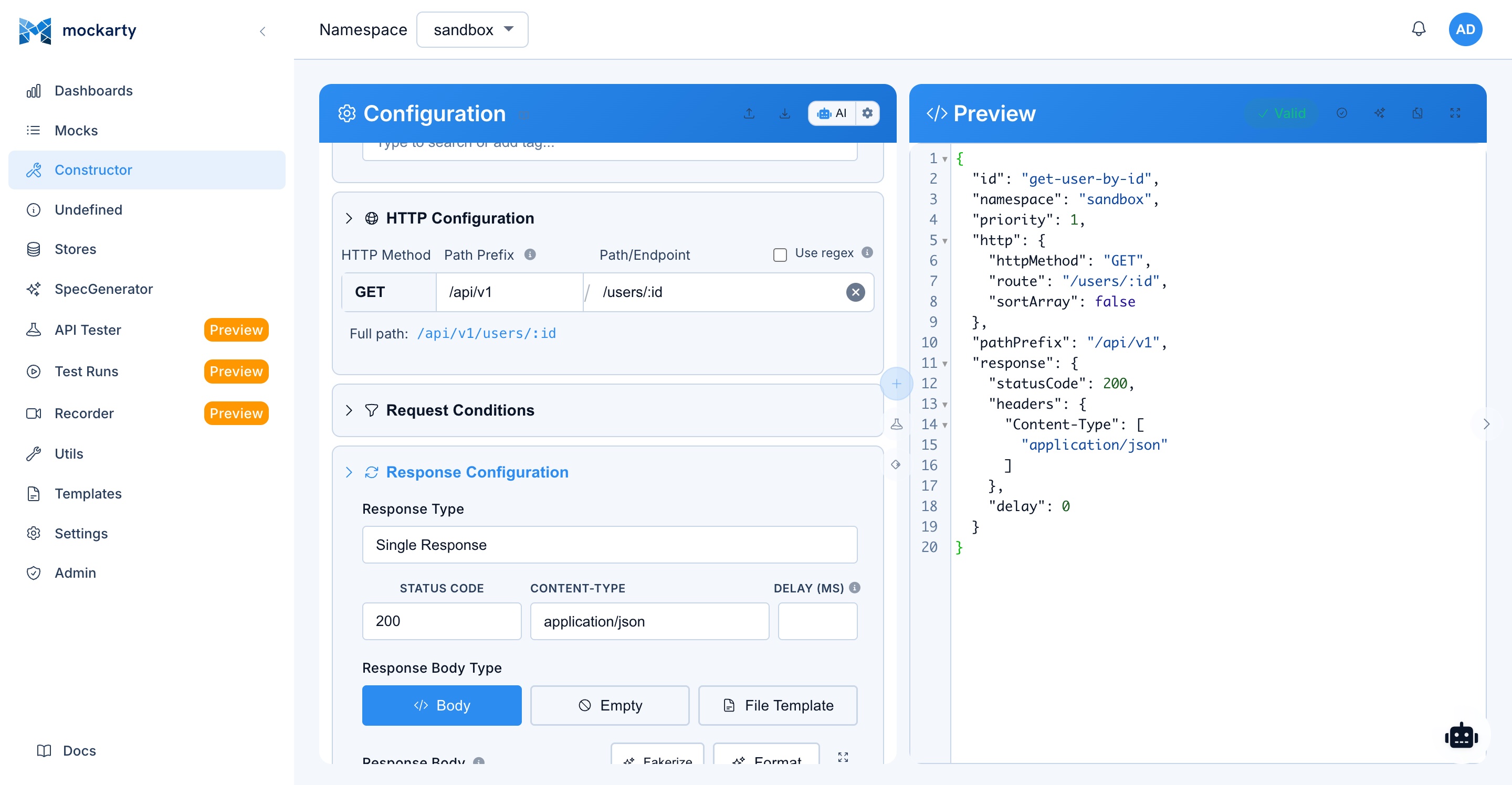
Table of Contents
- Authentication
- Mock Management API (Public)
- Namespace API
- Store API
- Template API
- CI/CD Integration Guide
- API Tester API
- Performance Testing API
- Fuzzing API
- Recorder API
- Contract Testing API
- Chaos Engineering API
- Admin API
- Utility Endpoints
- Call an HTTP Mock
- Autonomous mission namespace settings
- Review Agent Knowledge
- Delivery-policy environments (administrator)
- Related Documentation
1. Authentication
Mockarty uses two authentication mechanisms: API tokens for programmatic access and session cookies for the Web UI.
API Tokens
Create tokens in the Web UI (Settings > API Tokens) or via POST /api/v1/auth/tokens.
Include the token in requests using either header:
cURL
# X-API-Key header (namespace "sandbox" is the default)
curl -H "X-API-Key: mk_YOUR_TOKEN" http://localhost:5770/api/v1/mocks

# Authorization: Bearer header
curl -H "Authorization: Bearer mk_YOUR_TOKEN" http://localhost:5770/api/v1/mocks
CLI
# Configure token + namespace globally (saved to ~/.mockarty-cli/config.yaml)
mockarty-cli config set-context default --token mk_YOUR_TOKEN --namespace sandbox
mockarty-cli config use-context default

# Or pass per-command
mockarty-cli mock list --token mk_YOUR_TOKEN
Go
// Token is set via WithAPIKey option; namespace defaults to "sandbox"
client := mockarty.NewClient("http://localhost:5770",
    mockarty.WithAPIKey("mk_YOUR_TOKEN"),
    mockarty.WithNamespace("sandbox"), // optional, "sandbox" is the default
)
Python
# Token is set via api_key parameter; namespace defaults to "sandbox"
client = MockartyClient(
    base_url="http://localhost:5770",
    api_key="mk_YOUR_TOKEN",
    namespace="sandbox",  # optional, "sandbox" is the default
)
Java
// Token is set via apiKey; namespace defaults to "sandbox"
MockartyClient client = MockartyClient.builder()
    .baseUrl("http://localhost:5770")
    .apiKey("mk_YOUR_TOKEN")
    .namespace("sandbox")  // optional, "sandbox" is the default
    .build();
Kotlin
// Token is set via apiKey; namespace defaults to "sandbox"
val client = MockartyClient.builder()
    .baseUrl("http://localhost:5770")
    .apiKey("mk_YOUR_TOKEN")
    .namespace("sandbox")  // optional, "sandbox" is the default
    .build()
Session Authentication
For Web UI and browser-based access:
# Login (returns session cookie)
curl -c cookies.txt -X POST http://localhost:5770/api/v1/auth/login \
  -d '{"username": "admin", "password": "secret"}'

# Use session cookie
curl -b cookies.txt http://localhost:5770/api/v1/mocks
Auth Endpoints
| Method | Path | Auth | Description |
|---|---|---|---|
| POST | /api/v1/auth/login |
none | Login with username/password |
| POST | /api/v1/auth/logout |
user | End session |
| GET | /api/v1/auth/me |
user | Get current user info |
| POST | /api/v1/auth/change-password |
user | Change own password |
| POST | /api/v1/auth/tokens |
user | Create API token |
| GET | /api/v1/auth/tokens |
user | List own API tokens |
| GET | /api/v1/auth/tokens/:id |
user | Get token details |
| PATCH | /api/v1/auth/tokens/:id |
user | Update token (name, expiration) |
| DELETE | /api/v1/auth/tokens/:id |
user | Revoke token |
| POST | /api/v1/auth/delegated-credentials |
user | Issue a project-scoped delegated credential |
| GET | /api/v1/auth/delegated-credentials |
user | List the delegated credentials this caller may manage |
| GET | /api/v1/auth/delegated-credentials/:id |
user | Read a delegated credential |
| POST | /api/v1/auth/delegated-credentials/:id/rotate |
user | Replace its bearer, keeping the frozen scope |
| DELETE | /api/v1/auth/delegated-credentials/:id |
user | Revoke it permanently |
| POST | /api/v1/auth/ldap/login |
none | Login via LDAP |
| GET | /api/v1/auth/oauth/login/:provider |
none | Start OAuth flow |
| POST | /api/v1/auth/forgot-password |
none | Request password reset email |
| GET | /api/v1/auth/verify-email |
none | Verify email address |
Rate Limiting
API requests are rate-limited based on your license tier. Token-based rate limiting applies per API key.
2. Mock Management API (Public)
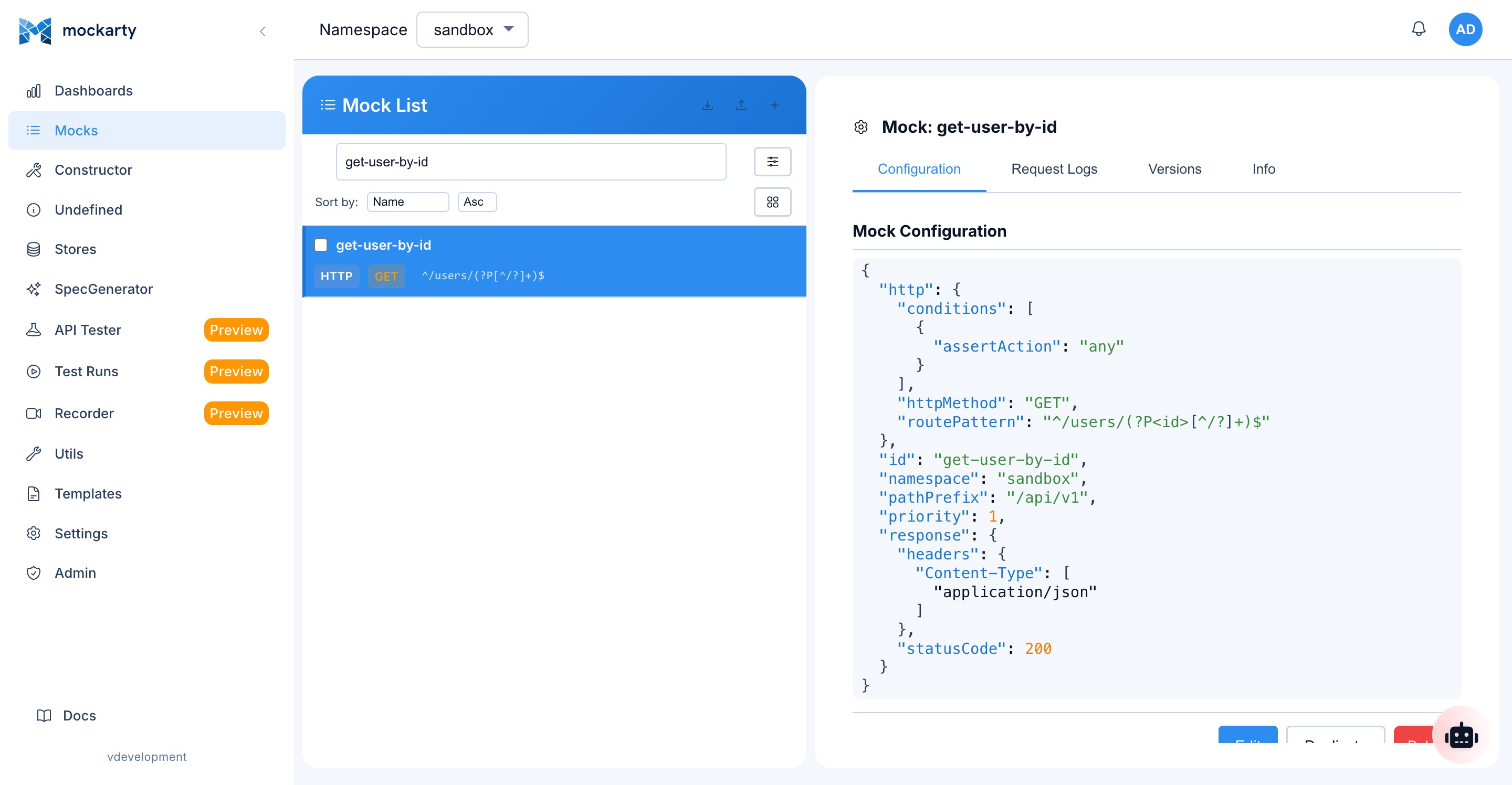
These endpoints manage mock definitions. Available at the server root (port 5770). Require authentication with read or write permission.
Create/Update Mock
POST /api/v1/mocks | Auth: user (write)
Creates a new mock or overwrites an existing one (matched by id).
cURL
curl -X POST http://localhost:5770/api/v1/mocks \
  -H "X-API-Key: mk_YOUR_TOKEN" \
  -H "Content-Type: application/json" \
  -d '{
    "id": "get-user",
    "namespace": "sandbox",
    "http": {
      "route": "/api/users/list",
      "httpMethod": "GET"
    },
    "response": {
      "statusCode": 200,
      "payload": {
        "id": "$.fake.UUID",
        "name": "$.fake.FirstName",
        "email": "$.fake.Email"
      }
    }
  }'
CLI
# Namespace defaults to "sandbox"
echo '{"id":"get-user","http":{"route":"/api/users/list","httpMethod":"GET"},"response":{"statusCode":200,"payload":{"id": "$.fake.UUID", "name": "$.fake.FirstName", "email": "$.fake.Email"}}}' | mockarty-cli mock create -f -
Go
mock := mockarty.NewMockBuilder().
    ID("get-user").
    Namespace("sandbox"). // optional, "sandbox" is the default
    HTTP(func(h *mockarty.HTTPBuilder) {
        h.Route("/api/users/list").Method("GET")
    }).
    Response(func(r *mockarty.ResponseBuilder) {
        r.Status(200).JSONBody(map[string]any{
            "id":    "$.fake.UUID",
            "name":  "$.fake.FirstName",
            "email": "$.fake.Email",
        })
    }).
    Build()

resp, err := client.Mocks().Create(context.Background(), mock)
Python
mock = (
    MockBuilder.http("/api/users/list", "GET")
    .id("get-user")
    .namespace("sandbox")  # optional, "sandbox" is the default
    .respond(200, body={
        "id": "$.fake.UUID",
        "name": "$.fake.FirstName",
        "email": "$.fake.Email",
    })
    .build()
)

result = client.mocks.create(mock)
Java
Mock mock = MockBuilder.http("/api/users/list", "GET")
    .id("get-user")
    .namespace("sandbox")  // optional, "sandbox" is the default
    .respond(200, Map.of(
        "id", "$.fake.UUID",
        "name", "$.fake.FirstName",
        "email", "$.fake.Email"
    ))
    .build();

SaveMockResponse resp = client.mocks().create(mock);
Kotlin
client.createMock {
    id = "get-user"
    namespace = "sandbox"  // optional, "sandbox" is the default
    http {
        route = "/api/users/list"
        method = "GET"
    }
    respond {
        statusCode = 200
        body = mapOf(
            "id" to "$.fake.UUID",
            "name" to "$.fake.FirstName",
            "email" to "$.fake.Email"
        )
    }
}
Response:
{
  "overwritten": false,
  "mock": {
    "id": "get-user",
    "namespace": "sandbox",
    "createdAt": 1704096000000,
    "useCounter": 0
  }
}
Full mock structure (all fields optional except id):
| Field | Type | Description |
|---|---|---|
id |
string | Unique mock ID |
namespace |
string | Namespace (default: “sandbox”) |
chainId |
string | Chain ID for linked mocks |
priority |
int64 | Higher priority mocks match first (default: 0) |
ttl |
int64 | Time-to-live in milliseconds (0 = unlimited) |
useLimiter |
int32 | Max usage count (0 = unlimited) |
transient |
bool | When true, the mock skips per-hit bookkeeping — request logging, live updates and the usage counter — to shed load at high traffic / during load testing (default: false). Matching and the response are unchanged. |
http |
object | HTTP route config (route, httpMethod, conditions, queryParams, header) |
grpc |
object | gRPC config (service, method, conditions, meta) |
mcp |
object | MCP config (method, tool, resource or prompt, conditions) |
soap |
object | SOAP config (service, method, action, path) |
graphql |
object | GraphQL config (operation, field, type, path) |
smtp |
object | SMTP config (serverName, senderConditions, recipientConditions, subjectConditions, bodyConditions, headerConditions) |
socket |
object | WebSocket/TCP/UDP config (serverName, event, namespace) |
kafka |
object | Kafka config (topic, serverName) |
rabbitmq |
object | RabbitMQ config (queue, serverName) |
sse |
object | SSE config (route, serverName) |
response |
object | Response: statusCode, payload, headers, delay, payloadTemplatePath |
oneOf |
object | Multiple responses: order (“order”/“random”), responses array |
proxy |
object | Proxy mode: target URL |
webhooks |
array | Webhook callbacks triggered on mock match (see Webhooks & Callbacks) |
tags |
array | String tags for categorizing and filtering mocks |
folderId |
string | Folder ID for hierarchical mock organization |
pathPrefix |
string | Unified path prefix for native protocols (HTTP, SOAP, MCP, SSE, GraphQL) |
serverName |
string | Server name for grouping mocks by environment (e.g., test, stage, prod) – used by Socket and gRPC |
mStore |
object | Mock Store – ephemeral key-value data available only during this mock’s processing |
extract |
object | Data extraction: mStore, cStore, gStore |
Condition Structure
What are conditions? Conditions let you return different mock responses depending on the incoming request. Without conditions, a mock matches any request to its route. With conditions, Mockarty inspects the request body, headers, or query parameters and only selects the mock if all conditions pass. This is useful when multiple mocks share the same route but should respond differently based on the request content (e.g., return an error when $.status equals "invalid").
The conditions array inside http, grpc, and mcp config objects controls when a mock is selected. Each condition is an object with the following fields:
| Field | Type | Required | Description |
|---|---|---|---|
path |
string | Yes | The path expression to evaluate (e.g., $.user.role, header name, query param name) |
assertAction |
string | Yes | The comparison operation (see table below) |
value |
any | Depends | The expected value to compare against. Required for equals, contains, not_equals, not_contains, matches, not_matches, gt, lt, gte, lte. Ignored for any, notEmpty, empty. |
decode |
string | No | Set to "base64" to base64-decode the extracted value before comparison. Useful when the request contains base64-encoded fields. |
sortArray |
bool | No | Sort arrays before comparison. Overrides the global sortArray flag on the protocol config object for this specific condition. |
valueFromFile |
string | No | Path to a file whose content is used as the condition value instead of value. The path supports template processing ($.fake.*, store references). Takes precedence over value when set. |
Assert actions:
| Assert Action | Description | Value Required |
|---|---|---|
equals |
Exact match (deep equality for objects/arrays) | Yes |
contains |
Substring match for strings, subset check for objects, element presence for arrays. For numbers and booleans there is no substring: it means the value is exactly that number/boolean (100 never contains 10) |
Yes |
not_equals |
Not equal to value | Yes |
not_contains |
Negation of contains — does not contain the substring or subset, and for numbers/booleans is not exactly that value |
Yes |
matches |
Regex pattern match against string value | Yes (regex pattern) |
not_matches |
Value does NOT match the regex (negation of matches; an absent field matches) |
Yes (regex pattern) |
gt |
Numeric greater-than — the field value and value are both parsed as numbers |
Yes (number) |
lt |
Numeric less-than — the field value and value are both parsed as numbers |
Yes (number) |
gte |
Numeric greater-than-or-equal (inclusive) — both sides parsed as numbers | Yes (number) |
lte |
Numeric less-than-or-equal (inclusive) — both sides parsed as numbers | Yes (number) |
any |
Always matches (ignores value) | No |
notEmpty |
Value exists and is not empty (non-null, non-empty string/array/object) | No |
empty |
Value is empty or null ("", [], {}, or null) |
No |
Note: The legacy alias
matchis also accepted and behaves identically tomatches.
Example with advanced condition fields:
{
  "id": "base64-body-mock",
  "http": {
    "route": "/api/validate",
    "httpMethod": "POST",
    "conditions": [
      {
        "path": "$.encodedData",
        "assertAction": "contains",
        "value": "expected-content",
        "decode": "base64"
      },
      {
        "path": "$.items",
        "assertAction": "equals",
        "value": ["b", "a", "c"],
        "sortArray": true
      },
      {
        "path": "$.payload",
        "assertAction": "equals",
        "valueFromFile": "/templates/expected-payload.json"
      }
    ]
  },
  "response": {
    "statusCode": 200,
    "payload": {"status": "validated"}
  }
}
Note:
decode,sortArray, andvalueFromFileare API-only fields – they are not exposed in the web UI constructor.
Get Mock
GET /api/v1/mocks/:id | Auth: user (read)
cURL
curl -H "X-API-Key: mk_YOUR_TOKEN" http://localhost:5770/api/v1/mocks/get-user
CLI
mockarty-cli mock get get-user
Go
mock, err := client.Mocks().Get(context.Background(), "get-user")
Python
mock = client.mocks.get("get-user")
Java
Mock mock = client.mocks().get("get-user");
Kotlin
val mock = client.mocks().get("get-user")
List Mocks
GET /api/v1/mocks | Auth: user (read)
| Query Param | Type | Description |
|---|---|---|
offset |
int | Pagination offset (default: 0) |
limit |
int | Page size (default: 50) |
namespace |
string | Filter by namespace |
tags |
string | Comma-separated tag filter |
search |
string | Search mock IDs and tags |
folderId |
string | Folder UUID or root |
protocol |
string | Filter by protocol |
onlyActive |
bool | Exclude soft-deleted mocks |
cURL
# Namespace "sandbox" is the default
curl -H "X-API-Key: mk_YOUR_TOKEN" \
  "http://localhost:5770/api/v1/mocks?namespace=sandbox&protocol=http&onlyActive=true&limit=10"
CLI
mockarty-cli mock list --namespace sandbox
Go
page, err := client.Mocks().List(context.Background(), &mockarty.ListMocksOptions{
    Namespace: "sandbox", // optional, "sandbox" is the default
    Protocol:  "http",
    Limit:     10,
    OnlyActive: true,
})
for _, m := range page.Items {
    fmt.Println(m.ID)
}
Python
page = client.mocks.list(namespace="sandbox", protocol="http", only_active=True, limit=10)
for mock in page.items:
    print(mock.id)
Java
Page<Mock> page = client.mocks().list(
    "sandbox", null, null, null, "http", true, 0, 10);
for (Mock m : page.getItems()) {
    System.out.println(m.getId());
}
Kotlin
val page = client.mocks().list(
    "sandbox", null, null, null, "http", true, 0, 10)
page.items.forEach { println(it.id) }
Delete Mock (soft)
DELETE /api/v1/mocks/:id | Auth: user (delete)
cURL
curl -X DELETE -H "X-API-Key: mk_YOUR_TOKEN" \
  http://localhost:5770/api/v1/mocks/get-user
CLI
mockarty-cli mock delete get-user
Go
err := client.Mocks().Delete(context.Background(), "get-user")
Python
client.mocks.delete("get-user")
Java
client.mocks().delete("get-user");
Kotlin
client.mocks().delete("get-user")
Restore Mock
Restore a soft-deleted mock (one or many) from the recycle bin:
POST /api/v1/mocks/batch/restore | Auth: user (write)
{ "ids": ["mock_123"] }
Purge Mock (permanent)
DELETE /api/v1/mocks/:id/purge | Auth: user (delete)
Get Mock Logs
GET /api/v1/mocks/:id/logs | Auth: user (read)
Returns request history for a mock.
{
  "id": "get-user",
  "requests": [
    {
      "calledAt": "2024-01-01T10:05:00Z",
      "req": {
        "header": {},
        "body": {},
        "queryParam": {},
        "url": "/stubs/api/users/123"
      }
    }
  ]
}
Chain Mocks
| Method | Path | Description |
|---|---|---|
| GET | /api/v1/mocks/chains/:id |
Get all mocks in a chain |
| DELETE | /api/v1/mocks/chains/:id |
Delete entire chain |
Batch Create
POST /api/v1/mocks/batch | Auth: user (write)
Creates multiple mocks in a single request.
cURL
curl -X POST http://localhost:5770/api/v1/mocks/batch \
  -H "X-API-Key: mk_YOUR_TOKEN" \
  -H "Content-Type: application/json" \
  -d '[
    {"id": "mock-1", "namespace": "sandbox", "http": {"route": "/api/a", "httpMethod": "GET"}, "response": {"statusCode": 200}},
    {"id": "mock-2", "namespace": "sandbox", "http": {"route": "/api/b", "httpMethod": "GET"}, "response": {"statusCode": 200}}
  ]'
CLI
# Batch create from a JSON file (namespace defaults to "sandbox")
mockarty-cli mock create --file mocks.json
Go
mocks := []*mockarty.Mock{
    mockarty.NewMockBuilder().ID("mock-1").
        HTTP(func(h *mockarty.HTTPBuilder) { h.Route("/api/a").Method("GET") }).
        Response(func(r *mockarty.ResponseBuilder) { r.Status(200) }).
        Build(),
    mockarty.NewMockBuilder().ID("mock-2").
        HTTP(func(h *mockarty.HTTPBuilder) { h.Route("/api/b").Method("GET") }).
        Response(func(r *mockarty.ResponseBuilder) { r.Status(200) }).
        Build(),
}

err := client.Mocks().BatchCreate(context.Background(), mocks)
Python
mocks = [
    MockBuilder.http("/api/a", "GET").id("mock-1").respond(200).build(),
    MockBuilder.http("/api/b", "GET").id("mock-2").respond(200).build(),
]

results = client.mocks.batch_create(mocks)
Java
// Java SDK does not have a dedicated batchCreate method;
// use a loop to create each mock individually
Mock mock1 = MockBuilder.http("/api/a", "GET").id("mock-1").respond(200).build();
Mock mock2 = MockBuilder.http("/api/b", "GET").id("mock-2").respond(200).build();

client.mocks().create(mock1);
client.mocks().create(mock2);
Partial Update (Patch)
PATCH /api/v1/mocks/:id | Auth: user (write)
Partially updates a mock (merges provided fields into the existing mock).
cURL
curl -X PATCH http://localhost:5770/api/v1/mocks/get-user \
  -H "X-API-Key: mk_YOUR_TOKEN" \
  -d '{"response": {"statusCode": 201}}'
CLI
# CLI does not expose a dedicated patch command.
# Export the mock, edit it locally, and re-apply the full definition — the server
# will update the existing mock by id.
mockarty-cli mock get get-user -o json > mock.json
# edit mock.json (e.g. change response.statusCode to 201)
mockarty-cli mock create -f mock.json
Go
updated, err := client.Mocks().Patch(context.Background(), "get-user", map[string]any{
    "response": map[string]any{"statusCode": 201},
})
Python
updated = client.mocks.patch("get-user", {"response": {"statusCode": 201}})
Java
Mock updated = client.mocks().patch("get-user", Map.of(
    "response", Map.of("statusCode", 201)
));
Mock Version History
| Method | Path | Description |
|---|---|---|
| GET | /api/v1/mocks/:id/versions |
List mock version history |
| GET | /api/v1/mocks/:id/versions/:version |
Get specific version |
| POST | /api/v1/mocks/:id/versions/:version/restore |
Restore mock to a previous version |
Preview Mock Resolution
GET /api/v1/mocks/preview | Auth: user (read)
Preview which mock would be resolved for a given route/method without actually calling the stub endpoint.
Batch Operations (UI API)
| Method | Path | Description |
|---|---|---|
| DELETE | /api/v1/mocks/batch |
Batch soft-delete: {"ids": [...]} |
| POST | /api/v1/mocks/batch/restore |
Batch restore: {"ids": [...]} |
| PATCH | /api/v1/mocks/batch/tags |
Batch tag update: {"ids": [...], "addTags": [...], "removeTags": [...]} |
Tags
| Method | Path | Description |
|---|---|---|
| GET | /api/v1/tags |
List all tags |
| POST | /api/v1/tags |
Create a new tag |
Mock Folders
Organize mocks into folders for easier management.
| Method | Path | Description |
|---|---|---|
| GET | /api/v1/mock-folders |
List all folders |
| POST | /api/v1/mock-folders |
Create folder |
| PUT | /api/v1/mock-folders/:id |
Update folder |
| DELETE | /api/v1/mock-folders/:id |
Delete folder |
| PATCH | /api/v1/mock-folders/:id/move |
Move folder (reorder/reparent) |
| PATCH | /api/v1/mocks/batch/move |
Move mocks to a folder |
Undefined Requests
Captured requests that did not match any mock.
| Method | Path | Description |
|---|---|---|
| GET | /api/v1/undefined-requests |
List undefined requests |
| PATCH | /api/v1/undefined-requests/:id/ignore |
Ignore an undefined request |
| DELETE | /api/v1/undefined-requests |
Delete selected undefined requests |
| DELETE | /api/v1/undefined-requests/all |
Clear all undefined requests |
| POST | /api/v1/undefined-requests/:id/create-mock |
Create mock from an undefined request |
Active plugin protocols
GET /api/v1/plugin-protocols | Auth: user (mock:read)
Returns the plugin-supplied wire codecs active in the requested namespace. Each
row includes the exact Socket serverName; use it unchanged when authoring the
mock. The wire listener itself is available only when the server starts with
MOCKARTY_UNIFIED_PORT=1.
curl -H "Authorization: Bearer $TOKEN" \
  "http://localhost:5770/api/v1/plugin-protocols?namespace=sandbox"
catalogue, err := client.Mocks().ListPluginProtocols(ctx, "sandbox")
catalogue = client.mocks.list_plugin_protocols(namespace="sandbox")
PluginProtocolCatalogue catalogue = client.mocks().listPluginProtocols("sandbox");
The same catalogue is available to agents as the read-only
plugin_protocols_list MCP tool and in the CLI as mockarty-cli plugin protocols.
Protocol mock examples (GraphQL / SOAP / gRPC)
Mocks aren’t HTTP-only. The same POST /api/v1/mocks endpoint accepts a
protocol config block (graphql, soap, grpc, …) instead of http. The
response.payload and template placeholders ($.fake.*, $.req.*) work
across protocols. All three examples below were verified end-to-end.
GraphQL — match by operation + field, served over HTTP at the
graphql.path:
# Create
curl -X POST "http://localhost:5770/api/v1/mocks?namespace=sandbox" \
  -H "Authorization: Bearer $TOKEN" -H "Content-Type: application/json" \
  -d '{
    "id": "gql-user",
    "graphql": { "operation": "query", "field": "user", "path": "/graphql" },
    "response": { "statusCode": 200, "payload": { "data": { "user": { "id": "$.fake.UUID", "name": "Ada" } } } }
  }'

# Invoke
curl -X POST http://localhost:5770/stubs/sandbox/graphql \
  -H "Content-Type: application/json" \
  -d '{"query":"query { user { id name } }"}'
# → {"data":{"user":{"id":"2778f790-…","name":"Ada"}}}
SOAP — match by service / method / action, served at soap.path.
For XML, set response.payload to the raw envelope string:
# Create
curl -X POST "http://localhost:5770/api/v1/mocks?namespace=sandbox" \
  -H "Authorization: Bearer $TOKEN" -H "Content-Type: application/json" \
  -d '{
    "id": "soap-getuser",
    "soap": { "service": "UserService", "method": "GetUser", "action": "GetUser", "path": "/soap/users" },
    "response": {
      "statusCode": 200,
      "payload": "<soap:Envelope xmlns:soap=\"http://schemas.xmlsoap.org/soap/envelope/\"><soap:Body><GetUserResponse><id>42</id><name>Ada</name></GetUserResponse></soap:Body></soap:Envelope>",
      "headers": { "Content-Type": ["text/xml"] }
    }
  }'

# Invoke
curl -X POST http://localhost:5770/stubs/sandbox/soap/users \
  -H "Content-Type: text/xml" -H "SOAPAction: GetUser" \
  -d '<soap:Envelope xmlns:soap="http://schemas.xmlsoap.org/soap/envelope/"><soap:Body><GetUser><id>42</id></GetUser></soap:Body></soap:Envelope>'
# → the GetUserResponse envelope above
gRPC — match by service / method. Upload the service .proto first
(Admin → gRPC, or POST /api/v1/api-tester/import/grpc), then create the mock:
# Create
curl -X POST "http://localhost:5770/api/v1/mocks?namespace=sandbox" \
  -H "Authorization: Bearer $TOKEN" -H "Content-Type: application/json" \
  -d '{
    "id": "grpc-getuser",
    "grpc": { "service": "user.UserService", "method": "GetUser" },
    "response": { "statusCode": 0, "payload": { "id": "42", "name": "Ada" } }
  }'

# Invoke with any gRPC client (the gRPC port defaults to :5773), e.g. grpcurl:
grpcurl -plaintext -d '{"id":"42"}' localhost:5773 user.UserService/GetUser
SSE — match by sse.eventPath; the response streams the events in
response.sseEventChain.events[]. A request counts as SSE when it carries
Accept: text/event-stream (or the path is under /sse/ or /events/):
# Create
curl -X POST "http://localhost:5770/api/v1/mocks?namespace=sandbox" \
  -H "Authorization: Bearer $TOKEN" -H "Content-Type: application/json" \
  -d '{
    "id": "sse-orders",
    "sse": { "eventPath": "/events/orders", "eventName": "order" },
    "response": { "sseEventChain": { "events": [
      { "eventName": "order", "data": { "id": "$.fake.UUID", "status": "created" }, "delay": 100 },
      { "eventName": "order", "data": { "status": "shipped" }, "delay": 100 }
    ] } }
  }'

# Invoke (stream)
curl -N -H "Accept: text/event-stream" http://localhost:5770/stubs/sandbox/events/orders
# → event:order
#   data:{"id":"ccdc58b8-…","status":"created"}
#   event:order
#   data:{"status":"shipped"}
WebSocket — match by socket.serverName + socket.event:
# Create
curl -X POST "http://localhost:5770/api/v1/mocks?namespace=sandbox" \
  -H "Authorization: Bearer $TOKEN" -H "Content-Type: application/json" \
  -d '{
    "id": "ws-echo",
    "socket": { "serverName": "chat", "event": "message" },
    "response": { "payload": { "reply": "pong", "at": "$.fake.RFC3339" } }
  }'

# Invoke with any WebSocket client (e.g. websocat):
websocat ws://localhost:5770/stubs/sandbox/chat
MCP — match by mcp.method (tools/call) + mcp.tool. The mock is exposed
as a tool on the namespace MCP server and invoked over JSON-RPC. A mock with no
pathPrefix is served at the namespace base (/stubs/<ns>); to serve it under a
sub-path, set pathPrefix (e.g. "/mcp") and call /stubs/<ns>/mcp. See
MCP Marketplace for the full server flow.
# Create
curl -X POST "http://localhost:5770/api/v1/mocks?namespace=sandbox" \
  -H "Authorization: Bearer $TOKEN" -H "Content-Type: application/json" \
  -d '{
    "id": "mcp-weather",
    "mcp": { "method": "tools/call", "tool": "get_weather", "description": "Get weather" },
    "response": { "payload": { "temp": 21, "city": "Berlin" } }
  }'

# Invoke over JSON-RPC at the namespace base (mock has no pathPrefix)
curl -X POST http://localhost:5770/stubs/sandbox \
  -H "Content-Type: application/json" \
  -d '{"jsonrpc":"2.0","id":1,"method":"tools/call","params":{"name":"get_weather","arguments":{}}}'
# → {"jsonrpc":"2.0","id":1,"result":{"content":[{"type":"text","text":"{\"temp\":21,\"city\":\"Berlin\"}"}],"isError":false}}
MCP prompts are mocked the same way: mcp.method prompts/get + mcp.prompt
(the prompt name). The response body is the prompt result — messages with a
role (user or assistant) and text, or just a string for one user message;
$.req.<argument> inserts an argument of the call. An arguments list in the body
is what prompts/list shows the client (it is not returned by prompts/get).
Conditions on arguments pick between several mocks of one prompt. As soon as a
server path has a prompt mock, initialize advertises the prompts capability.
curl -X POST "http://localhost:5770/api/v1/mocks?namespace=sandbox" \
  -H "Authorization: Bearer $TOKEN" -H "Content-Type: application/json" \
  -d '{
    "id": "mcp-review-prompt",
    "pathPrefix": "/prompts-demo",
    "mcp": { "method": "prompts/get", "prompt": "code_review", "description": "Review a diff" },
    "response": { "payload": {
      "arguments": [{ "name": "diff", "description": "Unified diff", "required": true }],
      "messages": [{ "role": "user", "text": "Review this change: $.req.diff" }]
    } }
  }'

curl -X POST http://localhost:5770/stubs/sandbox/prompts-demo \
  -H "Content-Type: application/json" \
  -d '{"jsonrpc":"2.0","id":3,"method":"prompts/get","params":{"name":"code_review","arguments":{"diff":"+ retry on 503"}}}'
# → {"id":3,"jsonrpc":"2.0","result":{"messages":[{"content":{"text":"Review this change: + retry on 503","type":"text"},"role":"user"}]}}
In the mock constructor choose Request Type → Prompt (prompts/get) and enter the
prompt name; a call for an unknown prompt lands in Undefined requests, from where
it can be turned into a prompt mock.
S3 — Mockarty emulates an S3-compatible object store per bucket. Declare the
bucket with s3.bucket, then use any S3 client (or plain path-style HTTP under
/stubs/<ns>/<bucket>/<key>, including aws s3 --no-sign-request):
# Create the bucket mock
curl -X POST "http://localhost:5770/api/v1/mocks?namespace=sandbox" \
  -H "Authorization: Bearer $TOKEN" -H "Content-Type: application/json" \
  -d '{ "id": "s3-assets", "s3": { "bucket": "assets" } }'

# PUT then GET an object (path-style, anonymous)
curl -X PUT  http://localhost:5770/stubs/sandbox/assets/greeting.txt --data 'hello from s3 mock'
curl http://localhost:5770/stubs/sandbox/assets/greeting.txt
# → hello from s3 mock
Kafka / RabbitMQ / SMTP — asynchronous mocks. Mockarty matches an incoming
message (Kafka record / AMQP message / e-mail) against the config + conditions and
can publish a reply to an output* topic/queue. The mock is created the same way;
it is exercised by producing to the matched topic/queue or sending mail to the
configured server (not over HTTP):
# Kafka — match topic 'orders', reply published to the configured output topic
curl -X POST "http://localhost:5770/api/v1/mocks?namespace=sandbox" \
  -H "Authorization: Bearer $TOKEN" -H "Content-Type: application/json" \
  -d '{ "id": "kafka-orders", "kafka": { "topic": "orders", "serverName": "prod" }, "response": { "payload": { "status": "ack" } } }'

# RabbitMQ — match queue 'tasks'
curl -X POST "http://localhost:5770/api/v1/mocks?namespace=sandbox" \
  -H "Authorization: Bearer $TOKEN" -H "Content-Type: application/json" \
  -d '{ "id": "rmq-tasks", "rabbitmq": { "queue": "tasks", "serverName": "prod" }, "response": { "payload": { "status": "ack" } } }'

# SMTP — match e-mails whose subject contains 'Welcome'
curl -X POST "http://localhost:5770/api/v1/mocks?namespace=sandbox" \
  -H "Authorization: Bearer $TOKEN" -H "Content-Type: application/json" \
  -d '{ "id": "smtp-welcome", "smtp": { "serverName": "mail", "subjectConditions": [ { "assertAction": "contains", "value": "Welcome" } ] }, "response": { "payload": { "accepted": true } } }'
3. Namespace API
Reading a list response
A list endpoint returns its rows under a key named after the entity, next to a count:
{ "count": 2, "mocks": [{ "id": "mock_1785…", "name": "users" }] }
{ "total": 7, "limit": 50, "offset": 0, "runs": [{ "id": "7e8ef264-…", "status": "running" }] }
Generic collections — where the entity name would add nothing — use items:
{ "count": 3, "items": [{ "id": "37abcf01-…", "name": "Chrome / Linux" }] }
The counter is count for a full result set and total when the response is paged
(limit / offset are then present too). Check the endpoint’s own section for which key it
uses; the Swagger schema (/swagger/index.html) is authoritative and always matches the
running build.
A list endpoint never returns a bare null for its rows — an empty result is an empty
array, so you can iterate without a nil check.
Naming the namespace on any endpoint
Every endpoint that works inside a namespace accepts it either way — pick whichever
suits your client and use it consistently:
# As a query parameter
curl "http://localhost:5770/api/v1/test-cases?namespace=staging" -H "X-API-Key: $TOKEN"

# As a path segment
curl "http://localhost:5770/api/v1/namespaces/staging/test-cases" -H "X-API-Key: $TOKEN"

# As a header (useful when a client sets it once for every request)
curl "http://localhost:5770/api/v1/test-cases" \
  -H "X-Mockarty-Namespace: staging" -H "X-API-Key: $TOKEN"
All three reach the same handler and return the same result. If your token is pinned to a
namespace, you can omit it entirely and that namespace is used.
Access is checked the same way regardless of spelling: you must be a member of the namespace
you name. Naming one you cannot read returns 404 — not 403 — so that the response cannot
be used to discover which namespaces exist.
| Method | Path | Auth | Description |
|---|---|---|---|
| POST | /api/v1/namespaces |
user (write) | Create namespace: {"name": "staging"} |
| GET | /api/v1/namespaces |
user (read) | List namespaces |
| POST | /api/v1/mocks/copy-to-namespace |
user (write) | Copy mocks between namespaces |
| GET | /api/v1/namespaces |
user | List accessible namespaces |
| POST | /api/v1/namespaces |
admin | Create namespace (admin route) |
Copy mocks example:
cURL
curl -X POST -H "X-API-Key: mk_YOUR_TOKEN" \
  http://localhost:5770/api/v1/mocks/copy-to-namespace \
  -d '{
    "sourceNamespace": "staging",
    "targetNamespace": "production",
    "mockIds": ["mock-1", "mock-2"]
  }'
Go
err := client.Mocks().CopyToNamespace(context.Background(),
    []string{"mock-1", "mock-2"}, "production",
)
Python
client.mocks.copy_to_namespace(
    ids=["mock-1", "mock-2"],
    target_namespace="production",
)
Java
client.mocks().copyToNamespace(
    List.of("mock-1", "mock-2"),
    "production"
);
4. Store API
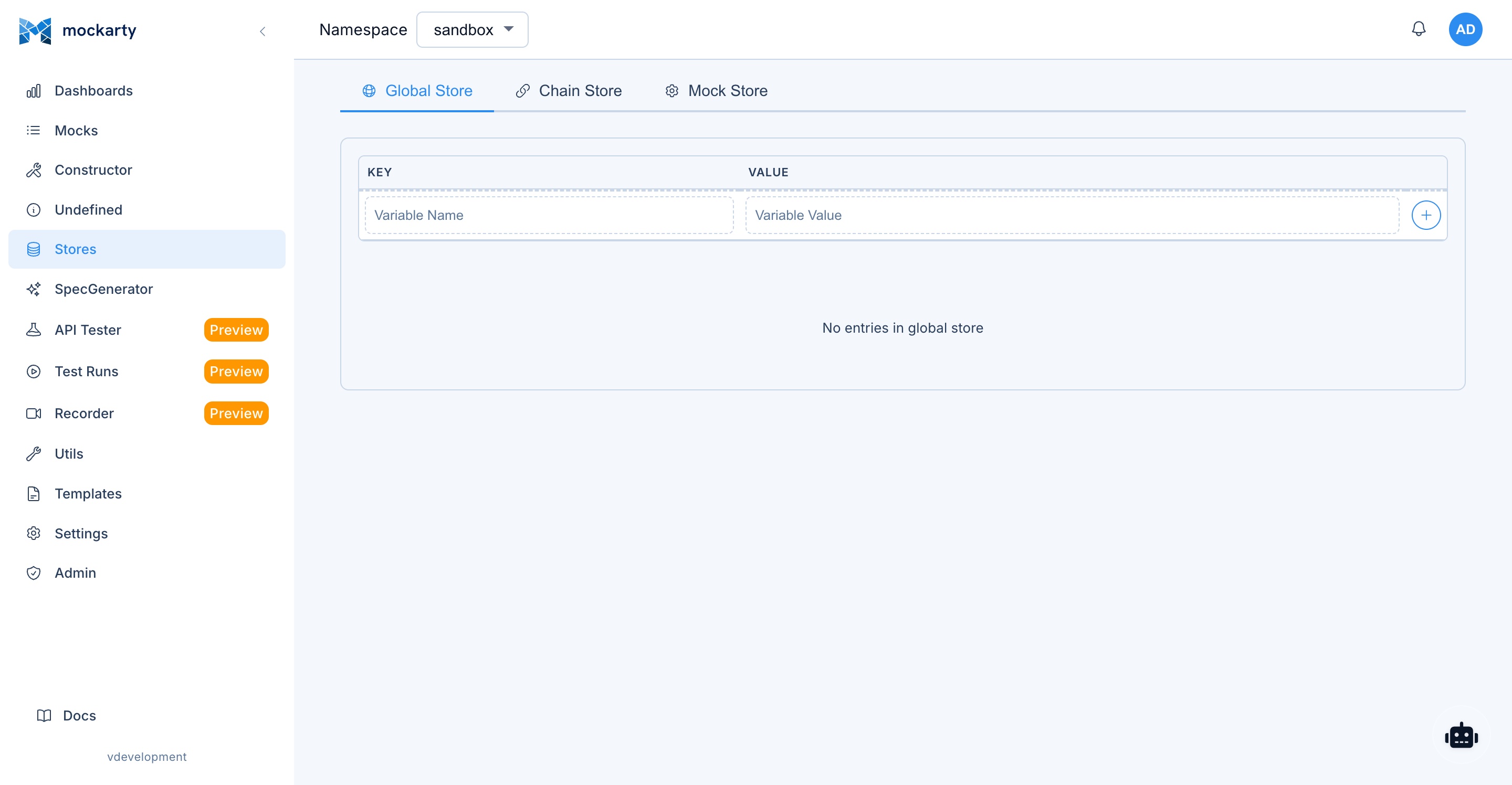
Three store types for stateful mock scenarios. See Store Systems for concepts.
Global Store
| Method | Path | Auth | Description |
|---|---|---|---|
| GET | /api/v1/stores/global?namespace=default |
user (read) | Get all global store data |
| POST | /api/v1/stores/global |
user (write) | Set a key-value pair: {"key": "...", "value": "...", "namespace": "..."} |
| DELETE | /api/v1/stores/global/:key?namespace=default |
user (write) | Delete a key (key in URL path) |
Each POST request adds a single key-value pair. Make separate requests to set multiple keys.
cURL
# Set a key-value pair (one per request)
curl -X POST -H "X-API-Key: mk_YOUR_TOKEN" \
  "http://localhost:5770/api/v1/stores/global" \
  -d '{"key": "totalUsers", "value": "100", "namespace": "sandbox"}'

curl -X POST -H "X-API-Key: mk_YOUR_TOKEN" \
  "http://localhost:5770/api/v1/stores/global" \
  -d '{"key": "serviceName", "value": "auth", "namespace": "sandbox"}'

# Read store
curl -H "X-API-Key: mk_YOUR_TOKEN" \
  "http://localhost:5770/api/v1/stores/global?namespace=sandbox"

# Delete a key (key in URL path)
curl -X DELETE -H "X-API-Key: mk_YOUR_TOKEN" \
  "http://localhost:5770/api/v1/stores/global/totalUsers?namespace=sandbox"
CLI
# Set a value (namespace defaults to "sandbox")
mockarty-cli store global set totalUsers 100
mockarty-cli store global set serviceName auth

# Read the store
mockarty-cli store global get

# Delete a key
mockarty-cli store global delete totalUsers
Go
// Set values (uses client's default namespace "sandbox")
err := client.Stores().GlobalSet(context.Background(), "totalUsers", 100)
err = client.Stores().GlobalSet(context.Background(), "serviceName", "auth")

// Read the store
store, err := client.Stores().GlobalGet(context.Background())
fmt.Println(store) // map[totalUsers:100 serviceName:auth ...]

// Delete a key
err = client.Stores().GlobalDelete(context.Background(), "totalUsers")
Python
# Set values (uses client's default namespace "sandbox")
client.stores.global_set("totalUsers", 100)
client.stores.global_set("serviceName", "auth")

# Or set multiple at once
client.stores.global_set_many({"totalUsers": 100, "serviceName": "auth"})

# Read the store
store = client.stores.global_get()
print(store)  # {"totalUsers": 100, "serviceName": "auth"}

# Delete keys
client.stores.global_delete("totalUsers")
Java
// Set values (uses client's default namespace "sandbox")
client.stores().globalSet("totalUsers", 100);
client.stores().globalSet("serviceName", "auth");

// Read the store
Map<String, Object> store = client.stores().globalGet();
System.out.println(store);

// Delete a key
client.stores().globalDelete("totalUsers");
Chain Store
| Method | Path | Auth | Description |
|---|---|---|---|
| GET | /api/v1/stores/chain/:id?namespace=default |
user (read) | Get chain store |
| POST | /api/v1/stores/chain/:id |
user (write) | Set a key-value pair: {"key": "...", "value": "...", "namespace": "..."} |
| DELETE | /api/v1/stores/chain/:id/:key?namespace=default |
user (write) | Delete a key (key in URL path) |
5. Template API
Upload payload templates for use in mock responses via payloadTemplatePath.
| Method | Path | Auth | Description |
|---|---|---|---|
| GET | /api/v1/templates |
user (read) | List all templates |
| GET | /api/v1/templates/:fileName |
user (read) | Download template |
| POST | /api/v1/templates/:fileName |
user (write) | Upload template file |
| DELETE | /api/v1/templates/:fileName |
user (write) | Delete template |
Temporary File Storage
Temporary file uploads for use in the agent chat interface. Files are automatically deleted after 30 minutes.
Temporary files are private to the authenticated uploader and selected namespace. Use the same identity and namespace to read, delete or import a file. Files expire after 30 minutes. Redis deployments share files across admin nodes; InMemory storage keeps them on the receiving node. Configured data encryption also protects the content and file names of shared temporary files. A full temporary store returns 429; an unavailable store returns 503. Do not repeat an import automatically after an uncertain response.
| Method | Path | Auth | Description |
|---|---|---|---|
| POST | /api/v1/temp-files |
user (write) | Upload a temporary file |
| GET | /api/v1/temp-files/:fileId |
user (read) | Download a temporary file |
| DELETE | /api/v1/temp-files/:fileId |
user (write) | Delete a temporary file |
Legacy OpenAPI Generation
| Method | Path | Auth | Description |
|---|---|---|---|
| POST | /api/v1/generators/openapi |
user (write) | Generate mocks from an OpenAPI spec |
6. CI/CD Integration Guide
The runnable CI/CD recipes have moved to API automation in CI/CD. Start there for API tests, load tests, fuzzing, imports, and test setup.
7. API Tester API
Full-featured API testing platform (like Postman). All endpoints are under /api/v1/ and require authentication.
Collections
| Method | Path | Description |
|---|---|---|
| POST | /api/v1/api-tester/collections |
Create collection |
| GET | /api/v1/api-tester/collections |
List collections |
| GET | /api/v1/api-tester/collections/:id |
Get collection |
| PUT | /api/v1/api-tester/collections/:id |
Update collection |
| DELETE | /api/v1/api-tester/collections/:id |
Delete collection |
| POST | /api/v1/api-tester/collections/:id/restore |
Restore deleted collection |
| POST | /api/v1/api-tester/collections/:id/duplicate |
Duplicate collection |
| DELETE | /api/v1/api-tester/collections/batch |
Batch delete |
| GET | /api/v1/api-tester/collections/:id/export |
Export collection (JSON) |
Note:
POST /api/v1/api-tester/collectionsaccepts an optional?namespace=query parameter. Without it — and without anX-Mockarty-Namespaceheader or a token pinned to a namespace — the collection is silently created in the defaultsandboxnamespace. Automation should always pass?namespace=explicitly so collections do not land where they are hard to find.
Collection Sharing
| Method | Path | Description |
|---|---|---|
| POST | /api/v1/api-tester/collections/:id/sharing/users |
Share with users |
| POST | /api/v1/api-tester/collections/:id/sharing/spaces |
Share with namespaces |
| GET | /api/v1/api-tester/collections/:id/users |
List collection users |
| PUT | /api/v1/api-tester/collections/:id/users/:userId/role |
Set user role |
| DELETE | /api/v1/api-tester/collections/:id/users/:userId |
Remove user |
| GET | /api/v1/api-tester/collections/:id/spaces |
List shared namespaces |
| DELETE | /api/v1/api-tester/collections/:id/spaces/:namespace |
Remove namespace |
Sharing changes are refused while the collection is in trash. Removing or changing a user share that does not exist returns 404.
Direct user shares are limited to current, enabled members of the collection’s
Space. Sharing does not invite someone to a Team, add a Seat, or restore access
after removal from a Space. Invite the colleague first. A shared target Space
must also be accessible to the person granting access; viewers cannot grant edit
rights. Revoked or disabled memberships invalidate existing grants as well.
People search and ID lookup require an explicit Space that the caller can read:
| Method | Path | Input |
|---|---|---|
| GET | /api/v1/api-tester/users/search?namespace={space}&q={text}&limit=20 |
Search the current Space’s members; maximum limit 100 |
| POST | /api/v1/users/lookup?namespace={space} |
JSON {"userIds":["{user_id}"]}; maximum 200 supplied IDs |
Instead of the query parameter, use X-Mockarty-Namespace or a token pinned to
that Space. Missing scope returns 400; access to the Space is checked before
returning people. Replies contain users with id, username, fullName and,
when present, email and avatarUrl. Unknown, foreign, disabled or deleted IDs
are omitted rather than confirming that a global account exists. These endpoints
are not a directory for finding or inviting strangers.
Requests
| Method | Path | Description |
|---|---|---|
| POST | /api/v1/api-tester/collections/:id/requests |
Create request |
| GET | /api/v1/api-tester/collections/:id/requests |
List requests in collection |
| GET | /api/v1/api-tester/requests/:id |
Get request |
| PUT | /api/v1/api-tester/requests/:id |
Update request |
| DELETE | /api/v1/api-tester/requests/:id |
Delete request |
| POST | /api/v1/api-tester/requests/execute |
Execute request (server-side) |
| POST | /api/v1/api-tester/requests/execute-client |
Execute for client-side mode |
| GET | /api/v1/api-tester/requests/history |
Request execution history |
| DELETE | /api/v1/api-tester/requests/batch |
Batch delete requests |
| PATCH | /api/v1/api-tester/requests/batch/move |
Batch move requests |
| POST | /api/v1/api-tester/collections/:id/requests/reorder |
Reorder requests in a collection (body: {"ids":["uuid","uuid",...]}) |
Environments
| Method | Path | Description |
|---|---|---|
| POST | /api/v1/api-tester/environments |
Create environment |
| GET | /api/v1/api-tester/environments |
List environments |
| GET | /api/v1/api-tester/environments/active |
Get active environment |
| GET | /api/v1/api-tester/environments/:id |
Get environment |
| PUT | /api/v1/api-tester/environments/:id |
Update environment |
| DELETE | /api/v1/api-tester/environments/:id |
Delete environment |
| POST | /api/v1/api-tester/environments/:id/activate |
Set as active |
Test Runs
| Method | Path | Description |
|---|---|---|
| GET | /api/v1/api-tester/test-runs |
List test runs (supports ?mode=&referenceId=&limit=&offset= filters) |
| GET | /api/v1/api-tester/test-runs/:id |
Get test run details |
| DELETE | /api/v1/api-tester/test-runs/:id |
Delete test run |
| POST | /api/v1/api-tester/test-runs/:id/cancel |
Cancel running test |
| GET | /api/v1/api-tester/test-runs/:id/export |
Export test run report |
| POST | /api/v1/api-tester/reports/import |
Import test run report |
| GET | /api/v1/test-runs/active |
Active runs across all modes in the namespace |
Unified test run modes
Every row returned from /api/v1/api-tester/test-runs includes a mode field
identifying which execution surface produced the run:
| Mode | Produced by | referenceId points to |
|---|---|---|
functional |
API Tester collection runs (default) | — |
load |
Performance / load engine | Performance config |
fuzz |
Fuzz campaigns | Fuzz config |
chaos |
Chaos experiments | Chaos experiment |
contract |
Contract verifications | Contract registry entry |
Filter examples:
# All fuzz campaigns in the namespace
curl -H "Authorization: Bearer $TOKEN" \
  "$MOCKARTY_URL/api/v1/api-tester/test-runs?mode=fuzz"

# Every run for a specific chaos experiment
curl -H "Authorization: Bearer $TOKEN" \
  "$MOCKARTY_URL/api/v1/api-tester/test-runs?mode=chaos&referenceId=$EXPERIMENT_ID"

# Paginated functional runs
curl -H "Authorization: Bearer $TOKEN" \
  "$MOCKARTY_URL/api/v1/api-tester/test-runs?mode=functional&limit=50&offset=100"
SDK equivalents:
// Go
runs, err := client.TestRuns.ListWithOptions(ctx, mockarty.ListTestRunsOptions{
    Mode:        "fuzz",
    ReferenceID: fuzzConfigID,
    Limit:       50,
})
# Python
runs = client.test_runs.list(mode="chaos", reference_id=experiment_id, limit=50)
// Java
List<TestRun> runs = client.testRuns().listByMode("fuzz", fuzzConfigId, 50, 0);
# CLI
mockarty-cli test-runs list --mode chaos --reference-id "$EXPERIMENT_ID" --limit 50
Scripts and Execution
| Method | Path | Description |
|---|---|---|
| POST | /api/v1/api-tester/requests/execute-with-scripts |
Execute with pre/post scripts |
| POST | /api/v1/api-tester/scripts/execute |
Run script standalone |
| POST | /api/v1/api-tester/collections/:id/execute |
Execute entire collection |
| POST | /api/v1/api-tester/collections/execute-multiple |
Execute multiple collections |
| POST | /api/v1/api-tester/collections/execute-perf |
Run selected collections as a load test |
| GET | /api/v1/api-tester/test-reports/:id |
Get test report |
For execute-perf, pass saved collectionIds, or selection entries with collectionId and optional requestIds to run specific requests. Replace the example collection ID with your own:
{
  "collectionIds": ["00000000-0000-4000-8000-000000000001"],
  "perfOptions": {"vus": 20, "duration": "1m", "rps": 100},
  "useSSE": true
}
Omitting perfOptions uses 10 virtual users for 30 seconds. rps: 0 runs without a target request rate. Optional fields are name, environmentId, environmentVariables, runnerId (preferred runner), ciTriggerId (a saved CI trigger), and isDebug. Omit the environment fields to use your active environment. A non-empty environmentVariables object replaces the environment values for this run; an explicit environmentId must still be accessible. A runner or CI selection requires an available execution service; otherwise the API returns HTTP 503.
Queued runs return HTTP 202 with taskId and status: "queued". A local run returns SSE events when useSSE is true, or a completed testRun object otherwise. isDebug: true executes without saving the run to history. Collection load generation supports HTTP, GraphQL and SOAP requests; enabled request scripts, collection scripts, multipart and binary bodies require a dedicated load script instead. An unhandled script exception marks the load run as failed; HTTP metrics reflect only actual requests.
Collections shared from another Space can be viewed and copied, but not executed in the recipient Space. Sending a saved request, running its scripts, starting a functional or performance collection run, or scheduling one returns HTTP 403. Copy the collection into your Space before running it. Collections shared within the same Space remain executable.
Copying a collection preserves its scripts and templates. Once copied into your Space, they may use your Space variables and secrets when you run it. Review them before running the copy.
Generating mocks from a collection also requires access to that collection in your Space. An inaccessible collection ID returns HTTP 404; a cross-Space shared collection returns HTTP 403 before its requests or history are read.
For a saved request that runs in the browser, POST /api/v1/api-tester/scripts/execute accepts {"scriptType":"preRequest","requestId":"<id>","authorizeOnly":true} as a read-only authorization preflight. It returns {"success":true} when permitted, HTTP 403 for a cross-Space shared collection, or HTTP 404 when the request is not accessible. It does not run scripts or create history.
Script verdicts include status (passed, failed, skipped, or error), success, totalTests, passedTests, failedTests and skippedTests. A failed assertion makes success false even when JavaScript executed successfully. /scripts/execute returns tests, logs and durationMs directly; standalone test runs retain their result object and duration in milliseconds. Pass requestId when previewing a saved request to retain its collection context. An execution result may include skipRequest: true when a pre-request script skips that request.
For a browser execution split into stages, set executionMode: "client". The pre-request stage returns the resolved requestData and scriptState; pass that state to the test stage together with the actual responseData. The state carries environmentId, environment, collectionVariables, requestVariables and runContext, and is limited to 1 MiB. An empty environmentId keeps the exchange without an environment. Both stages retain the original environment even if its active selection changes while the request runs. preScriptEnabled and testScriptEnabled control the request’s own fragments; collection hooks still run. A regular script preview is separate and does not persist environment changes.
Standalone Tests
| Method | Path | Description |
|---|---|---|
| GET | /api/v1/api-tester/tests |
List tests |
| POST | /api/v1/api-tester/tests |
Create test |
| GET | /api/v1/api-tester/tests/:id |
Get test |
| PUT | /api/v1/api-tester/tests/:id |
Update test |
| DELETE | /api/v1/api-tester/tests/:id |
Delete test |
| POST | /api/v1/api-tester/tests/:id/run |
Run test |
| POST | /api/v1/api-tester/tests/run |
Run test inline |
Schedules (Cron-based)
| Method | Path | Description |
|---|---|---|
| GET | /api/v1/api-tester/schedules |
List schedules |
| POST | /api/v1/api-tester/schedules |
Create schedule |
| GET | /api/v1/api-tester/schedules/:id |
Get schedule |
| PUT | /api/v1/api-tester/schedules/:id |
Update schedule |
| DELETE | /api/v1/api-tester/schedules/:id |
Delete schedule |
| POST | /api/v1/api-tester/schedules/:id/run |
Trigger schedule now |
Schedule reads, changes, deletion, and manual runs are limited to the exact
current namespace and schedule owner. Create, update, and run also verify that
the owner can access every referenced collection and environment. An unknown or
inaccessible reference is not disclosed; if Mockarty cannot verify access
because its data store is unavailable, the write/run request returns 503 and
does not start work. Scheduled occurrences re-check access before execution, so
revoking a collection prevents later dispatch.
Import/Export
| Method | Path | Description |
|---|---|---|
| POST | /api/v1/api-tester/import/postman |
Import Postman collection |
| POST | /api/v1/api-tester/import/postman-env |
Import Postman environment file |
| POST | /api/v1/api-tester/import/openapi |
Import from OpenAPI spec |
| POST | /api/v1/api-tester/import/wsdl |
Import from WSDL |
| POST | /api/v1/api-tester/import/grpc |
Import gRPC from .proto |
| POST | /api/v1/api-tester/import/graphql |
Import GraphQL schema |
| POST | /api/v1/api-tester/import/mcp |
Import MCP server tools |
| POST | /api/v1/api-tester/import/har |
Import HAR recording |
| POST | /api/v1/api-tester/import/soapui |
Import SoapUI project |
| POST | /api/v1/api-tester/import/jmx |
Import a JMeter test plan (.jmx) as collections |
| POST | /api/v1/api-tester/import/mockarty |
Import Mockarty collection |
| POST | /api/v1/api-tester/mock-from-response |
Generate mock from response |
| POST | /api/v1/api-tester/mocks-from-collection |
Generate mocks from collection |
For native Mockarty collection imports, HTTP 200 means every item was saved. HTTP 207 means some requests or folders failed; items inside a failed folder are also skipped. summary.failedCount gives the full number, and failures lists up to 50 affected items. The existing requestsCount counts saved rows including folders; summary.importedRequests counts only saved requests. The response still includes the new collectionId and the saved items, so inspect them before retrying.
Protocol Helpers
| Method | Path | Description |
|---|---|---|
| POST | /api/v1/proxy/http |
Proxy HTTP request |
| POST | /api/v1/proxy/soap |
Proxy SOAP request |
| POST | /api/v1/proxy/grpc |
Proxy gRPC request |
| POST | /api/v1/api-tester/mcp/connect |
Connect to MCP server |
| POST | /api/v1/api-tester/mcp/tools/list |
List MCP tools |
| POST | /api/v1/api-tester/mcp/tools/call |
Call MCP tool |
| POST | /api/v1/api-tester/mcp/resources/list |
List MCP resources |
| POST | /api/v1/api-tester/graphql/introspect |
Introspect GraphQL endpoint |
| POST | /api/v1/api-tester/grpc/discover |
Discover gRPC services |
| POST | /api/v1/api-tester/soap/operations |
List SOAP operations from WSDL |
MCP proxy helpers check the target both before the request and when opening the connection, including after redirects. Private targets follow the server’s configured policy; cloud-metadata addresses remain blocked.
Kafka Admin
| Method | Path | Description |
|---|---|---|
| POST | /api/v1/api-tester/kafka/metadata |
Get cluster metadata |
| POST | /api/v1/api-tester/kafka/topics |
List topics |
| POST | /api/v1/api-tester/kafka/topics/create |
Create topic |
| POST | /api/v1/api-tester/kafka/topics/delete |
Delete topic |
| POST | /api/v1/api-tester/kafka/consumer-groups |
List consumer groups |
RabbitMQ Admin
| Method | Path | Description |
|---|---|---|
| POST | /api/v1/api-tester/rabbitmq/publish |
Publish message |
| POST | /api/v1/api-tester/rabbitmq/read |
Read messages from queue |
| POST | /api/v1/api-tester/rabbitmq/metadata |
Get broker metadata |
| POST | /api/v1/api-tester/rabbitmq/queues |
List queues |
| POST | /api/v1/api-tester/rabbitmq/queues/create |
Create queue |
| POST | /api/v1/api-tester/rabbitmq/queues/delete |
Delete queue |
| POST | /api/v1/api-tester/rabbitmq/queues/purge |
Purge queue |
| POST | /api/v1/api-tester/rabbitmq/exchanges |
List exchanges |
| POST | /api/v1/api-tester/rabbitmq/exchanges/create |
Create exchange |
| POST | /api/v1/api-tester/rabbitmq/exchanges/delete |
Delete exchange |
8. Performance Testing API
Built-in performance testing with k6-compatible scripting. All endpoints under /api/v1/.
Perf Configs
| Method | Path | Description |
|---|---|---|
| GET | /api/v1/perf-configs |
List perf configurations |
| GET | /api/v1/perf-configs/:id |
Get perf config |
| POST | /api/v1/perf-configs |
Create perf config |
| PUT | /api/v1/perf-configs/:id |
Update perf config |
| DELETE | /api/v1/perf-configs/:id |
Delete perf config |
Run/Stop Tests
| Method | Path | Description |
|---|---|---|
| POST | /api/v1/perf/run |
Run perf test with script |
| POST | /api/v1/perf/run-collection |
Run perf test from collection |
| POST | /api/v1/perf/stop/:taskId |
Stop running test |
| POST | /api/v1/perf/scripts |
Generate k6 script from config |
| POST | /api/v1/perf/scripts/from-request |
Generate script from API tester request |
| POST | /api/v1/perf/scripts/from-har |
Convert HAR to perf script |
| GET | /api/v1/perf/snippets |
List script snippets |
Results
| Method | Path | Description |
|---|---|---|
| GET | /api/v1/perf-results |
List all results |
| GET | /api/v1/perf-results/:id |
Get result details |
| DELETE | /api/v1/perf-results/:id |
Delete result |
| GET | /api/v1/perf-results/compare |
Compare results side-by-side |
| GET | /api/v1/perf-results/history/:configId |
Result history for config |
| GET | /api/v1/perf-results/trend/:configId |
Trend data for config |
| GET | /api/v1/perf-results/group/:runGroupId |
Results by run group |
| POST | /api/v1/perf-results/:id/ai-analyze |
AI analysis of results |
Schedules
| Method | Path | Description |
|---|---|---|
| GET | /api/v1/perf-schedules |
List perf schedules |
| POST | /api/v1/perf-schedules |
Create schedule |
| PUT | /api/v1/perf-schedules/:id |
Update schedule |
| DELETE | /api/v1/perf-schedules/:id |
Delete schedule |
Runner Tasks
| Method | Path | Description |
|---|---|---|
| POST | /api/v1/runner-tasks |
Submit task to runner |
| GET | /api/v1/runner-tasks |
List runner tasks |
| GET | /api/v1/runner-tasks/:id |
Get task status |
| GET | /api/v1/runner-tasks/:id/queue-position |
Get queue position |
| DELETE | /api/v1/runner-tasks/:id |
Cancel task |
| GET | /api/v1/runners |
List available runners |
For type: "performance", POST /api/v1/runner-tasks requires configId. The saved configuration must belong to the caller’s namespace; Mockarty executes its script and environment, while an optional request options object replaces its saved run options. Use the higher-level performance APIs for ad-hoc inline scripts.
9. Fuzzing API
Security fuzzing with built-in payload categories (SQL injection, XSS, etc.). All endpoints under /api/v1/fuzzing/.
Summary and Payloads
| Method | Path | Description |
|---|---|---|
| GET | /api/v1/fuzzing/summary |
Fuzzing dashboard summary |
| GET | /api/v1/fuzzing/payload-categories |
List payload categories |
Configs
| Method | Path | Description |
|---|---|---|
| GET | /api/v1/fuzzing/configs |
List fuzz configs |
| GET | /api/v1/fuzzing/configs/:id |
Get fuzz config |
| POST | /api/v1/fuzzing/configs |
Create fuzz config |
| PUT | /api/v1/fuzzing/configs/:id |
Update fuzz config |
| DELETE | /api/v1/fuzzing/configs/:id |
Delete fuzz config |
| POST | /api/v1/fuzzing/configs/reorder |
Reorder configs |
Import
| Method | Path | Description |
|---|---|---|
| POST | /api/v1/fuzzing/import/curl |
Import from cURL command |
| POST | /api/v1/fuzzing/import/openapi |
Import from OpenAPI spec |
| POST | /api/v1/fuzzing/import/collection |
Import from API tester collection |
| POST | /api/v1/fuzzing/import/recorder |
Import from recorder session |
| POST | /api/v1/fuzzing/import/mock |
Import from mock definition |
Protocol Discovery
| Method | Path | Description |
|---|---|---|
| POST | /api/v1/fuzzing/introspect/graphql |
Introspect GraphQL for fuzzing |
| POST | /api/v1/fuzzing/discover/grpc |
Discover gRPC services for fuzzing |
Runs and Results
| Method | Path | Description |
|---|---|---|
| POST | /api/v1/fuzzing/run |
Start fuzz run |
| POST | /api/v1/fuzzing/run/:id/stop |
Stop fuzz run |
| POST | /api/v1/fuzzing/quick-fuzz |
Quick fuzz (create + run) |
| GET | /api/v1/fuzzing/results |
List fuzz results |
| GET | /api/v1/fuzzing/results/:id |
Get fuzz result |
| DELETE | /api/v1/fuzzing/results/:id |
Delete fuzz result |
Findings
| Method | Path | Description |
|---|---|---|
| GET | /api/v1/fuzzing/findings |
List findings |
| GET | /api/v1/fuzzing/findings/:id |
Get finding detail |
| PUT | /api/v1/fuzzing/findings/:id/triage |
Triage finding (set severity, status) |
| POST | /api/v1/fuzzing/findings/:id/replay |
Replay finding request |
| POST | /api/v1/fuzzing/findings/:id/analyze |
AI-analyze finding |
| POST | /api/v1/fuzzing/findings/batch-analyze |
AI-analyze multiple findings |
| POST | /api/v1/fuzzing/findings/batch-triage |
AI batch triage |
| POST | /api/v1/fuzzing/findings/export |
Export findings |
Schedules
| Method | Path | Description |
|---|---|---|
| GET | /api/v1/fuzzing/schedules |
List fuzz schedules |
| GET | /api/v1/fuzzing/schedules/:id |
Get schedule |
| POST | /api/v1/fuzzing/schedules |
Create schedule |
| PUT | /api/v1/fuzzing/schedules/:id |
Update schedule |
| DELETE | /api/v1/fuzzing/schedules/:id |
Delete schedule |
10. Recorder API
HTTP traffic recorder (proxy-based). All endpoints under /api/v1/recorder/.
Sessions
| Method | Path | Description |
|---|---|---|
| POST | /api/v1/recorder/start |
Start recording session |
| GET | /api/v1/recorder/sessions |
List sessions |
| GET | /api/v1/recorder/:id |
Get session details |
| POST | /api/v1/recorder/:id/stop |
Stop session |
| POST | /api/v1/recorder/:id/restart |
Restart session |
| DELETE | /api/v1/recorder/:id |
Delete session |
Start session example:
cURL
curl -X POST "$BASE/recorder/start" \
  -H "X-API-Key: $TOKEN" \
  -d '{
    "targetUrl": "https://api.example.com",
    "port": 8888,
    "name": "API Recording"
  }'
Go
session, err := client.Recorder().StartRecording(context.Background(), &mockarty.RecorderSession{
    TargetURL: "https://api.example.com",
    Port:      8888,
    Name:      "API Recording",
})
if err != nil {
    log.Fatal(err)
}
fmt.Printf("Session started: %s\n", session.ID)
Python
session = client.recorder.start_recording({
    "targetUrl": "https://api.example.com",
    "port": 8888,
    "name": "API Recording",
})
print(f"Session started: {session.id}")
Java
RecorderSession session = client.recorder().startRecording(Map.of(
    "targetUrl", "https://api.example.com",
    "port", 8888,
    "name", "API Recording"
));
System.out.println("Session started: " + session.getId());
Tip: The same operations are available through
mockarty-cli recorder ...— see the CLI User Guide for the command reference.
Entries
| Method | Path | Description |
|---|---|---|
| GET | /api/v1/recorder/:id/entries |
List recorded entries |
| PATCH | /api/v1/recorder/:id/entries/:entryId |
Annotate entry |
| POST | /api/v1/recorder/:id/entries/:entryId/replay |
Replay request |
Modifications (Request/Response rewriting)
| Method | Path | Description |
|---|---|---|
| GET | /api/v1/recorder/:id/modifications |
Get modification rules |
| PUT | /api/v1/recorder/:id/modifications |
Update modification rules |
Export
| Method | Path | Description |
|---|---|---|
| POST | /api/v1/recorder/:id/export |
Export as HAR |
| POST | /api/v1/recorder/:id/export-perf |
Export as perf script |
| POST | /api/v1/recorder/:id/export-test |
Export as test script |
| POST | /api/v1/recorder/:id/export-collection |
Export as API tester collection |
| POST | /api/v1/recorder/:id/mocks |
Create mocks from entries |
AI Analysis
| Method | Path | Description |
|---|---|---|
| POST | /api/v1/recorder/:id/ai-analyze |
AI-analyze session traffic |
| POST | /api/v1/recorder/:id/ai-scenarios |
AI-generate test scenarios |
Configuration
| Method | Path | Description |
|---|---|---|
| GET | /api/v1/recorder/ports |
List used ports |
| GET | /api/v1/recorder/port-check |
Check port availability |
| GET | /api/v1/recorder/configs |
List recorder configs |
| POST | /api/v1/recorder/configs |
Save config |
| POST | /api/v1/recorder/configs/import |
Import config |
| GET | /api/v1/recorder/configs/:id/export |
Export config |
| DELETE | /api/v1/recorder/configs/:id |
Delete config |
| GET | /api/v1/recorder/ca/status |
CA certificate status |
| POST | /api/v1/recorder/ca/generate |
Generate CA certificate |
| GET | /api/v1/recorder/ca/download |
Download CA certificate |
WebSocket
| Method | Path | Description |
|---|---|---|
| GET | /api/v1/recorder/:id/ws |
WebSocket for live entry streaming |
11. Contract Testing API
Contract testing validates that your mocks stay in sync with real API specifications. It supports OpenAPI schema validation, consumer-driven contracts (Pact-compatible), API drift detection, and an API registry (internal marketplace). All endpoints under /api/v1/contract/.
Mock Validation
| Method | Path | Description |
|---|---|---|
| POST | /api/v1/contract/validate-mocks |
Validate mocks against an OpenAPI spec |
| POST | /api/v1/contract/verify-provider |
Verify provider against consumer contracts |
| POST | /api/v1/contract/check-compatibility |
Check backward compatibility between API versions |
| POST | /api/v1/contract/validate-payload |
Validate a single mock payload against a schema |
| POST | /api/v1/contract/detect-drift |
Detect API drift between mocks and live endpoints |
Configs and Scheduled Runs
| Method | Path | Description |
|---|---|---|
| GET | /api/v1/contract/configs |
List contract testing configurations |
| POST | /api/v1/contract/configs |
Create/save a contract testing configuration |
| DELETE | /api/v1/contract/configs/:id |
Delete a configuration |
| POST | /api/v1/contract/configs/:id/run |
Run a configuration immediately |
Results and Trends
| Method | Path | Description |
|---|---|---|
| GET | /api/v1/contract/results |
List contract testing results |
| GET | /api/v1/contract/results/:id |
Get a specific result |
| GET | /api/v1/contract/trends |
Get trend data for contract testing over time |
Findings (AI Analysis)
| Method | Path | Description |
|---|---|---|
| POST | /api/v1/contract/findings/analyze |
AI-analyze contract testing findings |
| POST | /api/v1/contract/findings/auto-triage |
AI-powered auto-triage of findings |
| POST | /api/v1/contract/findings/export |
Export findings |
Consumer Contracts (Pact)
| Method | Path | Description |
|---|---|---|
| POST | /api/v1/contract/pacts |
Publish a consumer contract (Pact) |
| GET | /api/v1/contract/pacts |
List published pacts |
| GET | /api/v1/contract/pacts/:id |
Get a specific pact |
| DELETE | /api/v1/contract/pacts/:id |
Delete a pact |
| POST | /api/v1/contract/pacts/verify |
Verify provider against pact contracts |
| POST | /api/v1/contract/pacts/can-i-deploy |
Check if a version is safe to deploy (can-i-deploy) |
| GET | /api/v1/contract/pacts/verifications |
List pact verification results |
| POST | /api/v1/contract/pacts/:id/mocks |
Generate mocks from a pact contract |
API Registry (Internal Marketplace)
| Method | Path | Description |
|---|---|---|
| POST | /api/v1/contract/registry |
Publish an API to the registry |
| GET | /api/v1/contract/registry |
List registered APIs |
| GET | /api/v1/contract/registry/namespaces |
List registry namespaces |
| GET | /api/v1/contract/registry/:id |
Get a registered API |
| PUT | /api/v1/contract/registry/:id |
Update a registered API |
| DELETE | /api/v1/contract/registry/:id |
Delete a registered API |
| POST | /api/v1/contract/registry/:id/generate-mocks |
Generate mocks from a registry entry |
| POST | /api/v1/contract/registry/:id/subscribe |
Subscribe to API changes |
| GET | /api/v1/contract/registry/:id/subscribers |
List subscribers for an API |
| POST | /api/v1/contract/registry/:id/check-impact |
Check impact of API changes on subscribers |
Subscriptions
| Method | Path | Description |
|---|---|---|
| GET | /api/v1/contract/subscriptions |
List your subscriptions |
| DELETE | /api/v1/contract/subscriptions/:id |
Unsubscribe from an API |
12. Chaos Engineering API
Kubernetes-native chaos engineering for fault injection and resilience testing. Create experiments to inject faults (pod kills, network latency, resource stress) into your clusters and observe how services behave. All endpoints under /api/v1/chaos/.
Presets
| Method | Path | Description |
|---|---|---|
| GET | /api/v1/chaos/presets |
List available chaos experiment presets |
Experiments
| Method | Path | Description |
|---|---|---|
| GET | /api/v1/chaos/experiments |
List experiments (filter by ?namespace=, ?status=, ?limit=, ?offset=) |
| GET | /api/v1/chaos/experiments/:id |
Get experiment details |
| POST | /api/v1/chaos/experiments |
Create a new chaos experiment |
| PUT | /api/v1/chaos/experiments/:id |
Update an experiment |
| DELETE | /api/v1/chaos/experiments/:id |
Delete an experiment |
| POST | /api/v1/chaos/experiments/:id/run |
Run an experiment |
| POST | /api/v1/chaos/experiments/:id/abort |
Abort a running experiment |
| GET | /api/v1/chaos/experiments/:id/metrics |
Get experiment metrics |
| GET | /api/v1/chaos/experiments/:id/events |
Get experiment events timeline |
| GET | /api/v1/chaos/experiments/:id/report |
Get experiment report |
| GET | /api/v1/chaos/experiments/:id/report/download |
Download experiment report (?format=html|json|junit|allure) |
| GET | /api/v1/chaos/experiments/:id/snapshot |
Get experiment snapshot (cluster state at time of execution) |
Experiment Queue
| Method | Path | Description |
|---|---|---|
| GET | /api/v1/chaos/queue/:clusterId |
Get queue status for a cluster |
Infrastructure Profiles
| Method | Path | Description |
|---|---|---|
| GET | /api/v1/chaos/profiles |
List infrastructure profiles (filter by ?namespace=) |
| POST | /api/v1/chaos/profiles |
Create infrastructure profile (with kubeconfig) |
| PUT | /api/v1/chaos/profiles/:id |
Update infrastructure profile |
| DELETE | /api/v1/chaos/profiles/:id |
Delete infrastructure profile |
| POST | /api/v1/chaos/profiles/:id/test |
Test connection to cluster |
| POST | /api/v1/chaos/profiles/:id/connect |
Connect to cluster |
| POST | /api/v1/chaos/profiles-test |
Test inline kubeconfig (no saved profile) |
Chaos Operator
| Method | Path | Description |
|---|---|---|
| GET | /api/v1/chaos/operator/status |
Get Chaos Operator status on cluster |
| POST | /api/v1/chaos/operator/manifest |
Generate operator installation manifest |
| POST | /api/v1/chaos/operator/install |
Install Chaos Operator on cluster |
Kubernetes Resources
| Method | Path | Description |
|---|---|---|
| GET | /api/v1/chaos/clusters/:id/topology |
Get cluster topology |
| GET | /api/v1/chaos/pods/:namespace/:name |
Get pod details |
| GET | /api/v1/chaos/pods/:namespace/:name/logs |
Get pod logs |
| DELETE | /api/v1/chaos/pods/:namespace/:name |
Kill a pod |
| GET | /api/v1/chaos/deployments/:namespace/:name |
Get deployment details |
| POST | /api/v1/chaos/deployments/:namespace/:name/scale |
Scale a deployment |
| POST | /api/v1/chaos/deployments/:namespace/:name/restart |
Restart a deployment |
| GET | /api/v1/chaos/configmaps/:namespace |
List ConfigMaps |
| GET | /api/v1/chaos/configmaps/:namespace/:name |
Get ConfigMap |
| PUT | /api/v1/chaos/configmaps/:namespace/:name |
Update ConfigMap |
| GET | /api/v1/chaos/services/:namespace |
List Services |
| GET | /api/v1/chaos/crds |
List Custom Resource Definitions |
| GET | /api/v1/chaos/crds/:group/:version/:resource |
List CRD resources |
| GET | /api/v1/chaos/events/:namespace |
List Kubernetes events |
13. Admin API
Admin-only endpoints require the admin role. Prefix: /api/v1/admin/.
User Management
| Method | Path | Description |
|---|---|---|
| GET | /api/v1/admin/users |
List users |
| POST | /api/v1/admin/users |
Create user |
| PUT | /api/v1/admin/users/:id |
Update user |
| DELETE | /api/v1/admin/users/:id |
Delete user |
| PUT | /api/v1/admin/users/:id/password |
Set user password |
| POST | /api/v1/admin/users/:id/disable |
Disable user |
| POST | /api/v1/admin/users/:id/enable |
Enable user |
Namespace Management (Admin)
| Method | Path | Description |
|---|---|---|
| GET | /api/v1/admin/namespaces |
List namespaces with metadata |
| DELETE | /api/v1/admin/namespaces/:namespace |
Delete namespace |
| POST | /api/v1/admin/namespaces/:namespace/restore |
Restore namespace |
| GET | /api/v1/admin/namespaces/:namespace/users |
List namespace users |
| POST | /api/v1/admin/namespaces/:namespace/users |
Add user to namespace |
| DELETE | /api/v1/admin/namespaces/:namespace/users/:user_id |
Remove user |
| PUT | /api/v1/admin/namespaces/:namespace/users/:user_id/role |
Update user role |
Cleanup Policies
| Method | Path | Description |
|---|---|---|
| GET | /api/v1/admin/namespaces/:namespace/cleanup-policy |
Get cleanup policy |
| PUT | /api/v1/admin/namespaces/:namespace/cleanup-policy |
Set cleanup policy |
| GET | /api/v1/admin/cleanup-settings/:type |
Get global cleanup setting |
| PUT | /api/v1/admin/cleanup-settings/:type |
Update global cleanup setting |
LLM/AI Settings
| Method | Path | Description |
|---|---|---|
| GET | /api/v1/admin/llm-settings |
Get global LLM config |
| PUT | /api/v1/admin/llm-settings |
Save global LLM config |
| GET | /api/v1/admin/llm-profiles |
List LLM profiles |
| GET | /api/v1/admin/llm-profiles/:id |
Get LLM profile |
| POST | /api/v1/admin/llm-profiles |
Create LLM profile |
| PUT | /api/v1/admin/llm-profiles/:id |
Update LLM profile |
| DELETE | /api/v1/admin/llm-profiles/:id |
Delete LLM profile |
| GET | /api/v1/admin/llm-usage |
Aggregate LLM tokens, physical resource usage, and snapshotted costs |
| GET | /api/v1/admin/llm-usage/statement.csv |
Export bounded immutable composite usage ledger lines as CSV |
| POST | /api/v1/admin/llm-usage/reconciliations/:reservationId |
Resolve one dispatched UNKNOWN resource outcome from authoritative provider evidence |
| POST | /api/v1/admin/llm-usage/:eventId/refund |
Append an idempotent full customer refund |
| GET | /api/v1/admin/llm-prices |
List immutable LLM and resource price versions |
| POST | /api/v1/admin/llm-prices |
Append an effective LLM or resource price version |
| GET | /api/v1/admin/llm-budgets |
List workspace, product, and mission budgets with live spent/reserved values |
| POST | /api/v1/admin/llm-budgets |
Create a pre-call LLM budget |
| PUT | /api/v1/admin/llm-budgets/:id |
Update budget policy without changing accumulated spend |
| GET | /api/v1/admin/agent-settings |
Get AI agent settings |
| PUT | /api/v1/admin/agent-settings |
Update AI agent settings |
The usage response also includes per-currency provider/customer cost, margin,
included/prepaid/overage splits, a 30-day run-rate forecast, cost by outcome,
resource event/quantity counters, and reservation reconciliation counters.
unpricedCalls remains the LLM/embedding-only compatibility counter;
unpricedEvents counts every unpriced composite-ledger event. Resource counters
inside a currency cost row describe the priced resource events in that row.
resourceTotals groups all resource usage, priced or unpriced, by eventKind
and unit, with events and integer quantity values.
Each currency cost row also carries commercialTermsApplied. It is false when
no platform fee, markup, tax or discount was applied anywhere in that roll-up —
which means the customer cost is the provider cost, and the row records what the
work cost rather than what it was sold for. It says nothing about the two totals
being equal: a refund writes a negative customer cost with no commercial
components, so a scope with refunds shows a lower customer total while the flag
stays false.
Each budget row carries softLimitBreached, computed on read from spent plus
reserved. The soft limit deliberately stops nothing — the hard limit is what
refuses a call — so this is the only place the crossing is visible.
reconciliation is explicitly global, even when the usage rows are filtered;
the response marks this with reconciliationScope: "global". It counts both
LLM and physical-resource reservations. Its
unknown counter is dispatched work with an ambiguous outcome that remains
reserved until authoritative settlement; the UI shows it separately from work
which has not crossed the dispatch fence. A healthy pending durable hand-off is not a mismatch, while
a dead-lettered or missing hand-off contributes to missingUsageEvent.
Reconciliation is deliberately an admin-only UI/REST operation and is not
exposed as an MCP tool, SDK method, or CLI command: recording an authoritative
paid-effect decision must remain an explicit human operator action.
The CSV statement uses resource for tool and runner SKUs while retaining
model for backwards compatibility. Price and usage events are immutable;
budget policy is mutable, while its accumulated spentMicros and
reservedMicros fields are server-owned.
GET /llm-prices keeps LLM versions in prices and returns physical-resource
versions in the additive resourcePrices array. Filter resource versions with
eventKind=tool_call|runner_seconds|storage_byte_seconds|egress_bytes,
provider, resource, and unit. To
append a resource rate, post eventKind, provider, resource, the matching
unit (calls, seconds, byte_seconds, or bytes), currency, effectiveFrom,
providerMicrosPerUnit, and customerMicrosPerUnit. Resource rates use integer
micro-units per declared unit.
curl -X POST "$MOCKARTY_URL/api/v1/admin/llm-prices" \
  -H "X-API-Key: $MOCKARTY_API_TOKEN" -H "Content-Type: application/json" \
  -d '{"eventKind":"tool_call","provider":"mockarty-agent","resource":"run_api_test","unit":"calls","currency":"USD","effectiveFrom":"2026-08-01T00:00:00Z","providerMicrosPerUnit":250000,"customerMicrosPerUnit":500000}'
Go SDK
prices, err := client.Economics().ListResourcePrices(ctx, mockarty.ResourcePriceQuery{
	EventKind: "tool_call", Provider: "mockarty-agent", Resource: "run_api_test", Unit: "calls",
})
Python SDK
prices = client.economics.list_resource_prices(
    event_kind="tool_call", provider="mockarty-agent", resource="run_api_test", unit="calls"
)
Java SDK
ResourcePriceList prices = client.economics().listResourcePrices(
        "tool_call", "mockarty-agent", "run_api_test", "calls", 100);
# CLI: inspect usage, append a price, and create a monthly hard budget
mockarty economics usage --group-by mission --days 30
mockarty economics statement --namespace sandbox --output statement.csv
mockarty economics refund --event-id 11111111-1111-1111-1111-111111111111 \
  --reason "provider returned an invalid response"
mockarty economics prices append --provider openai --model gpt-4o-mini \
  --currency USD --effective-from 2026-08-01T00:00:00Z --input 0.15 --output 0.60
mockarty economics prices append --kind tool_call --provider mockarty-agent \
  --resource run_api_test --unit calls --currency USD \
  --effective-from 2026-08-01T00:00:00Z --provider-cost 0.25 --customer-price 0.50
mockarty economics budgets set --namespace sandbox --scope workspace \
  --period-start 2026-08-01T00:00:00Z --period-end 2026-09-01T00:00:00Z \
  --hard 100 --require-price
The Go, Python, and Java SDKs expose the same operations through their
Economics / economics API groups. Resource rates use
ListResourcePrices / list_resource_prices and
AppendResourcePrice / append_resource_price; the existing ListPrices and
AppendPrice methods remain LLM-specific.
Email Configuration
| Method | Path | Description |
|---|---|---|
| GET | /api/v1/admin/email/config |
Get email/SMTP config |
| PUT | /api/v1/admin/email/config |
Update email config |
| POST | /api/v1/admin/email/test |
Send test email |
| POST | /api/v1/admin/email/ping |
Ping SMTP server |
| POST | /api/v1/admin/email/broadcast |
Broadcast email to users |
| GET | /api/v1/admin/email/events |
List email events |
| GET | /api/v1/admin/email/templates |
List email templates |
| PUT | /api/v1/admin/email/templates |
Create/update template |
| DELETE | /api/v1/admin/email/templates/:slug |
Delete template |
| POST | /api/v1/admin/email/templates/preview |
Preview template |
License Management
| Method | Path | Description |
|---|---|---|
| POST | /api/v1/admin/licenses/activate |
Activate license key |
| POST | /api/v1/admin/licenses/import |
Import license file |
| GET | /api/v1/admin/licenses |
List licenses |
| GET | /api/v1/admin/licenses/:id |
Get license details |
| POST | /api/v1/admin/licenses/:id/revoke |
Revoke license |
| GET | /api/v1/admin/licenses/status |
License status summary |
| GET | /api/v1/admin/licenses/usage |
Usage statistics |
| GET | /api/v1/admin/licenses/combined-limits |
Combined limits |
Identity Providers
| Method | Path | Description |
|---|---|---|
| GET | /api/v1/admin/auth/providers |
List identity providers |
| POST | /api/v1/admin/auth/providers |
Create provider (OAuth, LDAP, SAML) |
| PUT | /api/v1/admin/auth/providers/:id |
Update provider |
| DELETE | /api/v1/admin/auth/providers/:id |
Delete provider |
| POST | /api/v1/admin/auth/ldap/test-connection |
Test LDAP connection |
Backup Management
| Method | Path | Description |
|---|---|---|
| GET | /api/v1/admin/backups/configs |
List backup configs |
| POST | /api/v1/admin/backups/configs |
Create backup config |
| PUT | /api/v1/admin/backups/configs/:id |
Update backup config |
| DELETE | /api/v1/admin/backups/configs/:id |
Delete backup config |
| GET | /api/v1/admin/backups/configs/:id/backups |
List backups for config |
| POST | /api/v1/admin/backups/create |
Create backup now |
| GET | /api/v1/admin/backups/download |
Download backup file |
| POST | /api/v1/admin/backups/restore |
Restore from backup |
| DELETE | /api/v1/admin/backups/delete |
Delete backup |
Database Monitoring
| Method | Path | Description |
|---|---|---|
| GET | /api/v1/admin/database/health |
Database health check |
| GET | /api/v1/admin/database/health-dashboard |
Full health dashboard |
| GET | /api/v1/admin/database/indexes |
List indexes |
| GET | /api/v1/admin/database/indexes/unused |
Find unused indexes |
| DELETE | /api/v1/admin/database/indexes/unused |
Drop unused indexes |
| GET | /api/v1/admin/database/tables |
List tables with stats |
| GET | /api/v1/admin/database/maintenance |
Maintenance recommendations |
| POST | /api/v1/admin/database/maintenance |
Run auto maintenance |
Webhooks
| Method | Path | Description |
|---|---|---|
| GET | /api/v1/admin/webhooks |
List admin webhooks |
| POST | /api/v1/admin/webhooks |
Create webhook |
| DELETE | /api/v1/admin/webhooks/:id |
Delete webhook |
Audit and Jobs
| Method | Path | Description |
|---|---|---|
| GET | /api/v1/admin/audit/export |
Export audit logs (csv, json, syslog, cef) |
| GET | /api/v1/admin/jobs/executions |
List job executions |
| GET | /api/v1/admin/jobs/statistics |
Job statistics |
| POST | /api/v1/admin/jobs/trigger |
Trigger job manually |
| GET | /api/v1/admin/ai-audit |
List AI usage audit |
| GET | /api/v1/admin/ai-audit/export |
Export AI audit (CSV) |
Telemetry
| Method | Path | Description |
|---|---|---|
| GET | /api/v1/admin/telemetry-settings |
Get telemetry settings |
| PUT | /api/v1/admin/telemetry-settings |
Update telemetry settings |
MCP Marketplace (Admin)
| Method | Path | Description |
|---|---|---|
| GET | /api/v1/admin/mcp-servers |
List MCP servers |
| POST | /api/v1/admin/mcp-servers |
Add MCP server |
| GET | /api/v1/admin/mcp-servers/:id |
Get MCP server |
| PUT | /api/v1/admin/mcp-servers/:id |
Update MCP server |
| DELETE | /api/v1/admin/mcp-servers/:id |
Delete MCP server |
| GET | /api/v1/admin/mcp-servers/:id/tools |
List server tools |
| PUT | /api/v1/admin/mcp-servers/:id/tools/:toolName |
Toggle tool |
| POST | /api/v1/admin/mcp-servers/:id/check |
Check connection |
| POST | /api/v1/admin/mcp-servers/:id/refresh |
Refresh tools |
Integration Tokens
| Method | Path | Description |
|---|---|---|
| GET | /api/v1/integrations |
List integration tokens |
| POST | /api/v1/integrations |
Create integration token (admin) |
| DELETE | /api/v1/integrations/:id |
Delete integration |
| POST | /api/v1/integrations/:id/revoke |
Revoke token |
| POST | /api/v1/integrations/:id/rotate |
Rotate token |
| GET | /api/v1/integrations/status |
Runner status |
| POST | /api/v1/integrations/namespace/:ns |
Create namespace integration |
| POST | /api/v1/runners/register |
Register runner agent |
Integration credentials expire 90 days after creation or rotation. Create and
rotate responses return the one-time token together with
credentialExpiresAt; rotate and replace the component secret before that
timestamp.
14. Utility Endpoints
Converters (no auth required)
| Method | Path | Description |
|---|---|---|
| POST | /api/v1/utils/convert-xml-to-json |
Convert XML to JSON |
| POST | /api/v1/utils/convert-txt-to-base64 |
Encode text as Base64 |
| POST | /api/v1/utils/extract-jpath |
Extract values via JsonPath |
Mock Generation from Specs
| Method | Path | Description |
|---|---|---|
| POST | /api/v1/generators/openapi/preview |
Preview mocks from OpenAPI |
| POST | /api/v1/generators/openapi |
Generate mocks from OpenAPI |
| POST | /api/v1/generators/soap/preview |
Preview mocks from WSDL |
| POST | /api/v1/generators/soap |
Generate mocks from WSDL |
| POST | /api/v1/generators/grpc/preview |
Preview mocks from .proto |
| POST | /api/v1/generators/grpc |
Generate mocks from .proto |
| POST | /api/v1/generators/graphql/preview |
Preview mocks from GraphQL |
| POST | /api/v1/generators/graphql |
Generate mocks from GraphQL |
| POST | /api/v1/generators/har/preview |
Preview mocks from HAR |
| POST | /api/v1/generators/har |
Generate mocks from HAR |
| POST | /api/v1/generators/mcp/preview |
Preview mocks from MCP |
| POST | /api/v1/generators/mcp |
Generate mocks from MCP |
| POST | /api/v1/generators/asyncapi/preview |
Preview messaging mocks from AsyncAPI |
| POST | /api/v1/generators/asyncapi |
Generate Kafka/RabbitMQ/NATS mocks from AsyncAPI |
| POST | /api/v1/generators/socket |
Generate Socket mocks |
| POST | /api/v1/generators/spec |
Build an OpenAPI 3.0 or AsyncAPI document FROM existing mocks |
The reverse direction — a specification from mocks you already have:
curl -X POST "$BASE/generators/spec" \
  -H "Authorization: Bearer $TOKEN" -H "Content-Type: application/json" \
  -d '{"format":"openapi","namespace":"sandbox","tags":["billing"],"title":"Billing mocks","version":"1.0.0"}'
format is openapi (HTTP mocks → OpenAPI 3.0) or asyncapi (Kafka/RabbitMQ/NATS mocks → AsyncAPI 2.6). Optional filters narrow the set: folderId, tags (a mock must carry all of them), mockIds; title, version and serverUrl fill the document’s info and servers. The response carries the document as a JSON value under spec, a warnings array (mockId, route, reason for every mock that could not be expressed), and stats (considered, exported). Read access to the namespace is required; each export is recorded in the audit log.
An AsyncAPI channel an address alone cannot describe carries what it is: x-mockarty-protocol (kafka, rabbitmq, nats), x-mockarty-address (topic, queue, routingKey, subject), and for RabbitMQ x-mockarty-exchange and x-mockarty-routing-key, because a queue name cannot say which exchange and routing key select the mock. POSTing that document back to /api/v1/generators/asyncapi reproduces the mock it came from. A channel declaring a protocol the generator cannot express (for example socket or smtp) is skipped with a warning naming the protocol, rather than being turned into a Kafka mock that answers traffic it was never exported for.
AI Features
| Method | Path | Description |
|---|---|---|
| POST | /api/v1/ai/generate-test-script |
Generate test script (AI) |
| POST | /api/v1/ai/generate-perf-script |
Generate perf script (AI) |
| POST | /api/v1/ai/diagnose-error |
Diagnose error (AI) |
| POST | /api/v1/ai/generate-mock |
Generate mock from description (AI) |
| POST | /api/v1/ai/improve-mock |
Improve existing mock (AI) |
| POST | /api/v1/ai/analyze-test-results |
Analyze test results (AI) |
| POST | /api/v1/ai/analyze-test-run-report |
Analyze test run report (AI) |
Notifications
| Method | Path | Description |
|---|---|---|
| GET | /api/v1/notifications |
List notifications |
| GET | /api/v1/notifications/unread-count |
Unread count |
| POST | /api/v1/notifications/:id/read |
Mark as read |
| POST | /api/v1/notifications/read-all |
Mark all read |
| DELETE | /api/v1/notifications/:id |
Delete notification |
| GET | /api/v1/notifications/preferences |
Get preferences |
| PUT | /api/v1/notifications/preferences |
Update preferences |
Agent Tasks
| Method | Path | Description |
|---|---|---|
| GET | /api/v1/agent/tasks |
List agent tasks |
| POST | /api/v1/agent/tasks |
Submit agent task |
| DELETE | /api/v1/agent/tasks |
Clear all agent tasks |
| GET | /api/v1/agent/tasks/:id |
Get task details |
| DELETE | /api/v1/agent/tasks/:id |
Delete a specific task |
| POST | /api/v1/agent/tasks/:id/cancel |
Cancel running task |
| POST | /api/v1/agent/tasks/:id/rerun |
Rerun a completed task |
| GET | /api/v1/agent/tasks/:id/export |
Export task result |
| GET | /api/v1/agent/tasks/:id/events |
SSE stream for task events |
| POST | /api/v1/agent/tasks/:id/tool-receipts/:receiptKey/reconcile |
Resolve an uncertain external action after checking the downstream system |
Resolve an uncertain external action
If an agent loses the response after sending a non-idempotent external action,
Mockarty pauses automatic recovery and shows Needs review in the task detail.
Check the real downstream system first. Then choose exactly one outcome:
already_applied— the external system proves the action completed;mark_failed— the external system proves it did not complete and the task
should remain terminal;retry_once— the external system proves no effect occurred, so Mockarty may
perform one new physical attempt.
Copy receiptKey, version, and toolName from GET /api/v1/agent/tasks/:id.
That response also returns canReconcileToolReceipts,
toolReceiptRetryAllowed, and (when blocked)
toolReceiptReconcileBlockedReason. The task owner can inspect every receipt,
but their own account needs Coder → Deploy permission in the namespace to
record a decision. Decisions become available after the task stops. A cancelled
task can record already_applied or mark_failed, but cannot start
retry_once. The UI explains these states instead of offering a control that
would fail.
Keep one idempotencyKey for retries of the same decision. A 409 means the
receipt changed: reload it and review the new state. Put only a safe summary or
external reference in reason and result—never credentials or personal data.
The reason limit is 2000 encoded UTF-8 bytes and the result limit is 65536
encoded UTF-8 bytes (not Unicode character counts); this matters for Cyrillic,
emoji, and other multibyte text.
Mockarty masks common credential patterns before persistence as a last-resort
safety net, but that does not replace careful input.
cURL
curl -X POST -H "Authorization: Bearer $MOCKARTY_API_TOKEN" \
  -H "Content-Type: application/json" \
  -H "Idempotency-Key: review-42" \
  -d '{"expectedVersion":7,"decision":"already_applied","reason":"Verified in billing console","result":"Invoice 42 exists"}' \
  "$MOCKARTY_URL/api/v1/agent/tasks/<task-id>/tool-receipts/<receipt-key>/reconcile"
SDK and CLI
receipt, err := client.AgentTasks().ReconcileToolReceipt(ctx, taskID, receiptKey,
    mockarty.ToolReceiptReconcileRequest{
        ExpectedVersion: 7, IdempotencyKey: "review-42",
        Decision: "already_applied", Reason: "Verified in billing console",
        Result: "Invoice 42 exists",
    })
receipt = client.agent_tasks.reconcile_tool_receipt(
    task_id, receipt_key, expected_version=7, idempotency_key="review-42",
    decision="already_applied", reason="Verified in billing console",
    result="Invoice 42 exists",
)
ToolReceipt receipt = client.agentTasks().reconcileToolReceipt(
    taskId, receiptKey, 7, "review-42", "already_applied",
    "Verified in billing console", "Invoice 42 exists");
mockarty-cli agent receipts list <task-id>
mockarty-cli agent receipts reconcile <task-id> <receipt-key> \
  --expected-version 7 --idempotency-key review-42 \
  --decision already_applied --reason "Verified in billing console" \
  --result "Invoice 42 exists"
Recover pre-namespace chat history
After upgrading an installation that stored agent chat before workspace
scoping, Mockarty keeps that history out of active chat until its owner makes
an explicit choice. Recovery is available on the connected admin node (not in
Desktop mode):
| Method | Path | Description |
|---|---|---|
| GET | /api/v1/agent/sessions/legacy |
List owner-only metadata; limit is 1-100 and cursor continues the keyset page |
| GET | /api/v1/agent/sessions/legacy/:id/export |
Export an owner-only event page; use limit (1-2000) and afterEventId to continue |
| POST | /api/v1/agent/sessions/legacy/:id/claim |
Move the history into a workspace where the caller has write access |
The list never returns message content. Export does not assign a workspace.
Claim requires acknowledgeUnknownOrigin: true because old history has no
trustworthy original workspace. It is safe to retry the same claim; a different
workspace cannot claim the same history.
cURL
curl -H "Authorization: Bearer $MOCKARTY_API_TOKEN" \
  "$MOCKARTY_URL/api/v1/agent/sessions/legacy?limit=50"

curl -X POST -H "Authorization: Bearer $MOCKARTY_API_TOKEN" \
  -H "Content-Type: application/json" \
  -d '{"namespace":"payments","acknowledgeUnknownOrigin":true}' \
  "$MOCKARTY_URL/api/v1/agent/sessions/legacy/<session-id>/claim"
Go SDK
page, err := client.AgentTasks().ListLegacySessions(ctx, 50, "")
session, err := client.AgentTasks().ClaimLegacySession(ctx, page.Sessions[0].OriginalID,
    mockarty.LegacyAgentSessionClaimRequest{
        Namespace: "payments", AcknowledgeUnknownOrigin: true,
    })
Python SDK
page = client.agent_tasks.list_legacy_sessions(limit=50)
session = client.agent_tasks.claim_legacy_session(
    page["sessions"][0]["originalId"],
    namespace="payments",
    acknowledge_unknown_origin=True,
)
Java SDK
Map<String, Object> page = client.agentTasks().listLegacySessions(50, null);
Map<String, Object> session = client.agentTasks().claimLegacySession(
    legacySessionId, "payments", null, true);
The CLI protects transcript exports from accidental terminal output:
mockarty-cli agent sessions legacy list
mockarty-cli agent sessions legacy export <session-id> --file ./session.json
mockarty-cli --namespace payments agent sessions legacy claim <session-id> \
  --acknowledge-unknown-origin
Health and Monitoring
| Method | Path | Description |
|---|---|---|
| GET | /health |
Full health check (DB, cache status) |
| GET | /health/live |
Liveness probe (returns 200) |
| GET | /health/ready |
Readiness probe |
| GET | /metrics |
Prometheus metrics |
| GET | /swagger/ |
Swagger UI |
| GET | /swagger/doc.json |
Swagger spec (JSON) |
| GET | /api/v1/stats |
Dashboard statistics |
| GET | /api/v1/counts |
Resource counts |
| GET | /api/v1/status |
System status |
| GET | /api/v1/system-metrics |
System metrics |
| GET | /api/v1/features |
Feature flags |
| GET | /api/v1/features/check |
Check specific features |
Health response example:
{
  "status": "up",
  "releaseId": "1.2.3",
  "checks": {
    "database": {"status": "up"},
    "cache": {"status": "up"}
  }
}
Dashboards
| Method | Path | Description |
|---|---|---|
| GET | /api/v1/dashboards/activity |
Recent namespace collaboration activity feed |
The legacy per-module stat endpoints (
mock-stats,comprehensive-stats,
testing-stats,contracts-stats) were removed with the Custom Dashboards
switch — those metrics are now served as widget data sources. See
Custom Dashboards.
MCP Server Endpoint
Mockarty exposes an MCP (Model Context Protocol) server at GET /mcp/sse. Connect AI tools (Claude Desktop, Cursor) to manage mocks via natural language.
SSE Events
| Method | Path | Description |
|---|---|---|
| GET | /api/v1/events |
SSE stream for real-time UI updates |
15. Call an HTTP Mock
Send a request to /stubs/<namespace>/<mock-path> on your Mockarty address. Use the method, headers, query and body that the mock expects. This is the address your application or test calls; the administrative API token used to create a mock is not part of the stub URL.
For a generated gRPC, Kafka or other protocol server, point the client at that server instead. The Server Generator Guide explains how to start one.
Choose the Right Namespace
Put the namespace in the first segment after /stubs/. Include it explicitly so the request reaches the intended set of mocks.
# Call a GET mock in the sandbox namespace
curl http://localhost:5770/stubs/sandbox/api/users/123

# Call a POST mock with a JSON body
curl -X POST http://localhost:5770/stubs/sandbox/api/orders \
  -H "Content-Type: application/json" \
  -d '{"customerId": "cust-1", "items": [{"id": "item-1", "price": 29.99}]}'
Template Prefixes in Responses
When building mock responses, Mockarty supports special prefixes to inject dynamic data:
| Prefix | Description | Example |
|---|---|---|
$.fake.* |
Faker-generated data | $.fake.UUID, $.fake.Email, $.fake.FirstName |
$.req.* |
Request body fields | $.req.userId, $.req.order.items[0].id |
$.reqHeader.* |
Request headers | $.reqHeader.Authorization[0] |
$.queryParams.* |
Query parameters | $.queryParams.limit |
$.pathParam.* |
URL path parameters | $.pathParam.id (for route /api/users/:id) |
$.namespace |
Current namespace name | $.namespace |
$.gS.* |
Global Store values | $.gS.totalUsers |
$.cS.* |
Chain Store values | $.cS.orderId |
$.mS.* |
Mock Store values | $.mS.tempKey |
Path parameters example:
cURL
# Create a mock with path parameter extraction (namespace "sandbox" is the default)
curl -X POST http://localhost:5770/api/v1/mocks \
  -H "Content-Type: application/json" \
  -d '{
    "id": "get-user-by-id",
    "namespace": "sandbox",
    "http": {
      "route": "/api/users/:id",
      "httpMethod": "GET"
    },
    "response": {
      "statusCode": 200,
      "payload": {
        "userId": "$.pathParam.id",
        "name": "$.fake.FirstName",
        "namespace": "$.namespace"
      }
    }
  }'

# Call it — namespace is always the first path segment after /stubs/
curl http://localhost:5770/stubs/sandbox/api/users/42
# Returns: {"userId": "42", "name": "Alice", "namespace": "sandbox"}
CLI
echo '{"id":"get-user-by-id","http":{"route":"/api/users/:id","httpMethod":"GET"},"response":{"statusCode":200,"payload":{"userId": "$.pathParam.id", "name": "$.fake.FirstName", "namespace": "$.namespace"}}}' | mockarty-cli mock create -f -

# Call it
curl http://localhost:5770/stubs/sandbox/api/users/42
Go
mock := mockarty.NewMockBuilder().
    ID("get-user-by-id").
    HTTP(func(h *mockarty.HTTPBuilder) {
        h.Route("/api/users/:id").Method("GET")
    }).
    Response(func(r *mockarty.ResponseBuilder) {
        r.Status(200).JSONBody(map[string]any{
            "userId":    "$.pathParam.id",
            "name":      "$.fake.FirstName",
            "namespace": "$.namespace",
        })
    }).
    Build()

_, err := client.Mocks().Create(context.Background(), mock)
Python
mock = (
    MockBuilder.http("/api/users/:id", "GET")
    .id("get-user-by-id")
    .respond(200, body={
        "userId": "$.pathParam.id",
        "name": "$.fake.FirstName",
        "namespace": "$.namespace",
    })
    .build()
)

client.mocks.create(mock)
Java
Mock mock = MockBuilder.http("/api/users/:id", "GET")
    .id("get-user-by-id")
    .respond(200, Map.of(
        "userId", "$.pathParam.id",
        "name", "$.fake.FirstName",
        "namespace", "$.namespace"
    ))
    .build();

client.mocks().create(mock);
Autonomous mission namespace settings
GET /api/v1/missions/{id} returns the mission card and an additive economics object sourced from that mission’s immutable usage ledger. It contains model calls/tokens/cache, resources[], unpricedEvents, and per-currency costs[]. Check economics.available before using the numbers: false means accounting could not be read, not measured zero spend. The same response includes executionBindingsAvailable and executionBindings[], the exact public child-execution evidence used by cancellation. Do not interpret an unavailable list as an empty authoritative list. MCP clients receive the same contract through mission_get.
| Method | Path | Description |
|---|---|---|
| GET | /api/v1/autotester/settings |
Read autonomy, budget, run-wall, knowledge-source and mission-evidence retention defaults for the caller’s namespace |
| PUT | /api/v1/autotester/settings |
Update those defaults |
| GET | /api/v1/missions/settings/effective |
Preview the settings a mission would use and return settingsDigest, which lets a client detect changes before launch |
| POST | /api/v1/missions |
Start a mission; interactive clients pass the reviewed expectedSettingsDigest and receive 409 mission_settings_changed if policy drifted |
| GET | /api/v1/missions/{id} |
Read the unified mission, its blocking public control receipt, exact child-execution evidence and economics |
| POST | /api/v1/missions/{id}/cancel |
Durably cancel the mission; the response includes the current exact child-execution evidence and returns a supplied reason as control.reason on every exact replay |
| POST | /api/v1/missions/{id}/answer |
Durably answer a needs_input mission; reuse Idempotency-Key after response loss. The answer stays on the mission but is omitted from public control receipts and audit metadata |
For the two retention fields, omission preserves the current namespace override, explicit null clears it to inherit instance policy, and a whole number from 1 to 3650 sets it. The older autonomy, budget and knowledge-source fields keep their full-replacement behavior. GET returns ETag; PUT accepts If-Match for optimistic concurrency and Idempotency-Key for safe exact retries (412 stale version, 409 key conflict). Prefer the CLI or SDK helpers, which read and preserve current settings, send both guards, and expose an explicit inherit operation. See Autonomous missions: automating namespace safety and retention for CLI, Go, Python and Java examples.
For an interactive launch, fetch effective settings immediately before review and copy its settingsDigest into expectedSettingsDigest on POST /api/v1/missions. When reviewing a deliberate per-mission window, pass it as runWindowMinutes to the preview endpoint and send the same value in the start body as data.settings.run_window_minutes. The digest then covers the exact snapshot-at-start values and their origins, including that mission override. Mockarty compares it in the same start operation before persisting the mission; a mismatch returns 409 and creates no mission.
If your launcher has already resolved a target or artifact, it can record that admission identity with targets[] or artifacts[]. Each item contains kind, id, a positive revision, and a canonical sha256:<64 lowercase hex> digest. Mission reads return the sealed records in pins[]. These fields preserve what the launcher observed; they do not replace provider-specific checks immediately before an external effect.
Go
request.Targets = []mockarty.MissionRevisionReference{{
    Kind: "repo", ID: "gitlab/mockarty", Revision: 41, Digest: commitDigest,
}}
Python
request.targets = [MissionRevisionReference(
    kind="repo", id="gitlab/mockarty", revision=41, digest=commit_digest,
)]
Java
request.targets(List.of(new MissionRevisionReference()
        .kind("repo").id("gitlab/mockarty").revision(41).digest(commitDigest)));
Review Agent Knowledge
Agent observations are candidates until an authorized reviewer publishes them. Open Missions → Knowledge to inspect the exact content and metadata, content digest, source, provenance, confidence, mission evidence, relations, and history before deciding. Use the state filter to revisit published, superseded, expired, or rejected records. Rejected candidates are retained for 90 days by the default bounded-retention policy and are never recalled by later missions; untouched candidates expire after 30 days.
Use the version returned by list or show and reuse one idempotency key when retrying the same decision. A 409 Conflict means another reviewer changed the candidate; fetch it again before deciding. supersedesId, contradictsIds and expiresAt apply only to publish.
cURL
curl -H "X-API-Key: $MOCKARTY_API_KEY" \
  'http://127.0.0.1:5770/api/v1/autotester/context/knowledge/review?state=candidate&limit=50'

curl -X POST -H "X-API-Key: $MOCKARTY_API_KEY" \
  -H 'Content-Type: application/json' -H 'Idempotency-Key: review-k-42-v1' \
  http://127.0.0.1:5770/api/v1/autotester/context/knowledge/review/k-42 \
  -d '{"decision":"publish","expectedVersion":1,"reason":"Confirmed by the linked run"}'
CLI
mockarty-cli agent knowledge review list --state candidate --limit 50
mockarty-cli agent knowledge review list --state published --limit 50
mockarty-cli agent knowledge review show k-42
mockarty-cli agent knowledge review decide k-42 --decision publish \
  --expected-version 1 --reason "Confirmed by the linked run" \
  --idempotency-key review-k-42-v1
Go
page, err := client.Experience().ListReview(ctx, mockarty.ExperienceReviewListRequest{Limit: 50})
if err != nil { return err }
for _, candidate := range page.Items { fmt.Println(candidate.ID, candidate.Source) }

_, err = client.Experience().Review(ctx, "k-42", mockarty.ExperienceReviewRequest{
    Decision: "publish", ExpectedVersion: 1,
    Reason: "Confirmed by the linked run", IdempotencyKey: "review-k-42-v1",
})
Python
page = client.experience.list_review(limit=50)
for candidate in page.items:
    print(candidate.id, candidate.source)

client.experience.review(
    "k-42", decision="publish", expected_version=1,
    reason="Confirmed by the linked run", idempotency_key="review-k-42-v1",
)
Java
client.experience().listReview("published", 50, null).getItems()
    .forEach(item -> System.out.println(item.getId() + " " + item.getSource()));

client.experience().review("k-42", new ExperienceReviewRequest()
    .decision("publish").expectedVersion(1)
    .reason("Confirmed by the linked run").idempotencyKey("review-k-42-v1"));
Delivery-policy environments (administrator)
The environment API stores immutable policy revisions. It is available only to
administrators and only when Mockarty has a verified delivery-policy authority
connection. A strict runtime node never falls back to its serving database
credential for these writes.
| Method | Endpoint | Purpose |
|---|---|---|
GET |
/api/v1/admin/delivery-policy/environments |
List a bounded page (status, cursor, limit) |
GET |
/api/v1/admin/delivery-policy/environments/{id} |
Read the public policy projection and strong ETag |
POST |
/api/v1/admin/delivery-policy/environments |
Create revision 1; requires Idempotency-Key |
PUT |
/api/v1/admin/delivery-policy/environments/{id} |
Advance; requires If-Match and Idempotency-Key |
DELETE |
/api/v1/admin/delivery-policy/environments/{id} |
Revoke; requires If-Match |
GET |
/api/v1/admin/delivery-policy/grants/{id} |
Read an exact credential-free approval projection |
Responses contain policy metadata and digests, never an approval bearer or
seal. Reload after 412 delivery_policy_precondition_failed and retry only
after reviewing the new revision.
The approval projection shows the exact principal, project, environment,
artifact, plan, policy, operations and targets authorized by the grant. It also
shows expiry, audit/evidence provenance, immutable per-operation caps and the
remaining durable aggregate environment limits. usageObserved=false means no
admission ledger exists yet; it does not mean that the remaining limits are
known to be zero.
Go
env, err := client.DeliveryPolicy().Create(ctx, mockarty.DeliveryPolicyEnvironmentRequest{
    ID: "staging", ProjectID: "payments", Class: "staging", Profile: "standard",
    AuditID: "change-123", EvidenceID: "review-123",
}, "payments-staging-v1")
Python
env = client.delivery_policy.create({
    "id": "staging", "projectId": "payments", "class": "staging",
    "profile": "standard", "auditId": "change-123", "evidenceId": "review-123",
}, idempotency_key="payments-staging-v1")
Java
Map<String, Object> env = client.deliveryPolicy().create(Map.of(
    "id", "staging", "projectId", "payments", "class", "staging",
    "profile", "standard", "auditId", "change-123", "evidenceId", "review-123"
), "payments-staging-v1");
Related Documentation
- Quick Start - Get running in 5 minutes
- Faker Functions Reference - Dynamic data generators
- JsonPath Guide - Data extraction and transformation
- Store Systems - Global, Chain, and Mock store patterns
- Performance Testing - Perf testing guide
- Fuzzing - Security fuzzing guide
- Contract Testing - API contract validation and drift detection
- Chaos Engineering - Kubernetes fault injection and resilience testing
- Recorder - HTTP traffic recording
- Web UI Guide - Visual interface guide
- Server Generator - Generate standalone protocol servers
- Webhooks & Callbacks - Event notifications
- Docker & Deployment - Production deployment