Create a mock in the Constructor
This page explains the Constructor fields. For a first hands-on mock, start with the guided tour or Quick Start.
Fields and protocols
Path: /ui/constructor
The Constructor is where you create and edit mocks. Instead of writing JSON by hand, you fill out a guided form: pick a protocol, set the route, define conditions, and craft a response. It is the main tool you will use day to day when working with Mockarty.
Create your first HTTP mock
- Select HTTP REST.
- Set the method and path, for example
GET /hello. - Enter a JSON response and keep status
200for the first try. - Press Test and check what your app would receive.
- Press Create. After a successful save, call the mock from API Tester or your application.
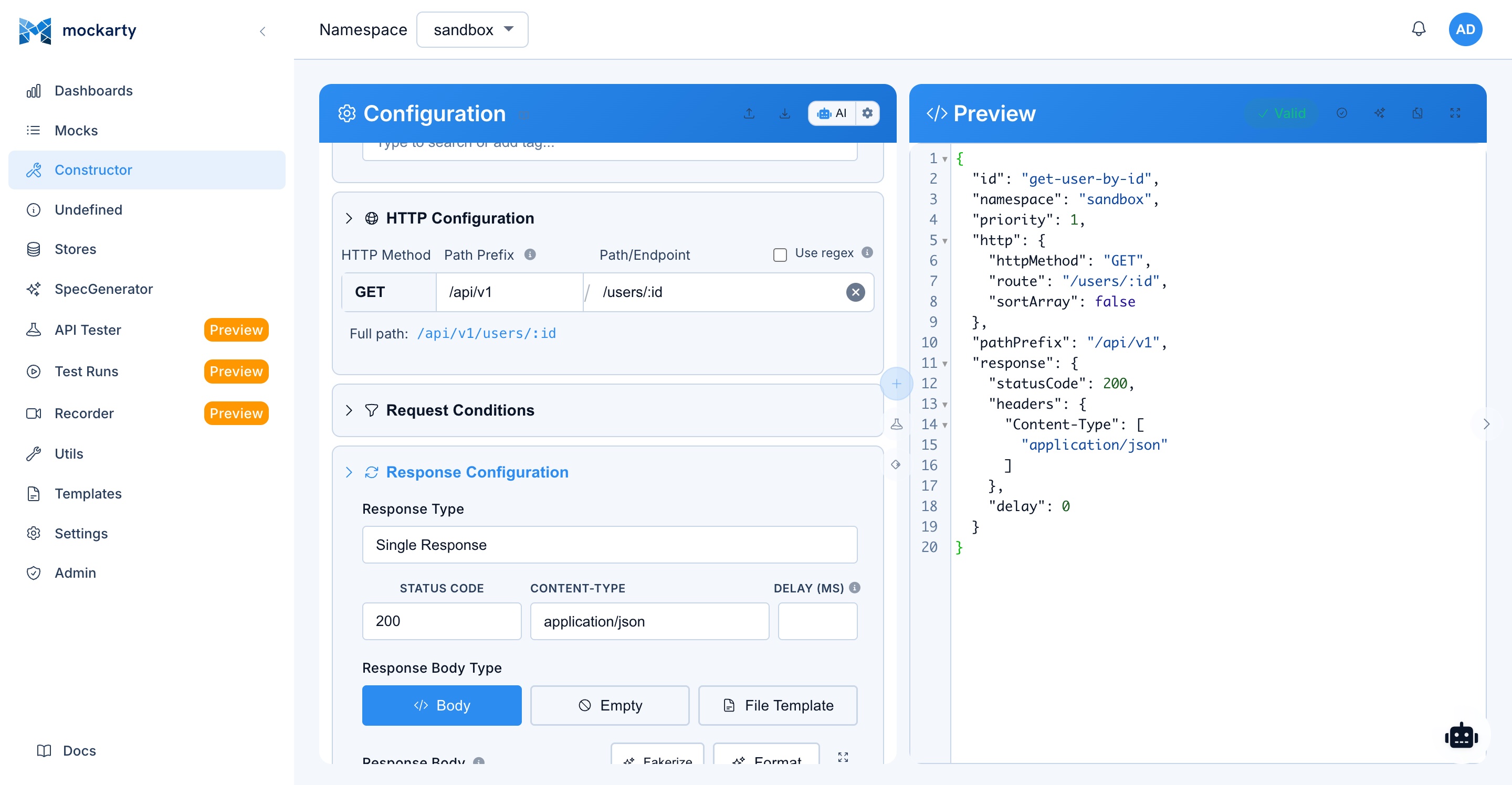
The sections below explain the other fields and protocols when you need them.
If you prefer to describe the mock in words, try Generate Mock. Improve Mock can suggest changes to an existing form. Review the result before saving; see AI Features.
Protocol Selection
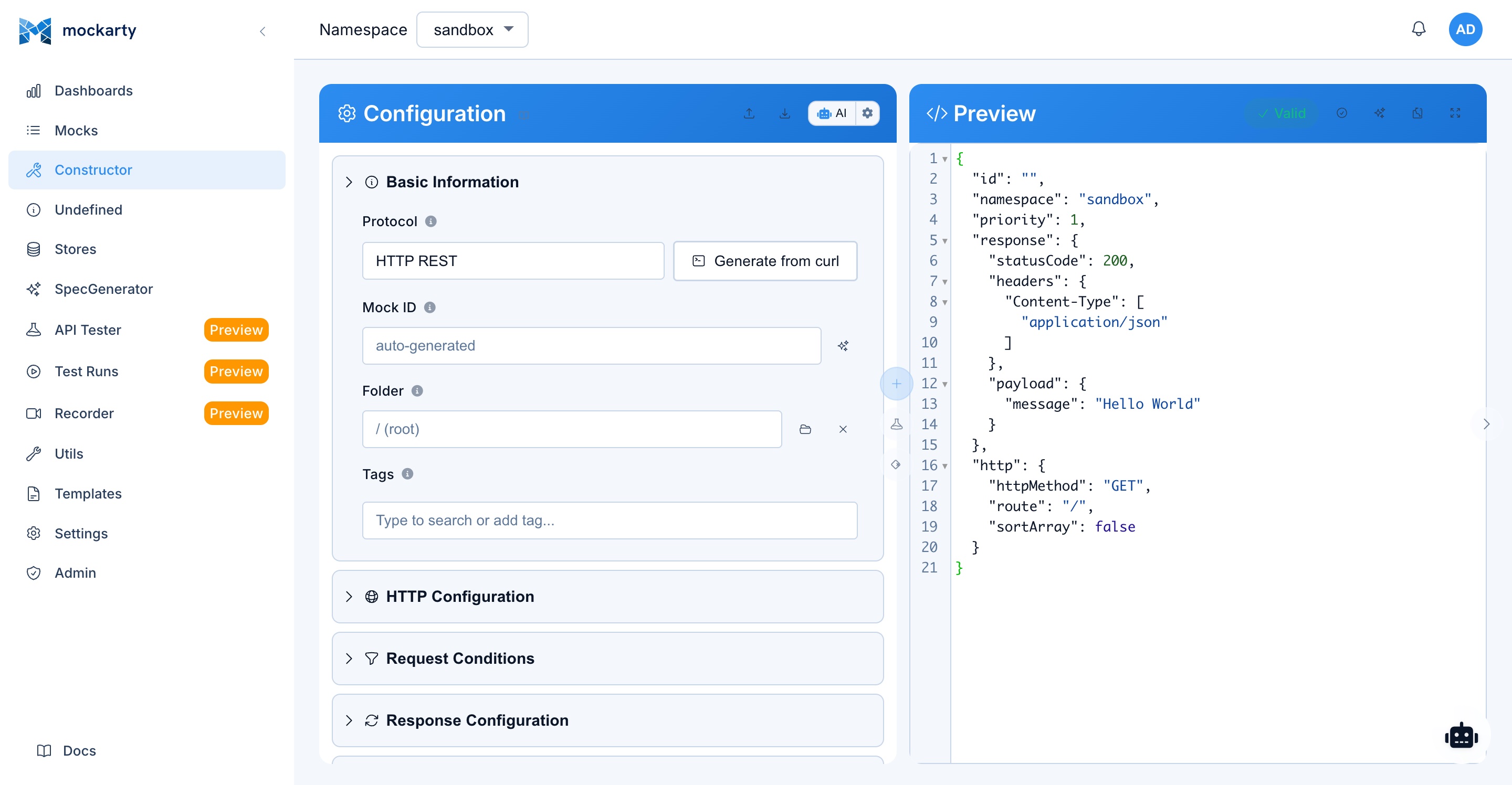
The first step in creating a mock is selecting the protocol. The Constructor supports all protocols that Mockarty can mock:
Direct protocols — served by the Mockarty node at /stubs/{namespace}/...:
- HTTP: RESTful HTTP endpoints with route parameters, query strings, and headers.
- GraphQL: Queries and mutations matched by operation type and name.
- SOAP: SOAP/XML services matched by action and path.
- SSE: Server-Sent Events with event name matching.
- MCP: Model Context Protocol tools, resources, and prompts.
Protocols that need a separate server — create the mock here, then generate and run a server before sending real protocol traffic. See the Server Generator Guide.
- gRPC: Unary and streaming gRPC methods with protobuf payloads.
- Kafka: Topic messages. Requires a running Kafka cluster.
- RabbitMQ: Queue and exchange messages. Requires a running RabbitMQ instance.
- Socket: WebSocket, TCP, and UDP communication with event matching.
- SMTP: SMTP email server mocking with sender, recipient, and message content matching.
After selecting a protocol, the Constructor shows protocol-specific configuration fields.
HTTP Mock Configuration
For HTTP mocks, configure the following fields:
- Route: The URL path pattern to match. Supports wildcard segments (e.g.,
/api/users/*) and exact paths. - HTTP Method: The HTTP method to match (GET, POST, PUT, PATCH, DELETE, HEAD, OPTIONS, or ANY for matching all methods).
- Status Code: The HTTP status code to return (e.g., 200, 201, 400, 404, 500).
- Response Headers: Key-value pairs for response headers (Content-Type, Cache-Control, etc.).
- Response Payload: The response body, either as JSON, XML, plain text, or binary data. Supports Faker variables and JsonPath interpolation.
gRPC Mock Configuration
For gRPC mocks:
- Service Name: The fully qualified gRPC service name (e.g.,
mypackage.MyService). - Method Name: The RPC method name (e.g.,
GetUser). - Response Payload: The JSON representation of the protobuf response message. Field names should match the proto definition.
- Error Code: Optional gRPC status code to return (OK, CANCELLED, UNKNOWN, INVALID_ARGUMENT, etc.).
- Error Message: Optional error message when returning a gRPC error.
MCP Mock Configuration
For MCP (Model Context Protocol) mocks:
- Server Name: The MCP server name for routing.
- Tool Name: The name of the MCP tool to mock.
- Input Schema: The JSON Schema describing the tool’s input parameters.
- Response Payload: The tool’s response content, supporting Faker variables and store references.
- Resource URI: For resource-type mocks, the URI pattern to match.
- Prompt Name: For prompt-type mocks, the prompt identifier.
GraphQL Mock Configuration
For GraphQL mocks:
- Operation Type: Query, Mutation, or Subscription.
- Operation Name: The named operation to match (optional; if omitted, matches any operation of the specified type).
- Response Payload: The GraphQL response body in standard
{ "data": { ... } }format. - Error Responses: Configure GraphQL-specific error responses with
{ "errors": [ ... ] }.
SOAP Mock Configuration
For SOAP mocks:
- SOAP Action: The SOAPAction header value to match.
- Path: The endpoint path to match.
- Response Payload: The XML response envelope. Supports Faker variables within XML elements.
- WSDL: Optional WSDL content for validation and auto-completion.
Kafka Mock Configuration
For Kafka mocks:
- Topic: The Kafka topic name to match.
- Server Name: The logical server name for routing (scopes the mock to a specific Kafka server instance).
- Response Payload: The message value to return, supporting JSON or plain text with Faker interpolation.
- Key: Optional message key.
- Headers: Optional Kafka message headers.
RabbitMQ Mock Configuration
For RabbitMQ mocks:
- Queue / Exchange: The queue or exchange name to match.
- Routing Key: The routing key pattern.
- Server Name: The logical server name for routing.
- Response Payload: The message body to return.
- Headers: Optional AMQP message headers.
SSE Mock Configuration
For SSE (Server-Sent Events) mocks:
- Event Name: The SSE event type to match.
- Server Name: The logical server name for routing.
- Response Payload: The event data to send.
- Retry: Optional reconnection interval in milliseconds.
- ID: Optional event ID for client-side tracking.
Socket Mock Configuration
For WebSocket and raw socket mocks:
- Server Name: The logical server name for routing (identifies which generated Socket server handles this mock).
- Event Name: The event name to match (for WebSocket/TCP/UDP message routing).
- Response Payload: The message to send back, supporting JSON or text.
SMTP Mock Configuration
For SMTP mocks:
- Server Name: The logical SMTP server name for routing.
- Sender (From): The sender email address pattern to match.
- Recipient (To): The recipient email address pattern to match.
- Subject: The email subject line to match.
- Response Payload: The SMTP response to return, supporting Faker variables and store references.
Conditions Tab

Conditions determine when a mock should be selected for a given request. Multiple conditions can be combined (all conditions must match for the mock to be selected – AND logic).
Body Conditions (JsonPath)
Match against specific fields in the request body using JsonPath expressions:
-
JsonPath: The path expression to evaluate against the request body (e.g.,
$.user.name,$.items[0].id). -
Assert Action: The comparison operation. Mockarty supports 13 assert actions:
Action JSON value Description Example Equals equalsExact match. For strings, compares literally. For objects and arrays, performs deep equality comparison. $.user.roleequals"admin"Contains containsFor strings – substring match. For objects – checks that the expected fields are a subset of the actual object. For arrays – checks that the expected element is present. For numbers and booleans there is no substring, so it means an exact match: 100does not contain10.$.user.namecontains"john"Not Equals not_equalsNegation of equals. Matches when the value does NOT equal the expected value.$.statusnot_equals"deleted"Not Contains not_containsNegation of contains. Matches when the value does NOT contain the expected substring or subset – and, for a number or boolean, when it is not exactly that value.$.tagsnot_contains"deprecated"Any anyAlways matches regardless of the actual value. Acts as a wildcard – the expected value is ignored. $.request_idanyNot Empty notEmptyMatches when the value is non-empty: non-null, non-empty string, non-empty array, or non-empty object. $.user.emailnotEmptyEmpty emptyMatches when the value is empty: null, empty string "", empty array[], or empty object{}.$.erroremptyMatches matchesRegular expression pattern matching against the string value. The expected value is the regex pattern. $.emailmatches"^[a-z]+@example\\.com$"Not Matches not_matchesNegation of Matches — matches when the value does NOT match the regex (an absent field matches). $.emailnot_matches"@blocked\\.com$"Is Number is_numberMatches when the value is numeric. $.amountis_numberGreater Than gtMatches when the value is numerically greater than the expected number. Both sides are parsed as numbers. $.amountgt100Less Than ltMatches when the value is numerically less than the expected number. Both sides are parsed as numbers. $.qtylt10Greater or Equal gteMatches when the value is numerically greater than OR equal to the expected number (inclusive). $.amountgte100Less or Equal lteMatches when the value is numerically less than OR equal to the expected number (inclusive). $.qtylte10Num Digits num_digitsMatches when the string has the expected number of digits. $.codenum_digits6Starts With starts_withMatches when the string starts with the expected prefix. $.skustarts_with"PRD-"Ends With ends_withMatches when the string ends with the expected suffix. $.fileends_with".pdf"One Of one_ofMatches when the value is one of the expected list. $.statusone_of["active","trial"]Note: The legacy alias
matchis also accepted and behaves identically tomatches. -
Expected Value: The value to compare against.
Header Conditions
Match against request headers:
- Header Name: The HTTP header name (case-insensitive for HTTP, case-sensitive for gRPC metadata).
- Assert Action: Same options as body conditions.
- Expected Value: The header value to compare against.
Query Parameter Conditions
Match against URL query parameters (HTTP only):
- Parameter Name: The query parameter key.
- Assert Action: Same options as body conditions.
- Expected Value: The parameter value to compare against.
You can add multiple conditions of each type. All conditions must be satisfied for the mock to match.
Advanced Condition Fields (API Only)
When creating conditions via the REST API (not in the web UI), each condition object supports additional fields:
| Field | Type | Description |
|---|---|---|
decode |
string | Set to "base64" to base64-decode the extracted value before comparison. Useful when the request contains base64-encoded fields. |
sortArray |
bool | Sort arrays before comparison. Overrides the global sortArray flag on the protocol config for this specific condition. |
valueFromFile |
string | Path to a file whose content is used as the condition value instead of value. The path supports template processing ($.fake.*, store references). Takes precedence over value when set. |
Example via API:
{
  "path": "$.data",
  "assertAction": "equals",
  "value": "expected",
  "decode": "base64",
  "sortArray": true,
  "valueFromFile": "/templates/expected-response.json"
}
Note:
decode,sortArray, andvalueFromFileare not exposed in the web UI constructor. Use the REST API (POST /api/v1/mocks) to set these fields.
Response Tab

The Response tab provides a rich editor for crafting the mock response:
Payload Editor
A code editor (with syntax highlighting for JSON and XML) for writing the response payload. The editor supports:
-
Faker variables: Insert dynamic data using
$.fake.*expressions. For example:$.fake.UUID– generates a random UUID.$.fake.FirstName– generates a random first name.$.fake.Email– generates a random email address.$.fake.Number– generates a random integer.- See the Faker Functions Reference for the complete list.
-
JsonPath interpolation: Reference data from the incoming request (see the JsonPath Guide for full syntax):
$.req.fieldName– extract a field from the request body.$.queryParams.page– extract a query parameter.$.reqHeader.Authorization[0]– extract a request header.
-
Store references: Access values from any of the three store types (see Store Systems for details):
$.gS.keyName– read from the Global Store.$.cS.keyName– read from the Chain Store.$.mS.keyName– read from the Mock Store.
-
Math and logic operations: Compute values dynamically:
$.sum(a, b)– addition.$.multiply(a, b)– multiplication.$.increment(key)– atomically increment a store counter.$.subtract(expr1, expr2)– subtract expr2 from expr1 (e.g.$.subtract($.gS.counter, 1)to decrement).$.divide(expr1, expr2)– divide expr1 by expr2 (a zero divisor yields 0).$.modulo(expr1, expr2)– remainder of expr1 / expr2.
Status Code
Set the HTTP status code (or gRPC status code for gRPC mocks). The UI provides a dropdown with common codes and their descriptions.
Response Headers
Add custom response headers as key-value pairs. Common headers can be selected from a dropdown for convenience.
Response Delay
Configure an artificial delay (in milliseconds) before sending the response. Useful for simulating slow services and testing timeout handling.
OneOf Responses

Mocks can define multiple response variants that are returned either in sequence or randomly:
- Ordered: Responses are returned in the defined order, cycling back to the first after all have been used. Useful for simulating state changes (e.g., first call returns “pending”, second returns “completed”).
- Random: A random response is selected for each request. Useful for simulating flaky services or variable behavior.
Each response variant has its own payload, status code, headers, and delay configuration. Add variants using the “Add Response” button in the Response tab.
Proxy Mode
Instead of returning a static or template-based response, a mock can proxy the request to a real backend service:
- Target URL: The base URL of the backend service to forward requests to.
- Response Delay: Configure an artificial delay on the Response tab (in milliseconds) to simulate network latency or slow processing. This applies to both static and proxied responses.
- Response Headers: Override or add specific headers via the Response tab — useful for adjusting CORS, adding tracing headers, or modifying auth tokens on the proxied response.
- Forward the full request path (HTTP): the upstream URL becomes the target plus the path the client requested. With target
https://api.example.com/v2, a request to/users/7goes tohttps://api.example.com/v2/users/7. Off, the target stands for this mock’s own route. - Remove path prefix: cut from the start of the request path before forwarding —
/gatewayturns/gateway/usersinto/users. - Headers sent upstream: one per line as
Name: value, for example an API key the real service needs. They replace a client header of the same name and are not shown in the client’s logged request. - Client headers not forwarded: comma-separated names (for example
Cookie) removed before the request goes upstream. - Record passthrough traffic: When enabled, every proxied request and its real upstream response are captured into Undefined Requests. From there a captured call converts into a real mock in one click — the mock is created with the observed method, route, query/body match conditions, and the real response pre-filled. Capture works for HTTP, SOAP, GraphQL, gRPC, and MCP proxy mocks.
Proxy mode is useful for:
- Recording and comparing real vs mocked responses.
- Testing timeout behavior (add delay to real responses).
- Adding toxicity to real services (intermittent errors, slow responses).
- Recording real responses while they pass through.
- Modifying response headers without changing the backend.
Store Extractors
Store extractors capture data from incoming requests and save it to one of the three store types for later use:
- Global Store (gS): Namespace-scoped persistent state. Values persist across requests and mocks. Ideal for counters, feature flags, and shared state.
- Chain Store (cS): Request-chain scoped state. Values persist across related mocks in a workflow (e.g., create -> get -> update). Linked by a chain ID.
- Mock Store (mS): Per-request ephemeral state. Values exist only during the processing of a single mock resolution. Useful for intermediate calculations.
For each extractor, configure:
- Source: Where to extract from (body, header, query parameter, path parameter).
- JsonPath: The JsonPath expression to evaluate (for body extraction).
- Store Type: gS, cS, or mS.
- Key: The key under which to store the extracted value.
TTL and Usage Limits
Control the lifecycle of a mock:
- TTL (Time to Live): The mock automatically expires after the specified duration (e.g., 1 hour, 24 hours, 7 days). After expiration, the mock no longer resolves requests. Useful for temporary test scenarios.
- Usage Limit: The mock expires after being resolved the specified number of times. After reaching the limit, subsequent requests are not matched. Useful for one-shot test scenarios.
When a mock expires (by TTL or usage limit), it remains visible in the Mocks list with an “expired” status badge. It can be manually re-enabled or deleted.
Priority Setting
When multiple mocks match the same request, priority determines which one is selected:
- Higher priority values take precedence.
- Default priority is 0.
- Mocks with conditions are typically given higher priority than catch-all mocks.
- Priority is particularly important when using broad route patterns alongside specific ones.
Tags
Tags provide a flexible categorization system:
- Add one or more tags to any mock using the tag input field.
- Tags are color-coded for visual distinction.
- Use tags for cross-cutting concerns (e.g., “payment”, “v2”, “regression”, “flaky”).
- Filter mocks by tag on the Mocks page.
- Batch-apply tags using the batch operations feature.
Appearance
The Constructor works in both themes. Use the theme switcher in the profile menu when you prefer a lighter or darker workspace.


When another mock already covers these requests
Two mocks on the same route whose trigger conditions match catch the same requests — and
only one of them can answer. The other stays in the list, looks healthy, and never receives
anything. Working that out later is expensive: the route answers with the wrong body while you
go looking for the bug in conditions nothing ever evaluated.
So on save Mockarty checks the route first, and when such a mock already exists it shows a
dialogue with:
- which mock is in the way — with a link that opens it in a new tab, so you can look
without losing the form you are filling in; - who created it — agreeing with them is often quicker than changing anything;
- why that one wins — priority, and at equal priority the save time (the one saved later
wins); - what you can do: raise one mock’s priority, or add a condition so each answers a
different request.
There are two buttons: cancel and save anyway. It is a warning, not a block — if you
are deliberately replacing the old mock, save and then delete it.
Only trigger conditions are compared, never responses. “This mock is covered by that one”
does not mean the other mock suits you: it may answer something completely different and exist
for another purpose. The only claim is that both catch the same request.
The dialogue appears when the overlap is provable: same route and method, and either both
mocks carry no conditions or their condition sets are identical. Partially overlapping
conditions are not reported — whether they collide on real traffic cannot be known without the
traffic, and a warning that fires on a perfectly good pair of mocks quickly teaches people to
click “save anyway” without reading.