Scaling Architecture
Start with one Mockarty node. Add a resolver when mock traffic grows, and a runner when tests need separate execution capacity. This guide shows what each component does, when to add it, and how to check that the deployment is healthy.
| What you need | Start here |
|---|---|
| A local or small-team setup | Deployment patterns |
| More mock requests | Horizontal scaling with resolvers |
| More test execution capacity | Runner Agent architecture |
| A production resource estimate | Capacity planning |
Note on Docker image names: Official images are published on Docker Hub as
mockarty/mockarty(admin),mockarty/resolver,mockarty/runner,mockarty/generator, andmockarty/cli. Snippets below may use different registries (e.g.ghcr.io/...) for illustration — replace them with whatever registry your organization mirrors.
About URLs in examples: All examples use
localhost:5770as the default Mockarty address. If your instance runs on a remote server, replacelocalhost:5770with its actual address (e.g.https://mockarty.company.comorhttp://192.168.1.50:5770). See Tips & Useful Features for details.
Architecture Overview
Mockarty consists of four component types that communicate over HTTP and gRPC:
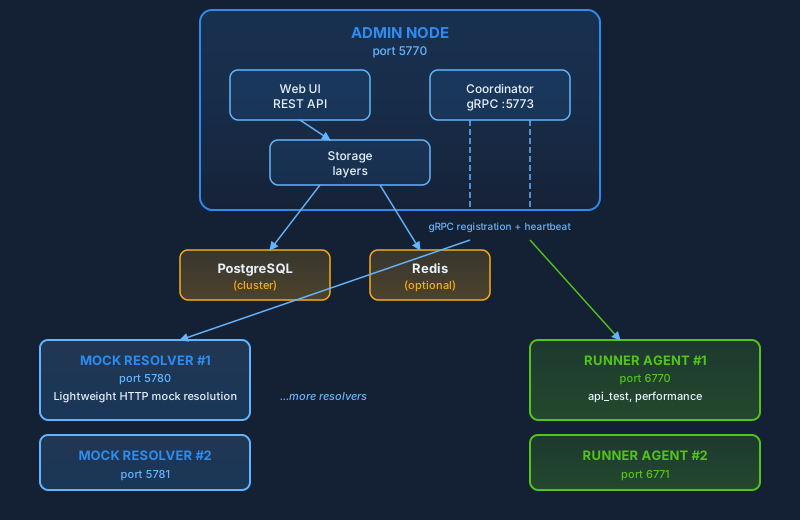
Component Roles
| Component | Default Port | Role |
|---|---|---|
| Admin Node | 5770 (HTTP), 5773 (gRPC) | Manages mocks, serves the UI, and coordinates runners. Start with one node; a clustered deployment can use several admin nodes with shared storage. |
| Mock Resolver | 5780+ | Lightweight nodes that handle incoming mock requests. They read mock definitions from the database (with caching) but never write. You can run as many as you need. |
| Runner Agent | 6770+ | Distributed workers that execute API tests and performance tests. They register with the Coordinator over gRPC and pull tasks from the queue. |
| Coordinator | 5773 (gRPC, hosted by Admin) | A gRPC service embedded in the Admin Node. Runners and resolvers register here, receive tasks, and send heartbeats. |
Key insight: The Admin Node is the only component that writes to the database. Resolvers only read. This separation means you can scale read-heavy mock resolution independently of the admin workload.
Deployment Topology & Sizing
This diagram shows a PostgreSQL-based server setup. The solid box contains its
core components; the dashed boxes show components you can add as traffic or
test workloads grow. For a local setup with SQLite, see Single Node.
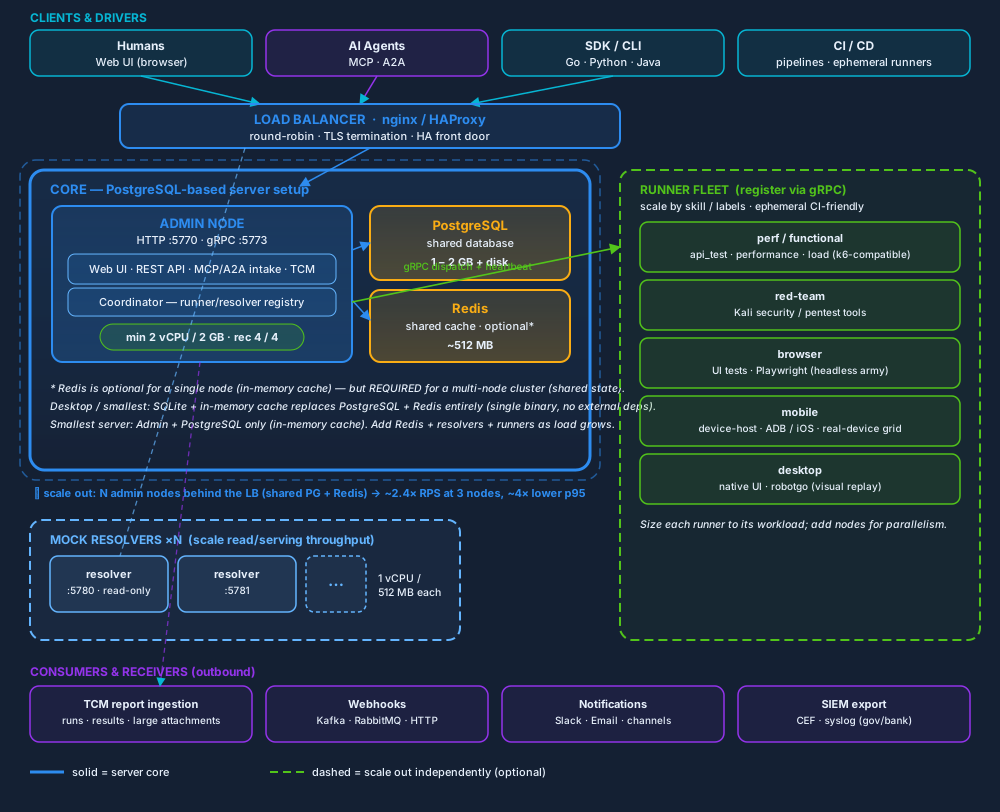
Open the diagram at full size.
Reading the diagram. Start with the CORE box — that is the smallest
thing that works (and on desktop it collapses to a single SQLite binary). As
traffic grows you peel parts into the dashed blocks: more resolvers
for mock-serving RPS, more admin nodes behind the LB for HA and ~linear
throughput, more runners (by type) for test execution. PostgreSQL and
Redis sit to the side as shared state. Clients drive it from the top; reports,
webhooks, notifications and SIEM flow out the bottom.
Minimum hardware per component
| Component | Minimum | Recommended | Notes |
|---|---|---|---|
| Admin node | 2 vCPU / 2 GB | 4 vCPU / 4 GB | Memory-bound: it OOMs below ~1 GB under load, so 2 GB is the safe floor with headroom for bursts + GC. 2 vCPU keeps p95 low and leaves a core for background schedulers. Same footprint on PostgreSQL or SQLite. |
| PostgreSQL | 1 GB | 2 GB + SSD | Server configs only. The single writer; size disk from the growth model below. |
| Redis | 512 MB | 1 GB | Mockarty caches many entity types (mocks, features, sessions, SSE fan-out, rate-limit windows, runner registry) — 128 MB fills under a real workload, so 512 MB is the floor. Optional single-node; required for multi-node clusters (shared cache + pub/sub invalidation). |
| Mock resolver | 1 vCPU / 512 MB | 1 vCPU / 1 GB | Read-only, stateless — add nodes to raise mock-serving RPS linearly. |
| Runner agent | sized to workload | — | perf/functional, red-team, browser, mobile, desktop. CI-ephemeral: spin up, drain one task, tear down. |
Database growth & memory over a year
The honest split most sizing guides get wrong: RAM does not grow with database
size — disk does. PostgreSQL serves a large database from a small working set
(hot rows + indexes), so the admin/PG RAM stays at the 2–4 GB recommendation
even after a year; what you size for the year is disk, driven by a few
high-volume, retention-bounded tables.
What actually accumulates (rough per-row footprint):
| Data | Per row | Growth driver | Bounded by |
|---|---|---|---|
| Mocks | 2–10 KB | created once, low churn | — (effectively static) |
| Mock request logs | 1–3 KB | every resolved request (if logging on) | retention cleaner |
| Test / case runs + results | 5–50 KB | each run + its steps/assertions | retention cleaner |
| Audit log | ~1 KB | each privileged action | retention cleaner |
| Undefined requests, fuzz/security/chaos/contract results | 1–20 KB | scan/test volume | retention cleaner |
| Attachment metadata | ~0.5 KB | per file (blobs live in object storage, sized separately) | quota |
Request logs, run results and audit are the growers, and all three are
retention-bounded — Mockarty ships cleaners (telemetry auto-purges at 90 days;
security/license/global retention are opt-in and configurable). So steady-state
disk ≈ daily_write_volume × retention_days, not daily × 365.
Honest year-one estimates (PostgreSQL, default retention, blobs excluded):
| Profile | Workload | DB disk / year | PG RAM | Admin RAM |
|---|---|---|---|---|
| Small team | ~50 mocks, ~100 runs/day, light request logging | 2–5 GB | 1–2 GB | 2 GB |
| Medium | ~500 mocks, ~1k runs/day, ~100k logged requests/day | 20–50 GB | 2–4 GB | 2 GB |
| Large / heavy logging | 10k+ runs/day, 1M+ logged requests/day | 80–200 GB (retention-capped; uncapped far larger) | 4–8 GB | 2–4 GB |
One-year plan rules: size PG disk to your retention window’s volume + ~30 %
headroom; keep PG RAM at 2–4 GB (it caches the working set, not the whole
table); enable / tune the retention cleaners if you log requests at volume —
without a retention policy the logs are the only thing that grows unbounded.
Large report blobs (200 MB+) do not hit the database — they live in object
storage (see the presigned lane above), so size S3/MinIO separately from PG disk.
Scaling evidence. Behind an nginx round-robin LB, 3 admin nodes (1 vCPU
each) delivered ~2.44× the requests/sec of a single node (16,222 vs 6,655 rps)
and ~4.2× lower p95 (40.6 ms vs 171 ms) on the serving path — near-linear
horizontal scaling. The shared PostgreSQL + Redis coordination (PG NOTIFY +
Redis pub/sub) does not collapse throughput; the sub-linear gap is balancer
overhead, not lock contention. Choose Redis vs in-memory cache by topology
(cluster needs Redis), not for latency — the two are latency-neutral on read
paths.
TCM report & attachment ingestion at scale (large reports)
TCM is the heaviest module under sustained load — continuous run results,
attachments, and report files. Attachment size is governed by two lanes, and
the lane you use decides your capacity:
| Lane | Per-file ceiling | Path | Use for |
|---|---|---|---|
| In-process upload | ~25 MiB | client → admin → blob backend (streamed) | screenshots, logs, small artefacts |
| Presigned (direct-to-storage) | 2 GiB (configurable) | client → object storage directly (admin only mints the URL) | large reports, traces, video, 200 MB+ bundles |
A single 200 MB report is rejected (413) on the in-process lane — that lane
is capped at ~25 MiB on purpose (one hostile/oversized upload must not pin admin
RAM). Use the presigned lane for anything large: the client requests a
presigned PUT, streams the 200 MB straight to S3/MinIO, and the admin only
signs the URL and records a metadata row. The bytes never transit the admin, so:
- Report-ingestion RPS is storage-bound, not admin-bound. Minting a
presigned URL is a tiny, sub-millisecond admin operation (no byte proxying),
so one admin node sustains thousands of large-report ingestions per second;
the actual 200 MB transfers parallelise client→storage. - How many 200 MB reports you can hold = your object-storage capacity ÷ 200 MB,
fenced by the per-namespace storage quota. Example: a
100 GiB namespace quota ≈ ~500 reports of 200 MB each; raise the quota (or
add buckets) for more — the admin node does not change. - Requirement: the presigned lane needs an S3 / MinIO blob backend. The
filesystem backend cannot presign — on filesystem
storage you are limited to the ~25 MiB in-process lane, so configure S3/MinIO
for large-report workloads.
For the other frequent TCM-adjacent operations under sustained load — test-run
launches, API calls, the external-run receiver (POST /tcm/external-runs),
syncs — throughput follows the admin-node sizing above (sub-10 ms p95 at the
measured load) and scales horizontally by adding admin nodes behind the LB.
Keep large bytes off the admin (presigned lane) and the admin stays a thin,
fast coordinator even under a heavy reporting workload.
How Mock Resolution Works
When a client sends a request to a resolver node, here is what happens:
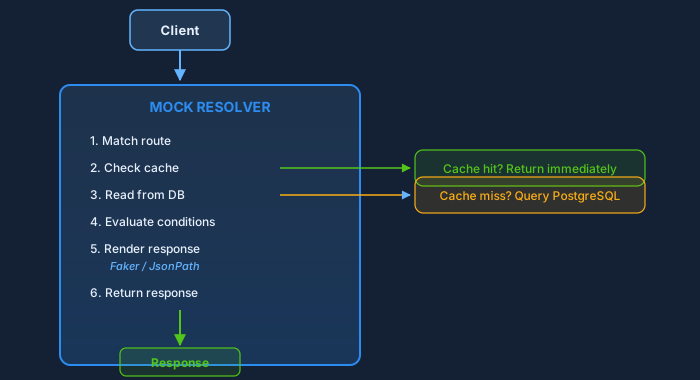
How caching works
The available layers depend on the node and deployment:
- In-memory cache — Microsecond lookups. Always available, no external dependencies. Holds recently-accessed mocks in a bounded LRU cache.
- Redis (optional, admin node only) — Shared cache on the admin node. Sub-millisecond lookups. Resolver nodes do not use Redis — they rely solely on in-memory cache.
- PostgreSQL — Source of truth for resolvers and multi-node deployments. Reads reach the database when the cache misses.
The read path follows a read-through pattern:
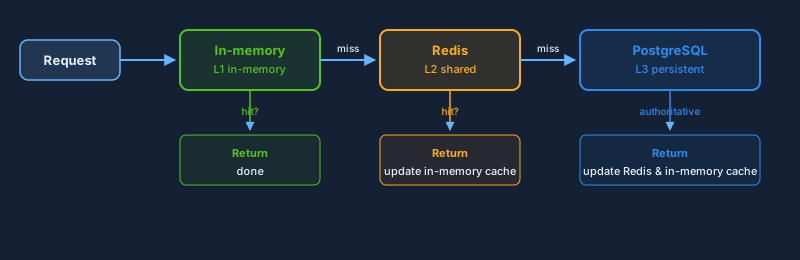
Writes always go to PostgreSQL first, then update the caches synchronously so a read right after a write never returns stale data. Write conflicts under high concurrency are retried transparently.
Horizontal Scaling with Resolvers
Why Resolvers?
The Admin Node does a lot: it serves the UI, runs background jobs (cleanup, backups, scheduling), coordinates runners, and handles mock resolution. Under heavy load, mock resolution — which is the most frequent operation — can starve the admin functions.
Resolvers solve this by offloading mock resolution to dedicated, lightweight processes. Each resolver:
- Serves mock traffic for HTTP, GraphQL, SOAP, SSE, MCP and S3; generated protocol servers can also use a resolver
- Does not serve native gRPC or WebSocket traffic — keep those on the Admin Node
- Connects directly to PostgreSQL (read-only workload, requires
DB_DSN) - Has its own in-memory cache (no Redis support)
- Registers with the Coordinator for health tracking
Adding resolver nodes can give mock traffic more capacity while keeping the Admin Node responsive for the UI and management tasks. The gain depends on your database, network and workload; measure it with a representative load test.
When to Add Resolvers
| Symptom | Action |
|---|---|
| Mock response latency increasing under load | Add resolver nodes behind a load balancer |
| Admin UI becomes sluggish during load tests | Separate mock traffic to resolvers, keep admin for UI/API |
| Need geographic distribution | Deploy resolvers closer to consuming services |
| Want zero-downtime mock updates | Resolvers pick up changes from DB; roll them without touching admin |
Example: 3 Resolvers Behind Nginx
# docker-compose.scaling.yml
version: "3.8"

services:
  postgres:
    image: postgres:17-alpine
    environment:
      POSTGRES_DB: mockarty
      POSTGRES_USER: mockarty
      POSTGRES_PASSWORD: secret
    ports:
      - "5432:5432"
    volumes:
      - pgdata:/var/lib/postgresql/data

  redis:
    image: redis:7-alpine
    ports:
      - "6379:6379"

  admin:
    image: mockarty/admin:latest
    environment:
      DB_DSN: "postgres://mockarty:secret@postgres:5432/mockarty?sslmode=disable"
      CACHE_TYPE: redis
      REPO_REDIS_HOST: redis
      REPO_REDIS_PORT: "6379"
      HTTP_PORT: "5770"
      RUNNER_GRPC_PORT: "5773"
    ports:
      - "5770:5770"
      - "5773:5773"
    depends_on:
      - postgres
      - redis

  resolver-1:
    image: mockarty/resolver:latest
    environment:
      DB_DSN: "postgres://mockarty:secret@postgres:5432/mockarty?sslmode=disable"
      HTTP_PORT: "5780"
      GRPC_PORT: "4780"
      COORDINATOR_ADDR: admin:5773
      API_TOKEN: "${RESOLVER_TOKEN}"
    depends_on:
      - admin

  resolver-2:
    image: mockarty/resolver:latest
    environment:
      DB_DSN: "postgres://mockarty:secret@postgres:5432/mockarty?sslmode=disable"
      HTTP_PORT: "5780"
      GRPC_PORT: "4780"
      COORDINATOR_ADDR: admin:5773
      API_TOKEN: "${RESOLVER_TOKEN}"
    depends_on:
      - admin

  resolver-3:
    image: mockarty/resolver:latest
    environment:
      DB_DSN: "postgres://mockarty:secret@postgres:5432/mockarty?sslmode=disable"
      HTTP_PORT: "5780"
      GRPC_PORT: "4780"
      COORDINATOR_ADDR: admin:5773
      API_TOKEN: "${RESOLVER_TOKEN}"
    depends_on:
      - admin

  nginx:
    image: nginx:alpine
    ports:
      - "8080:80"
    volumes:
      - ./nginx.conf:/etc/nginx/nginx.conf:ro
    depends_on:
      - resolver-1
      - resolver-2
      - resolver-3

volumes:
  pgdata:
nginx.conf for load balancing:
events {
    worker_connections 1024;
}

http {
    upstream resolvers {
        least_conn;
        server resolver-1:5780;
        server resolver-2:5780;
        server resolver-3:5780;
    }

    server {
        listen 80;

        # Mock resolution traffic → resolvers
        location / {
            proxy_pass http://resolvers;
            proxy_set_header Host $host;
            proxy_set_header X-Real-IP $remote_addr;
            proxy_set_header X-Forwarded-For $proxy_add_x_forwarded_for;
            proxy_connect_timeout 5s;
            proxy_read_timeout 30s;
        }

        # Health checks
        location /health {
            proxy_pass http://resolvers;
        }
    }
}
Your consuming services point at nginx:8080 for mock resolution, while developers access admin:5770 for the UI and API management.
Runner Agent Architecture
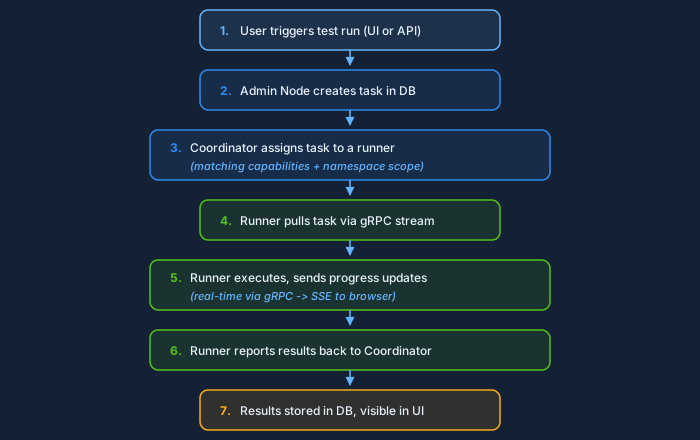
Runner Agents are distributed workers that execute long-running tasks such as API test collections and performance tests.
Capabilities
Each runner declares its capabilities when it registers:
| Capability | What it runs |
|---|---|
api_test |
API test collections, scheduled test suites |
performance |
Performance/load test scripts |
fuzzing |
Fuzzing campaigns |
A runner can have multiple capabilities. The binary defaults to api_test,performance; the Docker Compose profile enables api_test,performance,fuzzing. Specialised runner binaries add their own capabilities (browser/mobile UI, red-team scanners) — see the fleet diagram above. Set them via the CAPABILITIES environment variable:
CAPABILITIES="api_test,performance"
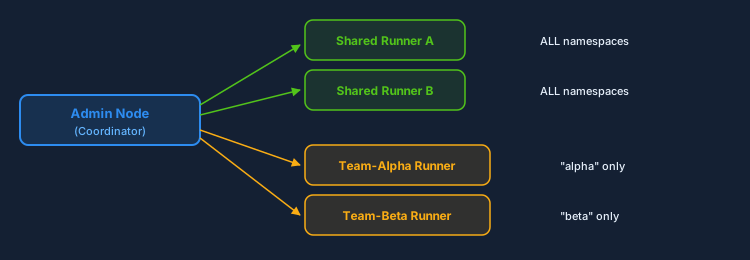
Shared vs Namespace Runners
Runners can operate in two scopes:
- Shared runners (scope:
admin) — Accept tasks from any namespace. Created with admin-scoped integration tokens. Best for shared infrastructure. - Namespace runners — Accept tasks only from their assigned namespace. Created with namespace-scoped integration tokens. Best for team isolation.
Task Dispatching Flow
Runner Agent Configuration
# Required
COORDINATOR_ADDR=mockarty:5773      # gRPC address of the Coordinator
API_TOKEN=mki_xxxxx                 # Integration token (mki_* format)
RUNNER_NAME=runner-1                # Unique name for this runner

# Optional
CAPABILITIES=api_test,performance   # What this runner can do
SHARED=true                         # Accept tasks from all namespaces
NAMESPACE=team-alpha                # Only if SHARED=false
MAX_CONCURRENT_TASKS=3              # Max parallel tasks (default: 3)
Heartbeats and Fault Tolerance
Runners send heartbeats to the Coordinator every few seconds (the send interval is HEARTBEAT_INTERVAL, default 10s). The Coordinator marks a runner offline when it misses heartbeats past RUNNER_HEARTBEAT_TIMEOUT (default 30s). If a runner stops responding:
- The Coordinator marks it as offline after the heartbeat timeout
- Any in-progress tasks are re-queued for other runners
- When the runner comes back, it re-registers automatically
Task timeout defaults to 30 minutes (RUNNER_TASK_TIMEOUT), preventing stuck tasks from blocking the queue.
Database and Cache Tiers
PostgreSQL — The Source of Truth
For a multi-node server deployment, PostgreSQL is the shared database. It stores:
- All mock definitions and their conditions
- Store data (Global, Chain, Mock stores)
- API test collections, results, and schedules
- User accounts, sessions, RBAC policies
- Audit logs and webhook configurations
- Runner task queue and results
Required version: PostgreSQL 14+ with UTF-8 server encoding. Mockarty’s
immutable mission authority uses PostgreSQL Unicode normalization and refuses
an older or non-UTF-8 database instead of weakening canonical identity checks.
SQLite is supported as an alternative for single-node deployments (dev, desktop, lightweight embedded installs). It cannot be used when CLUSTER_MODE=true — advisory locks for leader election require PostgreSQL.
MySQL is not supported. Mockarty runs on PostgreSQL (production/cluster) or SQLite (single-node). Pointing it at MySQL will fail on startup.
Redis — Shared Cache Layer
Redis is optional and available on the admin node only. When enabled (CACHE_TYPE=redis):
- The admin node uses Redis as a shared cache layer alongside the in-memory cache
- Cache invalidation works through the database change notification system
- Mock resolution latency on the admin node drops to sub-millisecond for cached mocks
Note: Resolver nodes do not support Redis. They use in-memory cache exclusively, with data loaded directly from PostgreSQL (requires DB_DSN).
Configuration:
CACHE_TYPE=redis
REPO_REDIS_HOST=redis
REPO_REDIS_PORT=6379
REPO_REDIS_PASSWORD=secret    # if auth is enabled
In-Memory Cache
Every node (admin and resolver) always uses an in-memory cache. This is the primary cache layer for resolver nodes and provides:
- Zero-latency lookups for hot mocks (microseconds)
- No external dependency
- Bounded memory usage with LRU eviction
On the admin node, when Redis is also configured, the in-memory cache acts as L1 and Redis as L2:

Choosing Your Cache Strategy
| Deployment | CACHE_TYPE |
Why |
|---|---|---|
| Single node, dev/test | inmemory (default) |
No Redis needed. the in-memory cache handles everything. |
| Production admin node | redis |
Admin node benefits from Redis as L2 cache alongside the in-memory cache. |
| Multiple resolvers | inmemory |
Resolvers warm their in-memory cache from PostgreSQL on startup and periodically refresh. |
Deployment Patterns
Pattern 1: Single Node (Development / Small Teams)

# Minimal start with SQLite
DB_USE=sqlite ./mockarty
- When: Local development, demos, small teams (< 5 people), < 100 mocks
- Pros: Zero infrastructure, single binary, instant startup
- Cons: No horizontal scaling, SQLite limitations for concurrent writes
Pattern 2: Small Team (PostgreSQL, Admin + 1 Resolver)
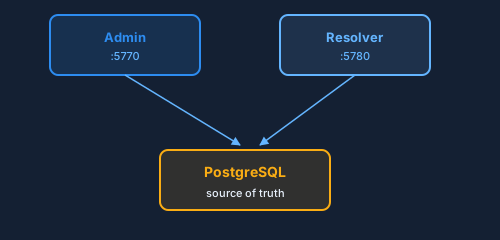
- When: Team of 5-20, moderate mock traffic, want admin UI to stay fast
- Pros: Admin offloaded from mock traffic, easy to set up
- Cons: Resolver is a single point of failure for mock resolution
Pattern 3: Medium (PostgreSQL + Redis, 2 Resolvers, 1 Runner)
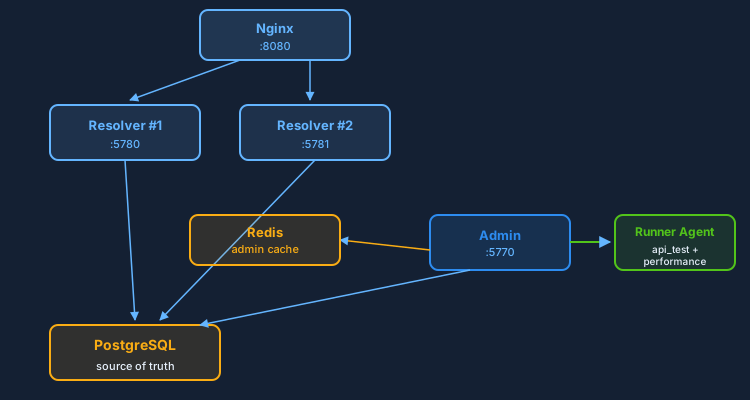
- When: 20-100 users, hundreds of mocks, automated test pipelines
- Pros: Redundant resolvers, shared Redis cache, distributed test execution
- Recommended hardware: 2 CPU / 4 GB RAM per resolver, 4 CPU / 8 GB RAM for admin
Pattern 4: Large / Enterprise
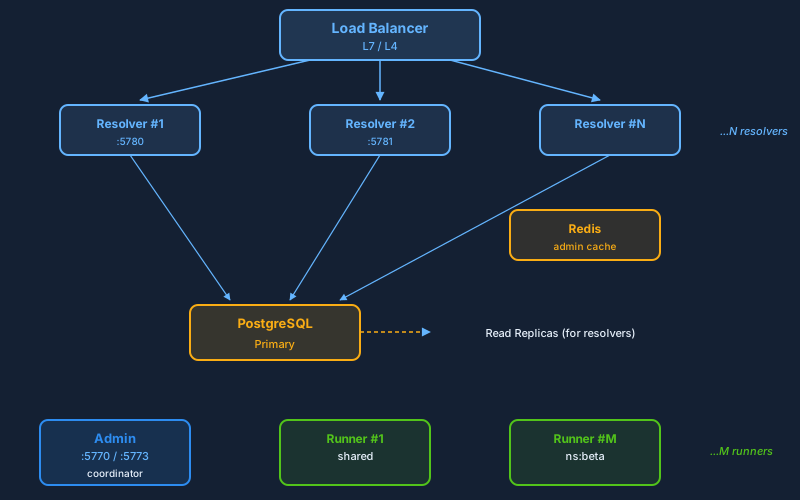
- When: 100+ users, thousands of mocks, multi-team namespaces, SLA requirements
- Infra: PostgreSQL HA (primary + replicas), Redis Sentinel or Cluster, N resolvers behind L7 load balancer, M runner agents (shared + per-namespace)
- Pros: Fault tolerant, independently scalable tiers, namespace isolation
Network Topology
Ports and Protocols
| Component | Port | Protocol | Direction | Purpose |
|---|---|---|---|---|
| Admin Node | 5770 | HTTP/HTTPS | Inbound | Web UI, REST API, mock resolution |
| Coordinator | 5773 | gRPC | Inbound | Runner/resolver registration, task dispatch |
| Resolver | 5780+ | HTTP/HTTPS | Inbound | Mock resolution only |
| Runner Agent | 6770+ | HTTP | Inbound (optional) | Runner dashboard (monitoring) |
| PostgreSQL | 5432 | TCP | Internal | Database connections from admin + resolvers |
| Redis | 6379 | TCP | Internal | Cache connections from admin node only |
TLS Between Components
The Coordinator (gRPC) supports TLS for runner-to-admin communication:
# Admin Node (Coordinator TLS)
RUNNER_GRPC_TLS_ENABLED=true
RUNNER_GRPC_TLS_CERT_FILE=/path/to/server.crt
RUNNER_GRPC_TLS_KEY_FILE=/path/to/server.key
RUNNER_GRPC_TLS_DIR=.mockarty/tls

# Optional: mTLS (mutual TLS) — require client certificates
RUNNER_GRPC_TLS_CLIENT_CA_CERT=/path/to/ca.crt
If RUNNER_GRPC_TLS_ENABLED=true but no cert/key files are specified, Mockarty auto-generates a self-signed certificate in the TLS directory.
For production deployments, use proper certificates signed by your organization’s CA, especially if runners communicate over untrusted networks.
Firewall Rules (Minimum)
Admin  → PostgreSQL :5432  (required)
Admin  → Redis      :6379  (if CACHE_TYPE=redis)

Resolver → PostgreSQL :5432  (required, read-only workload)
Resolver → Admin      :5773  (gRPC registration)

Runner → Admin :5773  (gRPC, task dispatch + heartbeats)

Clients → Resolver :5780  (mock requests, via load balancer)
Developers → Admin :5770  (UI and API management)
⚠️ Critical: Load Balancer Required for Integrations in Cluster Mode
IMPORTANT LIMITATION: When running multiple Admin nodes in cluster mode, Runner Agents and Mock Resolvers connect to the Coordinator via gRPC on a specific Admin node’s address. If that node goes down (leader failover), the integration loses its connection and cannot automatically discover the new leader.
The Problem
Runner Agents and Mock Resolvers are configured with a static COORDINATOR_ADDR (e.g., mockarty-1:5773). When the leader changes due to failover, the new coordinator starts on a different node’s gRPC port (e.g., mockarty-2:5773). The Runner/Resolver continues retrying the old address indefinitely.
Required Solution
Place a TCP/gRPC load balancer in front of all Admin nodes’ gRPC ports (default: 5773):
Runner Agent → Load Balancer :5773 → Admin Node 1 :5773 (leader)
                                   → Admin Node 2 :5773 (follower, proxies to leader)
                                   → Admin Node 3 :5773 (follower, proxies to leader)
Example Nginx gRPC load balancer configuration:
upstream mockarty_coordinator {
    server mockarty-1:5773;
    server mockarty-2:5773;
    server mockarty-3:5773;
}

server {
    listen 5773 http2;
    location / {
        grpc_pass grpc://mockarty_coordinator;
        grpc_next_upstream error timeout;
    }
}
Without Load Balancer
| Scenario | Result |
|---|---|
| Single Admin Node | ✅ Works — no failover needed |
| Multi-node, no LB | ⚠️ Integrations disconnect on leader change, manual reconnection required |
| Multi-node, with LB | ✅ Automatic failover — LB routes to alive nodes |
For the same reason, the Web UI (HTTP) should also be behind a load balancer when running multiple Admin nodes, to provide seamless access regardless of which node is the leader.
Leader-Exclusive Workloads
In cluster mode (CLUSTER_MODE=true), these workloads run only on the leader node. Followers keep the process alive, accept API reads, and stand by to take over if the leader loses its PostgreSQL advisory lock — but they do not execute these jobs:
| Workload | Why leader-only |
|---|---|
| gRPC Coordinator (runners & resolvers) | Single dispatch target for task queue and heartbeats |
| Task queue processor | Avoids double-dispatching the same task to runners |
| Runner heartbeat monitor | Single source of truth for runner liveness |
| API Tester scheduled runs | Prevents duplicate scheduled test runs |
| Fuzzing & performance test schedules | Same — schedules must fire exactly once |
| Database maintenance scheduler | VACUUM / ANALYZE / retention cleanup |
| Cleanup scheduler (stale runs, results) | Idempotent, but cheaper as a singleton |
| Global cleanup scheduler | Cross-namespace cleanup |
| Backup scheduler | Only one node writes backup artifacts |
Each of these runs only on the elected leader. On a leader transition the old leader stops them and the new leader starts them, so failover latency is the lock TTL plus the time the new leader needs to spin the jobs back up. Plan capacity with this in mind: a single well-sized admin node must be able to carry all of these workloads, because in a 3-node cluster only one node is doing them at any given moment.
Autonomous Mission recovery is different: active Admin nodes share that workload automatically instead of sending every recovery scan to the leader. If a node stops, its share is reassigned after the bounded ownership lease expires. Durable attempts and dispatch/result queues remain the duplicate-execution boundary during a network interruption or rolling update; no partition settings are required from the operator.
Operator visibility: the /health endpoint on the leader reports these schedulers as OK; on followers it reports them as standby. This is expected.
Capacity Planning
These are rough guidelines based on typical mock workloads. Actual numbers depend on mock complexity (number of conditions, Faker functions, store lookups, response size).
Mock Resolution Throughput
| Setup | Approx. Requests/sec | Notes |
|---|---|---|
| 1 Admin Node (no resolver) | ~2,000 | Adequate for development and small teams |
| 1 Resolver | ~5,000 | in-memory cache handles most reads |
| 3 Resolvers + Nginx | ~15,000 | Near-linear scaling with least_conn |
| 10 Resolvers + LB | ~50,000+ | Production-grade for large organizations |
Sizing Guidelines
Per-component starting sizes, the Helm chart’s defaults and the PostgreSQL
connection budget for each topology are in Capacity Planning.
The minimum hardware table above is the floor; the capacity guide adds the
production recommendation and the numbers to check before you scale out.
When to Scale
| Metric | Action |
|---|---|
| Mock response p95 > 100ms | Add more resolver nodes |
| Admin UI response > 2s | Move mock traffic to resolvers |
| DB connection pool exhaustion | Add PgBouncer or increase max_connections |
| Runner task queue growing | Add runner agents |
Health Monitoring
The /health Endpoint
Every component exposes a /health endpoint that returns detailed status:
curl -s http://localhost:5770/health | jq .
{
  "status": "pass",
  "releaseId": "1.2.3",
  "uptime": "72h15m30s",
  "system": {
    "goVersion": "go1.24.1",
    "goroutines": 142,
    "cpus": 4,
    "memAllocMb": "85.3",
    "memSysMb": "210.7"
  },
  "components": {
    "database": {
      "status": "up",
      "latency": "1.2ms"
    },
    "redis": {
      "status": "up",
      "latency": "0.3ms"
    },
    "scheduler": {
      "status": "up"
    },
    "coordinator": {
      "status": "up"
    }
  }
}
The status field is "pass" when all critical components are healthy, or "fail" if any required component (like the database) is down. Non-critical components (like Redis) report "not_configured" when disabled.
Prometheus Metrics
Mockarty exposes Prometheus-compatible metrics at /metrics:
curl http://localhost:5770/metrics
Key metrics to monitor:
| Metric | What it tells you |
|---|---|
mockarty_http_request_duration_seconds |
Mock resolution latency distribution |
mockarty_http_requests_total |
Request count by method, endpoint, status code |
mockarty_mock_requests_total |
Mock request count by mock ID, namespace, protocol |
mockarty_db_query_duration_seconds |
Database query performance |
mockarty_cache_hits_total / mockarty_cache_misses_total |
Cache effectiveness by cache type |
mockarty_errors_total |
Error count by type and component |
Alerting Recommendations
# Example Prometheus alerting rules
groups:
  - name: mockarty
    rules:
      - alert: MockartyDown
        expr: up{job="mockarty-admin"} == 0
        for: 1m
        labels:
          severity: critical

      - alert: HighMockLatency
        expr: histogram_quantile(0.95, http_request_duration_seconds_bucket) > 0.5
        for: 5m
        labels:
          severity: warning
        annotations:
          summary: "Mock response p95 exceeds 500ms — consider adding resolvers"

      - alert: DatabaseSlow
        expr: db_query_duration_seconds{quantile="0.99"} > 1
        for: 5m
        labels:
          severity: warning
Best Practices
1. Separate Mock Traffic from Admin Traffic
The single most impactful scaling decision: route your service-under-test traffic to dedicated resolver nodes, not the admin. The admin should only handle UI access and API management.
2. Start Simple, Scale When Needed

Do not over-engineer. A single admin node with PostgreSQL handles thousands of requests per second. Add resolvers only when you observe latency or throughput issues.
3. Scale Resolvers Horizontally
Each resolver warms its own in-memory cache independently from PostgreSQL. The coordinator pushes mock updates to all connected resolvers in real time, so caches stay consistent. Add more resolver nodes to handle increased traffic.
4. Pin Resolver Versions to Admin Version
All components share a unified version. When upgrading, update the admin node first (it runs migrations), then roll resolvers and runners. Never run resolvers on a newer version than the admin.
5. Use Namespace Runners for Team Isolation
In multi-team environments, give each team a namespace-scoped runner. This prevents one team’s expensive performance test from blocking another team’s API test suite.
6. Monitor the Task Queue
A growing task queue means your runners cannot keep up. Either add more runner agents or review whether tests are hanging (check RUNNER_TASK_TIMEOUT).
7. Use Connection Pooling for PostgreSQL
In large deployments with many resolvers, each resolver opens its own connection pool. Use PgBouncer between resolvers and PostgreSQL to multiplex connections and avoid hitting max_connections.
8. Scale Resolvers Before Adding CPU to Admin
If mock latency is the problem, adding CPU to the admin node gives diminishing returns because the admin does many things. A dedicated resolver uses all its resources for mock resolution. Two small resolvers outperform one large admin node for mock traffic.
Common Mistakes
- Running resolvers on a newer version than the Admin Node. Always update the Admin Node first (it runs database migrations), then roll out resolvers and runners. A resolver on a newer version may expect database schema changes that have not been applied yet.
- Forgetting
DB_DSNfor resolver nodes. Resolvers read mock data directly from PostgreSQL. Without a validDB_DSN, they cannot resolve mocks. This is different from the Admin Node whereDB_DSNis obviously required. - Using
mki_*tokens for REST API calls. Integration tokens are only for gRPC coordinator registration (resolver/runner). For REST API automation (CI/CD, scripts), use user API tokens (mk_*). - Pointing mock traffic at the Admin Node in production. The Admin Node handles UI, background jobs, coordination, AND mock resolution. Under load, mock resolution will starve admin functions. Always use dedicated resolver nodes for production mock traffic.
- Not setting up health checks on the load balancer. Without health checks, a dead resolver will still receive traffic. Configure your load balancer to probe
GET /healthon each resolver.
Kubernetes Operator and CRD-Based Configuration
The Mockarty Kubernetes Operator manages the entire cluster lifecycle through a custom MockartyCluster CRD. The Admin Node writes the desired state to the CR, the operator reconciles it into Kubernetes resources (Deployments, Services, ConfigMaps, NetworkPolicies), and standard Kubernetes controllers handle the rest.
MockartyCluster CRD Spec
The CRD supports the following top-level sections:
| Section | Purpose |
|---|---|
adminNode |
Admin Node deployment (replicas, image, resources, env) |
resolverNodes |
Mock Resolver pool (replicas, image, resources, HPA config) |
runnerAgents |
Runner Agent pool (replicas, image, resources) |
orchestrator |
Server Generator Orchestrator (optional, replicas, image) |
database |
PostgreSQL connection (DSN secret reference, pool size) |
cache |
Redis connection (host, port, secret reference) or in-memory |
tokenBootstrap |
Automatic integration token provisioning (enabled/disabled) |
Minimal Example
apiVersion: mockarty.ru/v1alpha1
kind: MockartyCluster
metadata:
  name: mockarty
  namespace: mockarty
spec:
  adminNode:
    replicas: 1
    image: ghcr.io/mockarty/mockarty:latest
  resolverNodes:
    replicas: 2
    image: ghcr.io/mockarty/mockarty-resolver:latest
  database:
    dsnSecretRef:
      name: mockarty-db
      key: dsn
  tokenBootstrap:
    enabled: true
Full Example with HPA and Network Policies
apiVersion: mockarty.ru/v1alpha1
kind: MockartyCluster
metadata:
  name: mockarty-production
  namespace: mockarty
spec:
  adminNode:
    replicas: 1
    image: ghcr.io/mockarty/mockarty:1.3.0
    resources:
      requests:
        cpu: "500m"
        memory: "512Mi"
      limits:
        cpu: "2"
        memory: "2Gi"
    env:
      - name: LOG_LEVEL
        value: "info"
      - name: COOKIE_SECURE
        value: "true"

  resolverNodes:
    replicas: 3
    image: ghcr.io/mockarty/mockarty-resolver:1.3.0
    resources:
      requests:
        cpu: "250m"
        memory: "256Mi"
      limits:
        cpu: "1"
        memory: "1Gi"
    hpa:
      enabled: true
      minReplicas: 2
      maxReplicas: 10
      targetCPUUtilization: 70

  runnerAgents:
    replicas: 2
    image: ghcr.io/mockarty/mockarty-runner:1.3.0
    resources:
      requests:
        cpu: "250m"
        memory: "256Mi"
      limits:
        cpu: "1"
        memory: "1Gi"

  orchestrator:
    replicas: 1
    image: ghcr.io/mockarty/orchestrator:1.3.0

  database:
    dsnSecretRef:
      name: mockarty-db
      key: dsn
    maxOpenConns: 25

  cache:
    type: redis
    host: redis-master.mockarty.svc.cluster.local
    port: 6379
    passwordSecretRef:
      name: mockarty-redis
      key: password

  tokenBootstrap:
    enabled: true

  networkPolicy:
    enabled: true
    allowIngressFrom:
      - namespaceSelector:
          matchLabels:
            mockarty-access: "true"
Architecture Flow
- Admin Node – the user configures the cluster through the Admin UI or REST API. The Admin Node patches the
MockartyClusterCR in Kubernetes with the desired state. - Operator – watches
MockartyClusterresources. On every change, it reconciles the desired state into concrete Kubernetes objects: Deployments, Services, ConfigMaps, HPA, and NetworkPolicies. - Kubernetes – standard controllers (Deployment controller, HPA controller) handle scheduling, scaling, and health checks.
This separation means the Admin Node never talks to the Kubernetes API for day-to-day operations – it only writes desired state. The operator handles all imperative Kubernetes interactions.
Token Bootstrap
When tokenBootstrap.enabled: true, the operator automatically:
- Creates integration tokens via the Admin Node API after the Admin Node becomes ready
- Injects the tokens as Kubernetes Secrets (
mockarty-resolver-token,mockarty-runner-token) - Mounts the secrets into Resolver and Runner pods as environment variables
For manual token management, set tokenBootstrap.enabled: false and create tokens through the Admin UI, then reference them in your own Secrets.
HPA Configuration
The hpa section under resolverNodes creates a HorizontalPodAutoscaler:
minReplicas/maxReplicas– scaling boundstargetCPUUtilization– scale-up threshold (percentage)
Resolvers are the primary scaling target because they handle all production mock traffic. Runner agents are typically scaled manually based on test workload.
Network Policies
When networkPolicy.enabled: true, the operator creates NetworkPolicy resources that:
- Allow ingress to Admin Node only from specified namespaces or pod selectors
- Allow ingress to Resolvers from any pod in the cluster (mock traffic)
- Restrict Resolver and Runner egress to the Admin Node coordinator port (5773) and the database
- Allow all pods to reach the cache (Redis)
Use allowIngressFrom to specify which namespaces can send mock traffic to the resolvers.
Related Documentation
- Docker Deployment Guide — Building and deploying Mockarty containers
- Integrations — Setting up integration tokens for resolvers and runners
- API Reference — Complete REST API documentation
- Admin Setup Guide — Initial configuration and first-time setup
- Performance Testing — Distributed load testing with Runner Agents
- Fuzzing — Automated security testing for your APIs
- Contract Testing — Validate mocks against API specifications
- Chaos Testing — Inject failures and latency to test system resilience